CISA · Domain 5 · 26% of the exam Protection of Information Assets
32 topics · Governance and privacy · Access control · Cryptography · Network and platform security · Physical · Threats · Response and monitoring
D5 Governance and privacy Security Governance and Roles
Who's in charge of information security and who does what, from the board to the people at keyboards, plus the success factor and CISO reporting line the exam keeps returning to.
Who's in charge of security?
In a block of flats, the owners' committee decides how secure the building should be and pays for it. The caretaker fits the locks. Each resident decides who gets a key to their own flat. Everyone is expected to shut the main door behind them.
Information security works the same way. Security governance is the board and senior management setting direction, managing risk and providing resources. It's part of corporate governance.
The roles
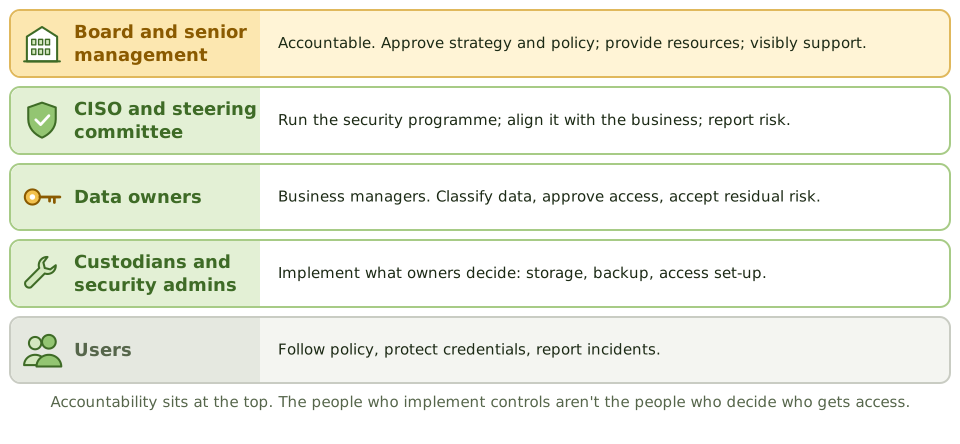
Exam tipThe most important success factor for a security programme: senior management commitment and support.
Owner vs custodian vs admin
Data ownerA business manager. Classifies the data, approves access, accepts the leftover risk.
Data custodianUsually IT. Implements the protection the owner asks for: storage, backup, access set-up.
Security administratorSets up accounts and rights as approved. Doesn't decide who gets access.
IS auditorGives independent assurance over all of it.
Where the CISO reports
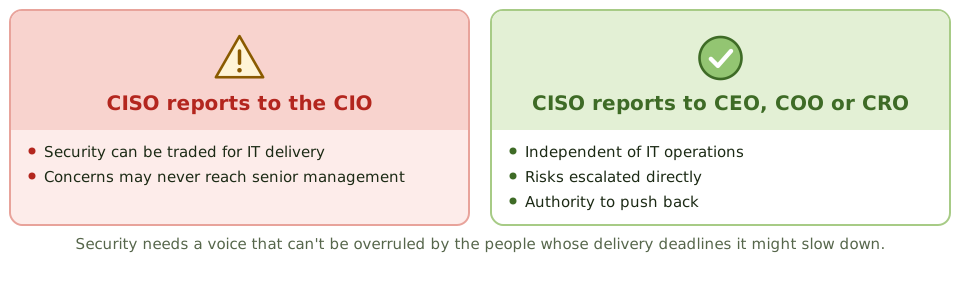
ExampleThe CISO reports to the head of IT infrastructure, who alone decides to delay a critical patch for a product launch. The CISO's concerns never reach senior management.
How the exam asks about it
| If the question asks… | Answer |
|---|
| Most important success factor | Senior management commitment |
| Who classifies data and approves access | The data owner |
| Who implements the owner's decisions | Custodian / security administrator |
| Concern with CISO reporting to the CIO | Conflict of interest; less independence |
| Who is accountable for security | The board / senior management |
Key takeaways
- ✓Information security governance is part of corporate governance: the board is accountable, senior management sets direction and resources.
- ✓The most important success factor for an information security program is senior management commitment and support.
- ✓The CISO leads the security program and should report at a level that provides independence from IT operations.
- ✓Data owners classify data and approve access; data custodians implement protection; users follow policy.
- ✓A security steering committee with business representation aligns security with business needs.
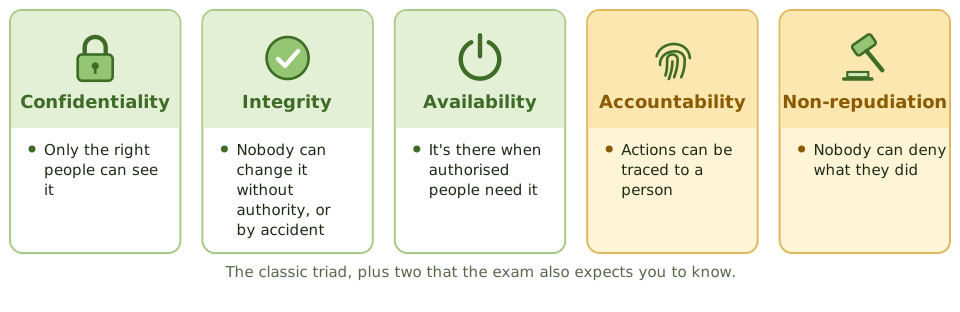
- ✓Security objectives are confidentiality, integrity and availability, plus accountability and non-repudiation.
Exam traps
- !The CISO reporting to the CIO can create a conflict, since security may be traded off against IT delivery.
- !Data owners are business managers, not IT staff.
- !Security administrators implement access as approved by owners; they don't decide who gets access.
- !Security is everyone's responsibility, but accountability must be assigned.
Governance and privacy Data Classification and Ownership
Sorting information by how much harm it could do, so protection matches the risk: who decides the level, typical schemes, and how the level drives every handling rule.
Not everything needs a safe
At home, you don't lock the TV guide in a safe, but you probably keep your passport somewhere secure. Protecting everything to the highest level would be expensive and exhausting; protecting nothing would be reckless.
Data classification sorts information by how much harm it could do, so protection is proportionate.
A typical scheme
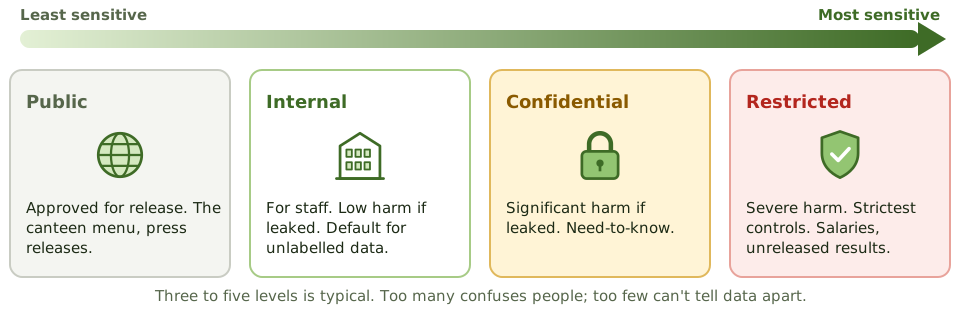
Exam tipSensitivity is the harm from disclosure. Criticality is the harm from losing it or having it corrupted.
Who decides
Data ownerA business manager. Decides the level, approves access, reviews both.
Data custodianIT, DBAs, storage teams. Put the required controls in place.
Data userHandles data according to its label.
Exam tipIT and security provide the scheme and tools. They don't classify on the business's behalf.
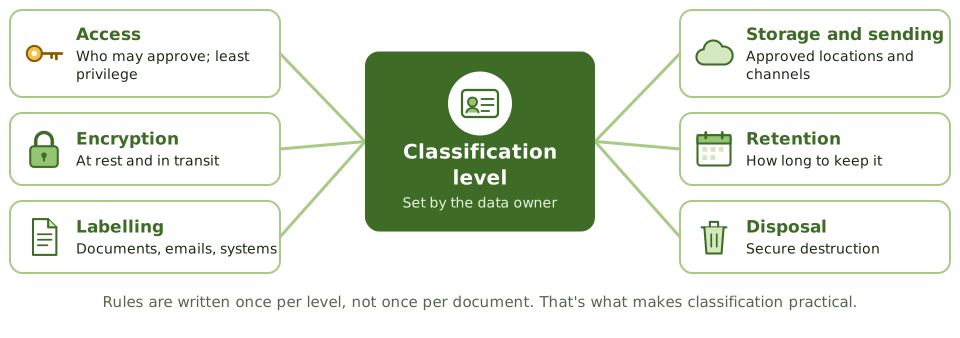
The level drives the rules
Doing it in practice
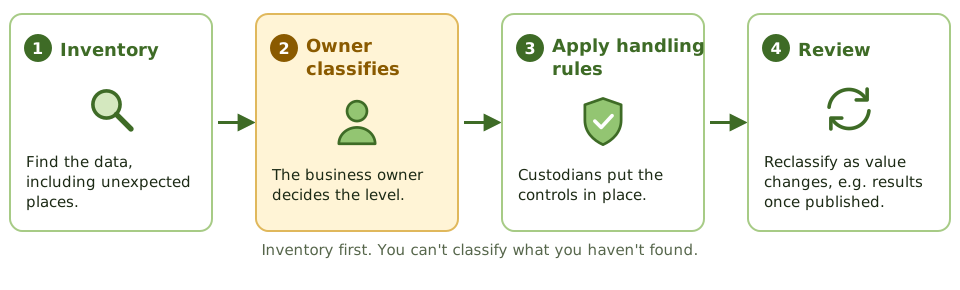
ExampleHR salary data is labelled 'internal', the same as the canteen menu, because IT applied one default label to every system. No business owner was ever asked.
Watch out for aggregation
Names alone are harmless. Names plus dates of birth plus home addresses are an identity thief's dream. Combining data can raise its sensitivity.
Unlabelled data should default to a protective level such as internal, not to public.
How the exam asks about it
| If the question asks… | Answer |
|---|
| First step in protecting information | Inventory and classify it |
| Who decides classification | The data owner |
| Main benefit of classification | Protection proportionate to value |
| Custodian's role | Implement controls as the owner directs |
| Sensitivity changes over time | Periodic review and reclassification |
Key takeaways
- ✓Data classification groups information by sensitivity and criticality so that protection is proportionate.
- ✓The data owner is responsible for classifying data and reviewing the classification periodically.
- ✓Classification drives access rules, encryption, labelling, storage, transmission, retention and disposal requirements.
- ✓Typical schemes have three to five levels, such as public, internal, confidential and restricted.
- ✓Too many levels makes classification hard to apply; too few doesn't differentiate protection.
- ✓Inventory first, then classify: you can't classify what you haven't identified.
Exam traps
- !The first step in protecting information is identifying and classifying it.
- !IT or security doesn't decide classification; the business owner does.
- !Classification must be reviewed as data's value changes (for example, results become public after announcement).
- !Unlabelled data is often handled at the lowest level of protection.
- !Aggregation can raise sensitivity: individually harmless data can be sensitive together.
Governance and privacy Security Policies
The information security policy and the policies under it: what they say, who approves them, how they're made to work in real life, and how the auditor tests that they do.
House rules
A gym has house rules: members sign them when they join, staff explain them, and there are consequences for breaking them. A rule pinned to the wall that nobody follows or enforces isn't really a rule.
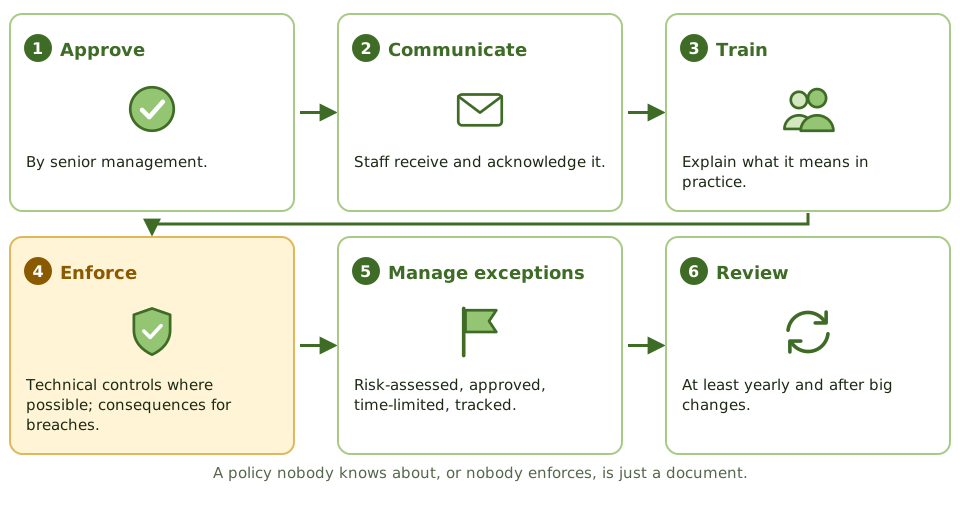
Security policies are management's house rules for information. They only matter if they're known, followed and enforced.
The top-level policy
- 1Objectives and scope of information security.
- 2Management's commitment.
- 3Roles and responsibilities.
- 4Principles: risk-based, classification, least privilege, segregation of duties.
- 5Compliance monitoring, exceptions, consequences.
- 6Owner and review frequency.
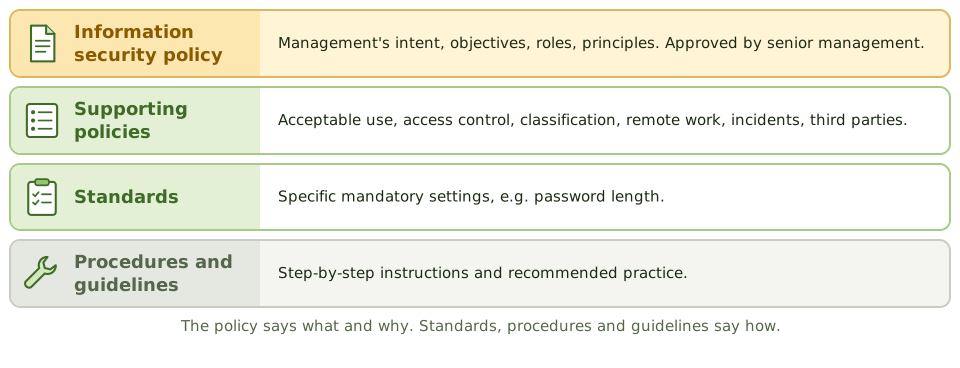
Exam tipApproved by senior management, not just the CISO. Technology-neutral: specific settings belong in standards.
Supporting policies
| Policy | Covers |
|---|
| Acceptable use | Rules for systems, email, internet; signed at hiring |
| Access control | Request, approve, review, remove access |
| Classification and handling | Levels and handling rules |
| Remote and mobile | Home working, VPN, BYOD |
| Incident response | What to report and how |
| Third-party security | Requirements for suppliers |
Auditing policies
Do policies exist for key areas, approved at the right level? Are they current, communicated and acknowledged? Consistent with standards? Above all: are they actually followed? Test compliance, don't just read the document.
ExamplePolicy forbids storing company data in personal cloud accounts. Network logs show large uploads to personal storage every week, with nothing blocking or monitoring it. The policy exists but isn't enforced.
How the exam asks about it
| If the question asks… | Answer |
|---|
| Who approves the security policy | Senior management |
| Best evidence a policy works | Compliance testing shows it's followed |
| Document users sign at hiring | Acceptable use policy |
| Policy exceptions | Formal, risk-assessed, approved, time-limited |
| First document in a security audit | The information security policy |
Key takeaways
- ✓The information security policy states management's intent, objectives and responsibilities for security, and is approved by senior management.
- ✓Supporting policies cover topics such as acceptable use, access control, data classification, remote work, incident response and third parties.
- ✓Policies must be communicated, acknowledged by staff, enforced and reviewed periodically.
- ✓Acceptable use policies set rules for users and are typically signed at onboarding.
- ✓Exceptions follow a formal process with risk assessment, approval and expiry.
- ✓The auditor checks existence, approval, currency, communication and actual compliance.
Exam traps
- !A policy without enforcement or monitoring has little effect.
- !Security policy should be approved by senior management, not just the CISO.
- !Policies should be technology-neutral; specific settings belong in standards.
- !The first document an auditor typically reviews in a security audit is the security policy.
Governance and privacy Privacy Principles and GDPR
Handling personal information fairly, not just securely: the seven privacy principles, the GDPR essentials (controllers, processors, rights, DPIAs, the 72-hour rule) and what the auditor checks.
Privacy isn't just security
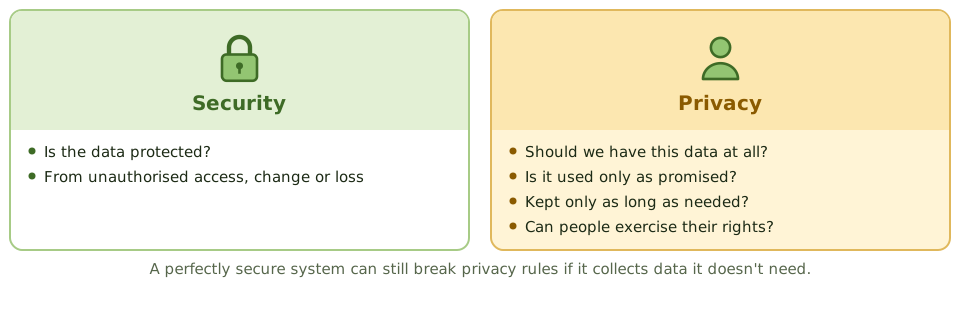
A doctor's receptionist who locks your medical file in a safe has kept it secure. If they also asked for your salary and shared your details with a marketing firm, they've broken your privacy, however secure the safe was.
Privacy is about whether personal information should be collected, how it's used and shared, how long it's kept, and people's rights over it. Security is one of the tools that protects it.
Controller and processor
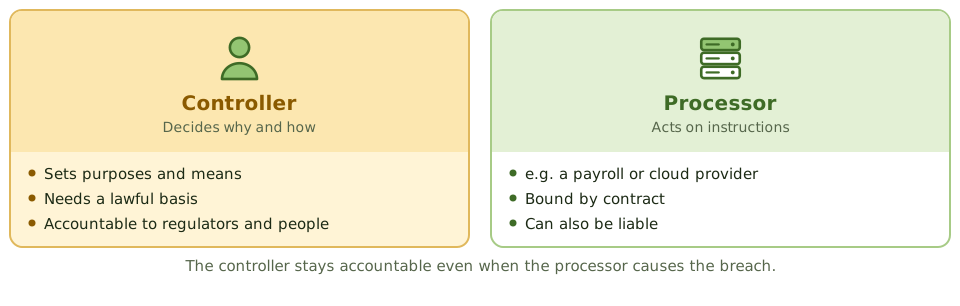
Exam tipLawful bases: consent, contract, legal obligation, vital interests, public task, legitimate interests.
GDPR essentials
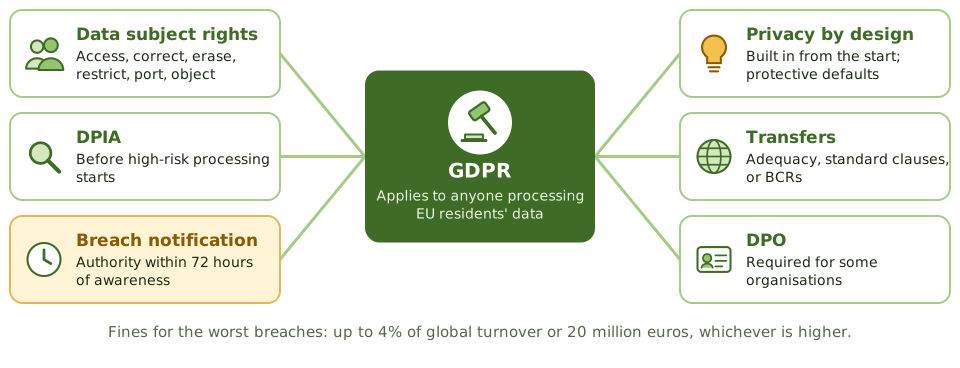
Exam tipSimilar laws: CCPA/CPRA (California), PIPEDA (Canada), LGPD (Brazil), DPDP (India), HIPAA (US health).
Auditing privacy
- 1Inventory of personal data and records of processing?
- 2Lawful basis and privacy notice for each purpose?
- 3DPIAs done before high-risk processing?
- 4Data subject requests answered on time?
- 5Retention periods defined and enforced?
- 6Processor contracts, breach process and transfer mechanisms in place?
ExampleAn app asks for users' contacts and location but only needs an email address. The data is encrypted and well protected, yet it still breaks data minimisation and purpose limitation.
How the exam asks about it
| If the question asks… | Answer |
|---|
| Collecting more data than needed | Breaks data minimisation |
| GDPR breach notice to the authority | Within 72 hours of awareness |
| Who decides the purposes of processing | Controller |
| Assessment before high-risk processing | Data protection impact assessment |
| Processor causes a breach: who's accountable | The controller (processor may also be liable) |
| Privacy vs security | Privacy: appropriate use. Security: protection |
Key takeaways
- ✓Privacy is about the appropriate collection, use, sharing and retention of personal information; security is one of the means to protect it.
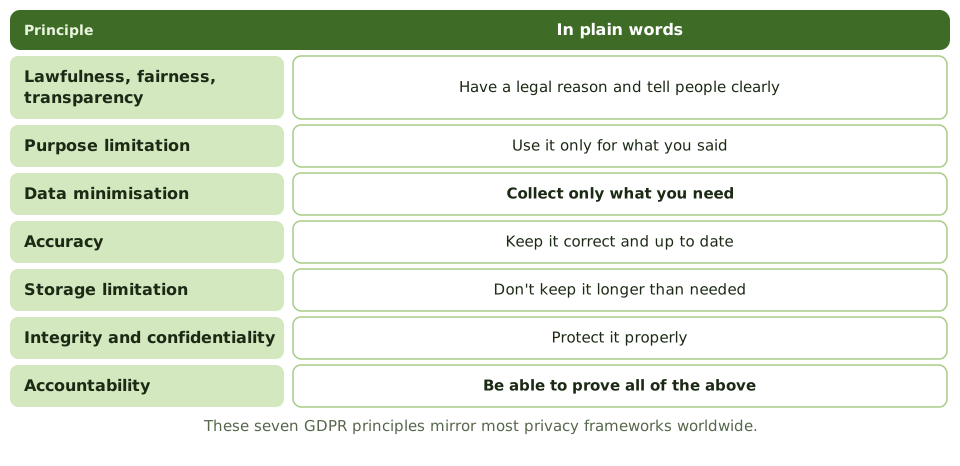
- ✓Core principles: lawfulness, fairness and transparency; purpose limitation; data minimisation; accuracy; storage limitation; integrity and confidentiality; accountability.
- ✓Under GDPR, the controller decides purposes and means; the processor processes data on the controller's behalf under contract.
- ✓Data subjects have rights including access, rectification, erasure, restriction, portability and objection.
- ✓Personal data breaches likely to result in risk must be reported to the supervisory authority within 72 hours of awareness.
- ✓A data protection impact assessment (DPIA) is required for high-risk processing; privacy by design builds protection in from the start.
- ✓Cross-border transfers need a legal mechanism, such as adequacy decisions or standard contractual clauses.
Exam traps
- !Collecting more data than needed violates data minimisation, even if it's secured.
- !The controller remains accountable even when a processor causes a breach.
- !Encryption reduces breach impact but doesn't remove the need for a lawful basis.
- !A privacy impact assessment is done before processing starts, not after.
- !Privacy and security overlap but differ: a secure system can still violate privacy.
Access control Identity Management
Knowing who's who and what they may do: identification, authentication, authorisation and accountability, the joiner-mover-leaver cycle, SSO and federation, and how the auditor tests user access.
Who are you, and what may you do?
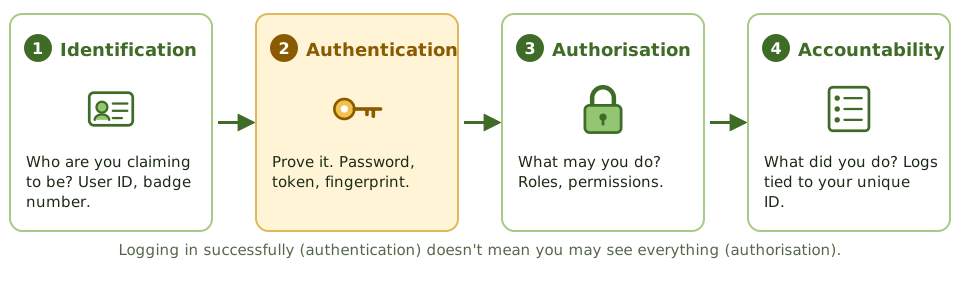
Checking into a hotel: you give your name (identification), show your passport (authentication), get a key card that opens your room and the gym but not the kitchen (authorisation), and the card logs every door you open (accountability).
Identity management does the same for systems.
Exam tipEvery user needs a unique ID. Shared accounts make it impossible to tell who did what.
The identity life cycle
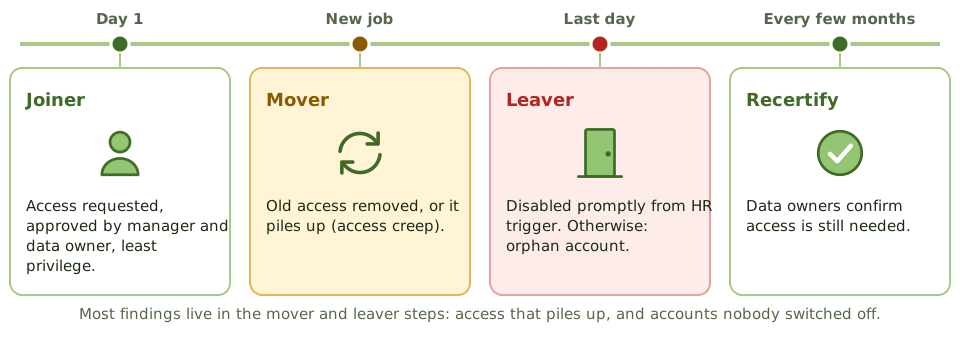
Exam tipService accounts, API keys and machine identities need owners, minimal rights and credential rotation too.
Testing user access
- 1Match HR leaver lists to active accounts: any orphans?
- 2Sample new and changed accounts for approval.
- 3Check access reviews were done by owners, and excess removed.
- 4Find shared, generic and default accounts.
- 5Review privileged and service accounts.
- 6Check MFA on SSO and federation.
ExampleQuarterly access reviews are 'completed', but IT admins approved every account in bulk without asking owners. In one system, 40% of users still have rights from old jobs.
How the exam asks about it
| If the question asks… | Answer |
|---|
| Proving a claimed identity | Authentication |
| Deciding what a user may do | Authorisation |
| Why unique user IDs matter | Accountability |
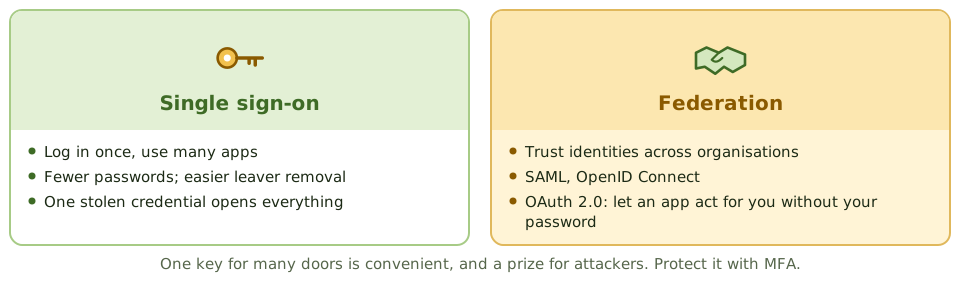
| Main risk of SSO | One stolen credential opens everything; use MFA |
| Best test of leaver controls | Match HR terminations to active accounts |
| Who recertifies access | Data / system owners |
Key takeaways
- ✓Identification claims an identity, authentication proves it, authorisation decides what it can do, and accountability records what it did.
- ✓Each user should have a unique ID so actions can be traced; shared IDs destroy accountability.
- ✓The identity life cycle: joiner (provisioning), mover (change of role), leaver (deprovisioning), with periodic access reviews.
- ✓Access is granted on approval by the data owner, based on least privilege and need-to-know.
- ✓Single sign-on improves usability and reduces password sprawl, but makes the single credential a high-value target; protect it with MFA.
- ✓Federation (SAML, OpenID Connect) lets identities be trusted across organisations.
- ✓Periodic access recertification by data owners detects access creep and orphan accounts.
Exam traps
- !Authentication is not authorisation. Logging in successfully doesn't mean you should see everything.
- !Shared or generic accounts prevent accountability; replace with named accounts or controlled check-out.
- !Leavers' accounts should be disabled promptly; orphan accounts are a common finding.
- !SSO without MFA concentrates risk on one password.
- !Access reviews by IT alone don't confirm business need; owners must review.
Access control Authentication Factors
The three ways to prove who you are, what genuinely counts as multifactor, how to make passwords less bad, and which kinds of MFA stand up to phishing.
Three ways to prove it's you
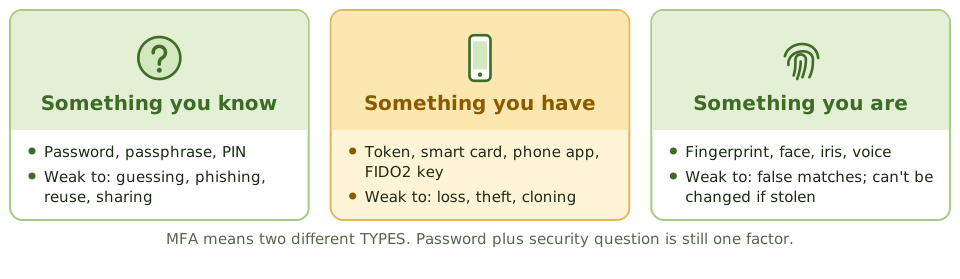
Taking cash from an ATM needs your card (something you have) and your PIN (something you know). A thief with just one of them gets nothing. That's multifactor authentication.
The three factor types are something you know, something you have, and something you are.
What counts as multifactor
Is MFASmart card + PIN. Password + hardware token. Phone app + fingerprint.
Is NOT MFAPassword + security question. Two passwords. Both are things you know.
Exam tipExtra risk signals some systems use: somewhere you are (location), something you do (behaviour).
Making passwords less bad
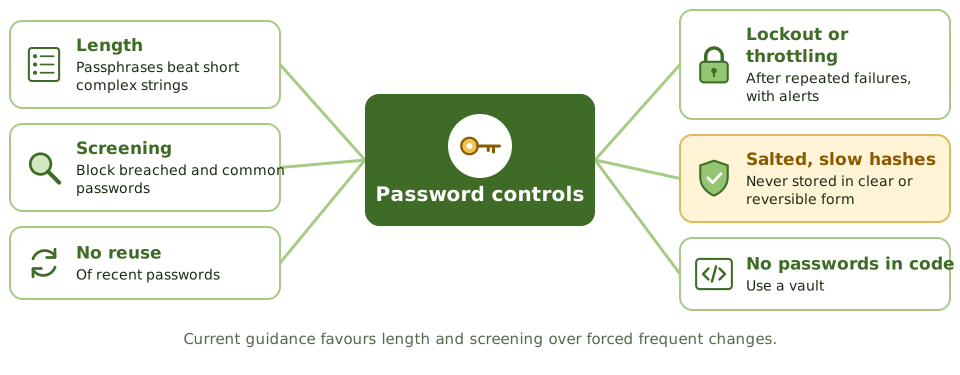
Exam tipLockout stops guessing but can be abused to lock people out. Use sensible thresholds and alerts.
Not all MFA is equal
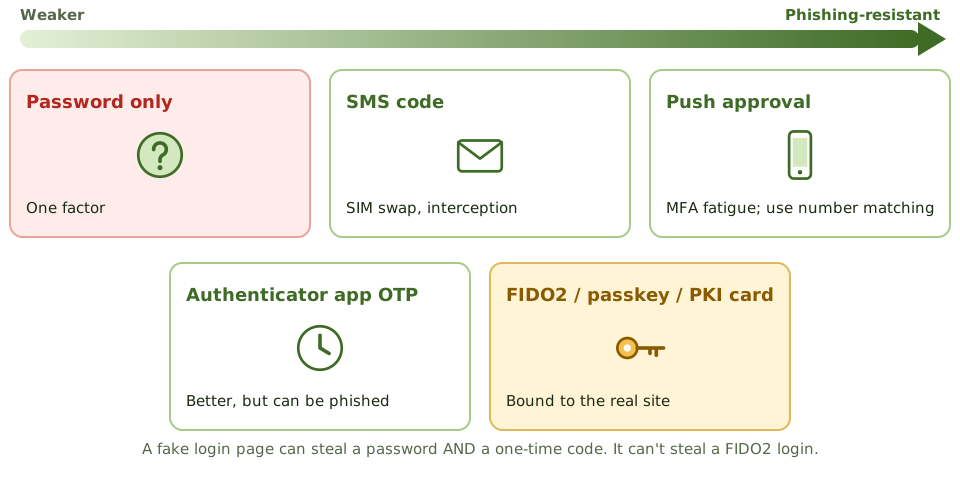
ExampleAn attacker's fake login page captures a finance manager's password and one-time code, and replays them on the real site within seconds. MFA was there, but not a phishing-resistant type.
Where MFA goes first
- 1Remote access: VPN, remote desktop, webmail.
- 2Privileged and administrator accounts.
- 3Cloud administration consoles.
- 4Sensitive data and payment systems.
How the exam asks about it
| If the question asks… | Answer |
|---|
| Example of two-factor authentication | Smart card + PIN; password + token |
| Password + security question | Single-factor (both knowledge) |
| Strongest protection against phishing | FIDO2 / passkeys / PKI-based MFA |
| Best way to store passwords | Salted hashes, slow algorithm |
| Weakness of SMS codes | SIM swapping and interception |
| Top priority for MFA | Remote and privileged access |
Key takeaways
- ✓Three factor types: something you know (password, PIN), something you have (token, phone, smart card), something you are (biometric).
- ✓Multifactor authentication combines factors of different types; two passwords are still single-factor.
- ✓Password controls: length and complexity, no reuse, lockout after failed attempts, secure storage as salted hashes, and screening against breached passwords.
- ✓One-time passwords from tokens or apps are stronger than static passwords; SMS codes are weaker because of SIM swapping and interception.
- ✓Phishing-resistant MFA (FIDO2 security keys, passkeys, smart cards with PKI) binds authentication to the legitimate site.
- ✓MFA should be applied first to remote access, privileged accounts, and access to sensitive data.
Exam traps
- !A password plus a security question is two things you know: single-factor.
- !Account lockout protects against online guessing but can be abused for denial of service; use thresholds and alerts.
- !Passwords must be stored hashed with a salt, never in clear text or with reversible encryption.
- !Push-notification MFA can be defeated by 'MFA fatigue' attacks; use number matching or phishing-resistant methods.
- !Smart cards are something you have; the PIN that unlocks them is something you know.
Access control Biometrics
Using your body to prove who you are: how biometric matching works, the two kinds of error and why one is worse, the crossover rate, the types of biometric, and the risks of data you can't change.
Your body as a key
Unlocking your phone with your face or thumb is biometrics. At set-up, the phone records your features as a template (enrolment). Each time you unlock it, it compares a fresh scan with the template and lets you in if they're close enough.
'Close enough' is the tricky bit. No two scans are ever identical, so the system has to decide how strict to be.
Two kinds of mistake
False rejection (FRR, type I)You're kept out of your own phone. Annoying, but safe.
False acceptance (FAR, type II)Someone else gets into your phone. This is the dangerous one for security.
The crossover error rate
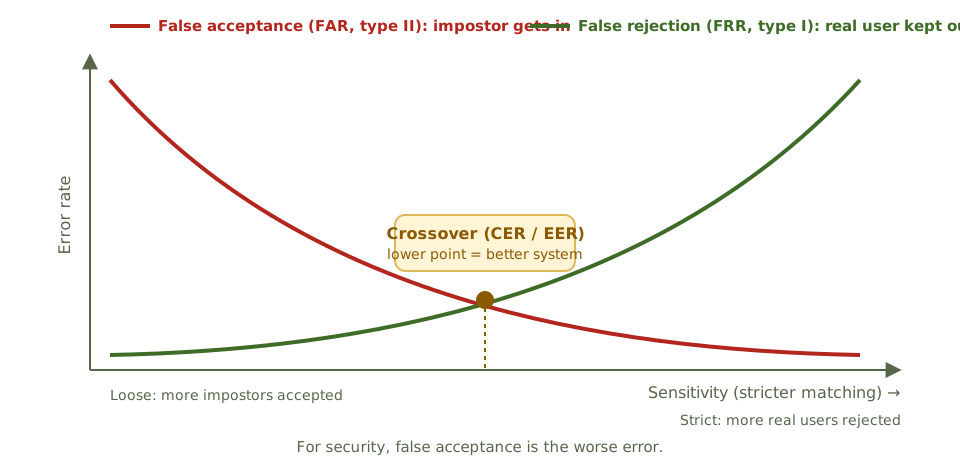
Exam tipTighten sensitivity: fewer impostors, more real users rejected. CER is the best single measure for comparing systems; lower is better.
Risks of data you can't change
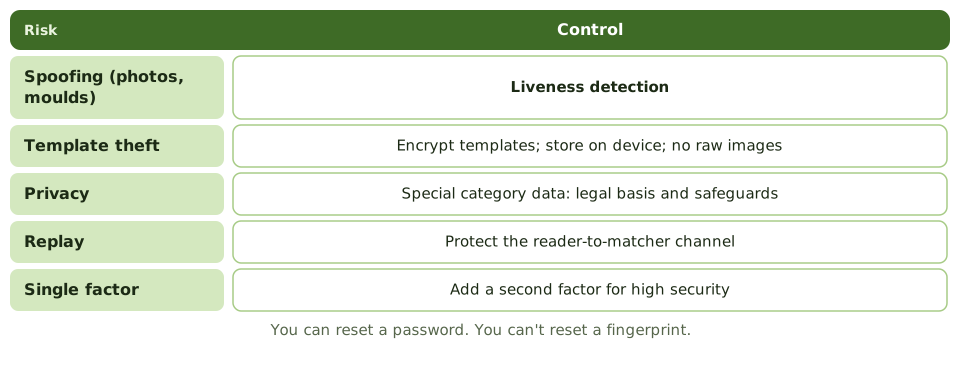
ExampleData centre fingerprint readers keep rejecting staff, so security lowers the sensitivity. Complaints stop, but false acceptance rises. Better: keep sensitivity and add a badge as a second factor.
How the exam asks about it
| If the question asks… | Answer |
|---|
| Most important performance measure | Crossover / equal error rate (lower is better) |
| Most serious error for security | False acceptance (type II) |
| Type I error | False rejection |
| Effect of raising sensitivity | Lower FAR, higher FRR |
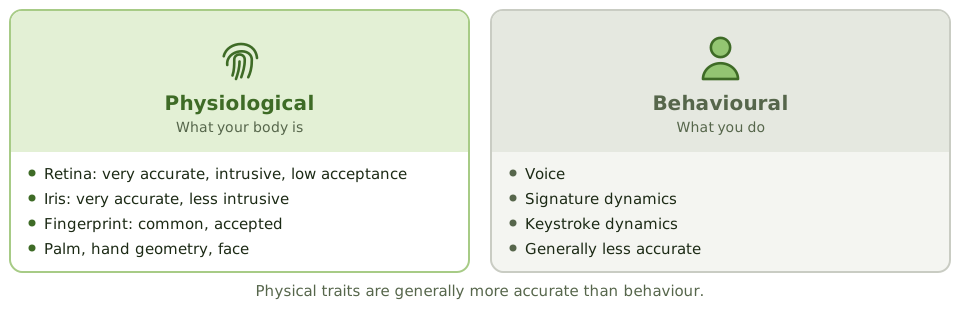
| Very accurate but least accepted | Retina scan |
| Control against fake fingerprints | Liveness detection |
Key takeaways
- ✓Biometric systems enrol a user's characteristic as a template and compare later samples against it.
- ✓False rejection rate (FRR, type I error) is how often legitimate users are rejected; false acceptance rate (FAR, type II error) is how often impostors are accepted.
- ✓Raising sensitivity lowers FAR but raises FRR; lowering it does the opposite.
- ✓The crossover (equal) error rate, CER or EER, is where FAR equals FRR; the lower the CER, the more accurate the system.
- ✓From a security perspective, false acceptance is the most serious error.
- ✓Physiological biometrics (fingerprint, iris, retina, face, palm) are generally more accurate than behavioural ones (voice, signature, keystroke).
- ✓Biometric data is sensitive personal data and can't be changed if compromised; templates must be protected.
Exam traps
- !Type I = false rejection; Type II = false acceptance. Type II is worse for security.
- !Best overall measure of accuracy: CER. Lower is better.
- !Retina scanning is highly accurate but intrusive, with low user acceptance.
- !Biometrics should usually be combined with another factor, not used alone for high-security access.
- !Liveness detection is needed to resist spoofing with photos, moulds or recordings.
Access control Access Models: DAC, MAC, RBAC
The different ways systems decide who gets access (by the owner, by labels, by job role, by rules or by attributes), the principles that apply to all of them, and how to spot each one in a scenario.
Who decides who gets in?
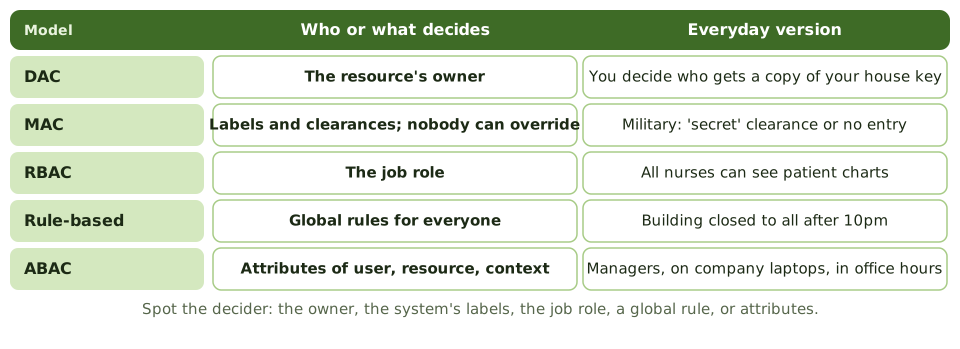
Every access model answers one question: who or what decides? The owner of the thing? A label stamped on it? Your job title? A rule that applies to everyone? A mix of facts about you, the data and the situation?
Find the decider in the exam scenario and you've found the model.
Strengths and weaknesses
| Model | Strength | Weakness |
|---|
| DAC | Flexible, simple | Owners over-share; malware inherits user rights |
| MAC | Strong; nobody can override | Rigid, complex |
| RBAC | Consistent; easy to administer | Role design effort; toxic combinations |
| Rule-based | Simple, consistent | Coarse |
| ABAC | Fine-grained, dynamic | Complex; harder to audit |
Exam tipMAC models: Bell-LaPadula protects confidentiality (no read up, no write down); Biba protects integrity (no read down, no write up).
Principles for every model
RBAC in practice
- 1Build roles from job functions; business owners approve their content.
- 2Check each role for internal SoD conflicts before use.
- 3Assign users to roles, never directly to permissions.
- 4Review roles and memberships regularly.
- 5Avoid role explosion: hundreds of narrow roles become unmanageable.
ExampleAn ERP role 'Accounts Payable Clerk' includes both 'create vendor' and 'release payment'. Everyone with that one role has an SoD conflict. The fix is in the role design.
How the exam asks about it
| If the question asks… | Answer |
|---|
| Owner decides access | DAC |
| Labels enforced; users can't change | MAC |
| Permissions by job function | RBAC |
| Time-of-day rule for everyone | Rule-based |
| User, resource and context attributes | ABAC |
| Only the rights needed | Least privilege |
Key takeaways
- ✓Discretionary access control (DAC): the owner of a resource decides who can access it.
- ✓Mandatory access control (MAC): the system enforces access based on security labels and clearances; users can't change it.
- ✓Role-based access control (RBAC): permissions are assigned to roles, and users get access through their roles.
- ✓Rule-based access control applies system-wide rules, such as time-of-day restrictions or firewall rules.
- ✓Attribute-based access control (ABAC) evaluates attributes of the user, resource and context.
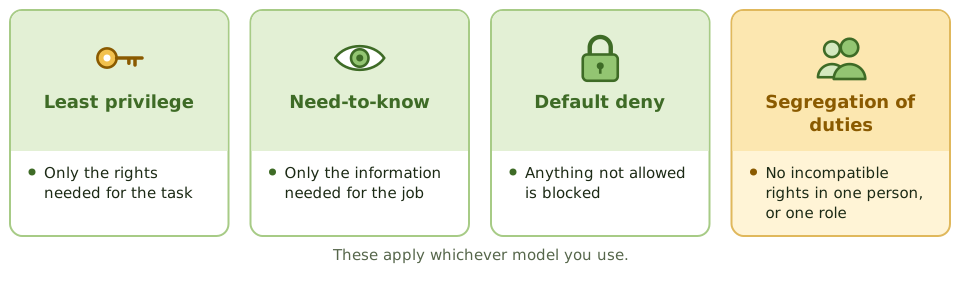
- ✓Least privilege and need-to-know apply whatever the model.
- ✓RBAC simplifies administration and supports segregation of duties when roles are designed carefully.
Exam traps
- !MAC is non-discretionary: even the data owner can't override the labels.
- !File permissions set by the file's creator = DAC.
- !Roles can contain toxic combinations; RBAC doesn't guarantee segregation of duties by itself.
- !Role explosion (too many narrow roles) undermines RBAC's benefits.
- !Need-to-know limits information access; least privilege limits all rights.
Access control Logical and Privileged Access
Controlling every route into systems and data, and keeping the most powerful accounts on a very short leash: access paths, session controls, privileged access management, emergency access and remote access.
Every door counts
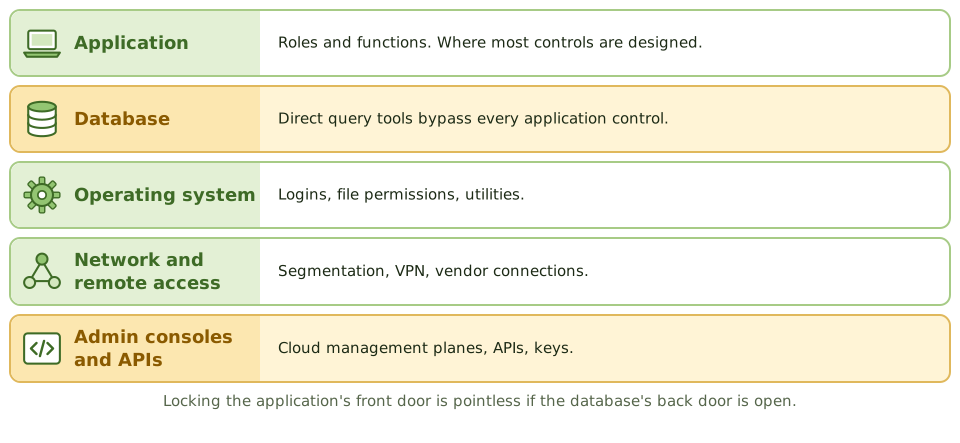
A burglar doesn't care how strong your front door is if the back door is open. Systems are the same: the application might have perfect roles, but if support staff can connect straight to the database with a query tool, those roles mean nothing.
Logical access controls must cover every access path.
Session controls
- 1Automatic logoff or screen lock after inactivity.
- 2Limits on concurrent sessions.
- 3Restrictions by time, location or device for sensitive functions.
- 4Show the last login time, so users can spot misuse.
The most powerful accounts
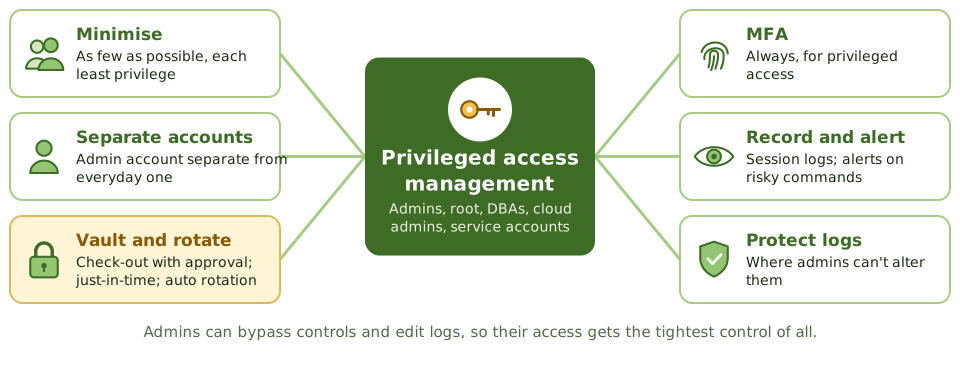
ExampleA 500-person company has 37 domain admin accounts, including six service accounts with five-year-old passwords and two former contractors. None are in the PAM vault.
Remote and vendor access
- 1MFA for all remote access.
- 2Vendor access switched on only when needed, monitored, then switched off.
- 3Never expose remote desktop directly to the internet.
- 4Service accounts: owned, non-interactive where possible, minimal rights, rotated credentials.
How the exam asks about it
| If the question asks… | Answer |
|---|
| Best control over privileged accounts | PAM: vault, approve, monitor, rotate |
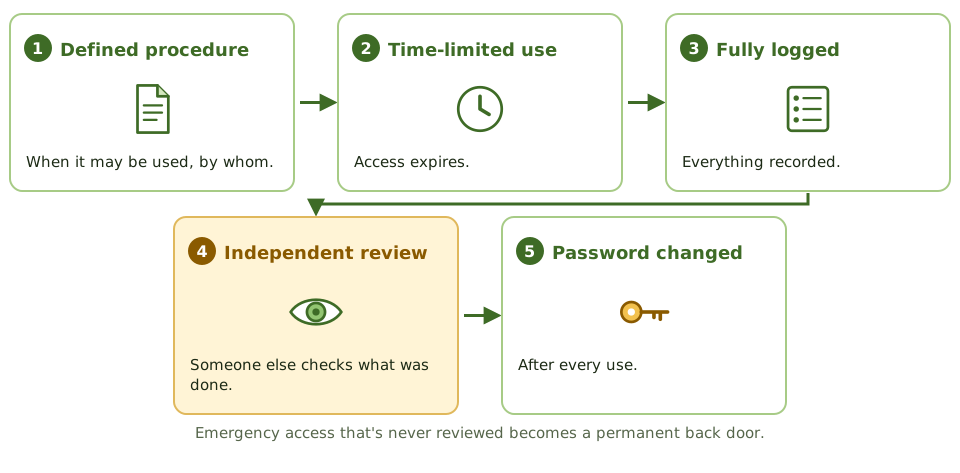
| Control for emergency access | Firefighter IDs, logged and reviewed after use |
| Risk of direct database access | Bypasses application controls |
| Why admins need separate accounts | Less exposure of privileged credentials |
| Privileged activity logs | Stored where admins can't alter them |
Key takeaways
- ✓Logical access controls protect systems and data through identification, authentication and authorisation at every access path.
- ✓Access paths include the network, operating system, database, application, remote access, APIs and administrative consoles; all must be controlled.
- ✓Privileged accounts (administrators, root, DBAs, service accounts) can bypass controls and must be minimised, approved, monitored and reviewed.
- ✓Privileged access management (PAM) vaults credentials, provides just-in-time access, records sessions and rotates passwords.
- ✓Emergency (break-glass or firefighter) access is pre-approved, time-limited, logged and reviewed afterwards.
- ✓Administrators should use separate accounts for privileged and everyday work.
- ✓Session controls: automatic logoff after inactivity, limited concurrent sessions, and screen locks.
Exam traps
- !Controlling access at the application while leaving direct database access open defeats the control.
- !Shared administrator passwords prevent accountability.
- !Logging privileged activity is pointless if the same administrators can alter the logs.
- !Emergency access that's never reviewed becomes a permanent back door.
- !Service accounts with interactive login and never-changing passwords are a common finding.
Cryptography Cryptography Basics
What cryptography can and can't do, the handful of terms you need, how the three main tools fit together, and why the keys matter more than the maths.
Locks, keys and fingerprints
A combination padlock is public: anyone can see how it works. What keeps your locker safe is the combination. Cryptography works the same way. The algorithm (the lock design) is public; the key (the combination) must stay secret.
And just like a padlock, it's only as good as how carefully you guard the combination.
Three tools
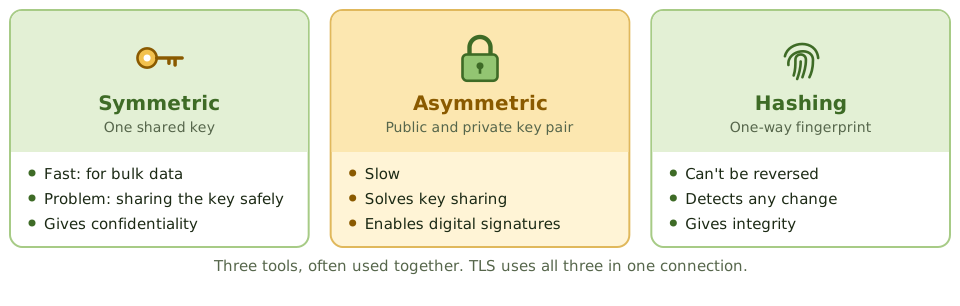
Exam tipTerms: plaintext (readable), ciphertext (scrambled), algorithm or cipher (the method), key (the secret), work factor (effort to break it).
Key management is where it fails
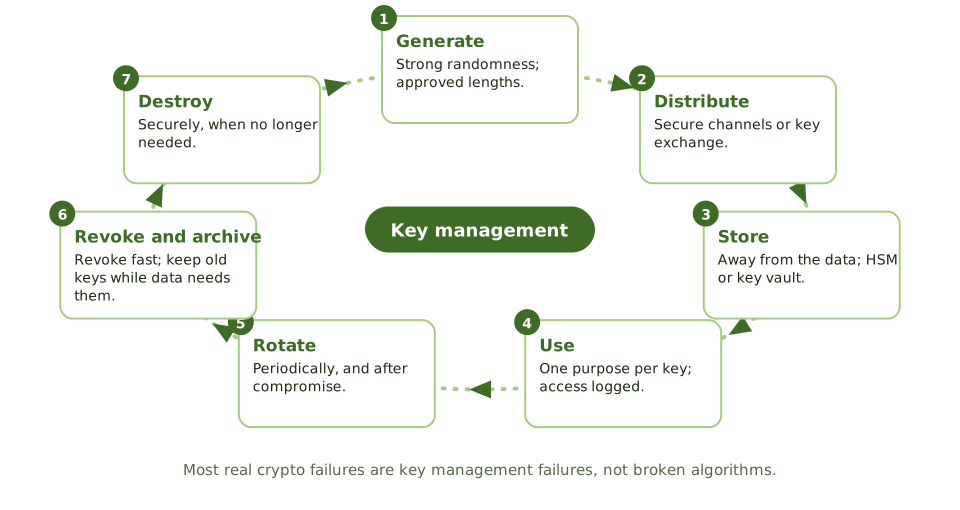
ExampleA database is encrypted with AES-256. The key sits in a config file on the same server, readable by the application. An attacker who gets the server gets both.
Algorithms
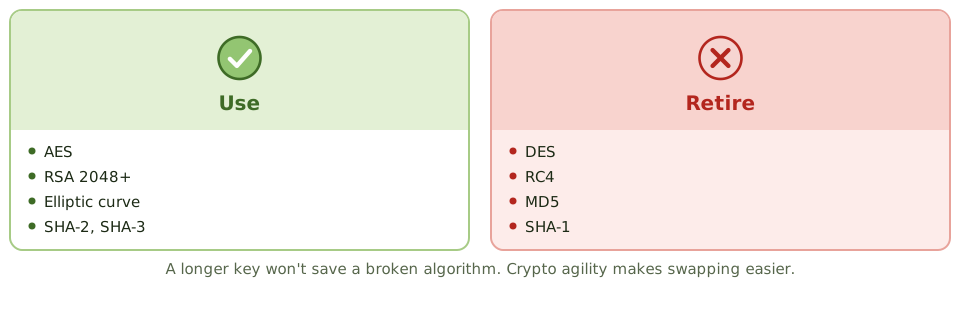
Exam tipMaster keys use split knowledge and dual control. Key managers shouldn't also have free access to the encrypted data.
How the exam asks about it
| If the question asks… | Answer |
|---|
| Most common crypto weakness | Key management |
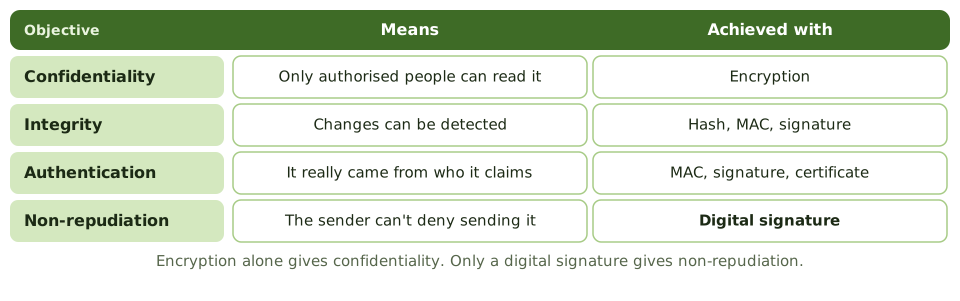
| Provides non-repudiation | Digital signature |
| Where to store keys | Away from the data, in an HSM or key vault |
| Encryption for bulk data | Symmetric |
| Is hashing reversible? | No |
Key takeaways
- ✓Cryptography can provide confidentiality, integrity, authentication and non-repudiation, depending on the technique used.
- ✓Symmetric encryption uses one shared key; asymmetric uses a public and private key pair; hashing produces a one-way fingerprint.
- ✓The strength of encryption depends on the algorithm, the key length and, above all, how keys are managed.
- ✓Key management covers generation, distribution, storage, use, rotation, revocation, archiving and destruction.
- ✓Keys should be stored separately from the data they protect, ideally in hardware security modules or key management services.
- ✓Weak or deprecated algorithms (DES, RC4, MD5, SHA-1) should be replaced; crypto agility makes that easier.
Exam traps
- !Encryption alone doesn't give integrity or non-repudiation; digital signatures do.
- !The most common weakness isn't the algorithm, it's key management.
- !Keys stored on the same server as the encrypted data provide little protection if the server is compromised.
- !Longer keys mean more resistance to brute force, but a broken algorithm stays broken.
- !Hashing isn't encryption: it can't be reversed.
Cryptography Symmetric Encryption
One key to lock and unlock: how symmetric encryption works, why it's fast, why sharing the key is the hard part, the algorithms to use and avoid, and where you'll find it.
One key for both
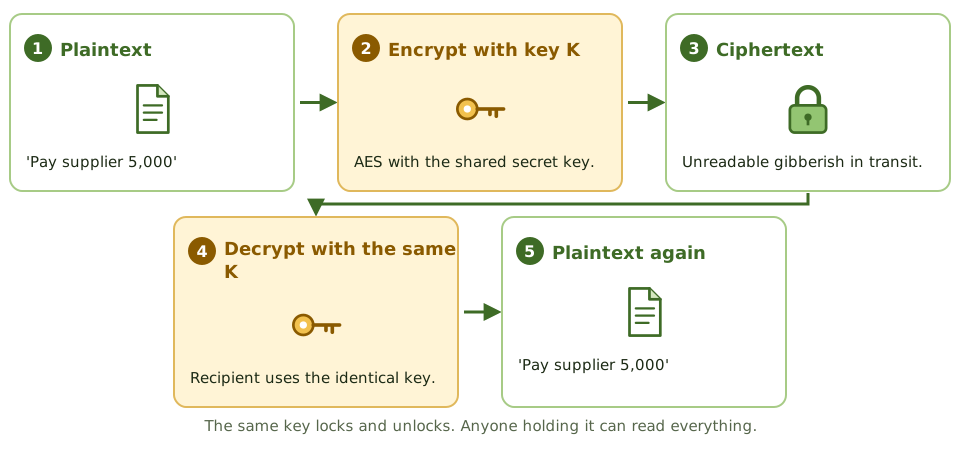
A house key locks and unlocks the same door. Give a copy to a friend and they can get in too. Lose a copy and anyone who finds it can get in.
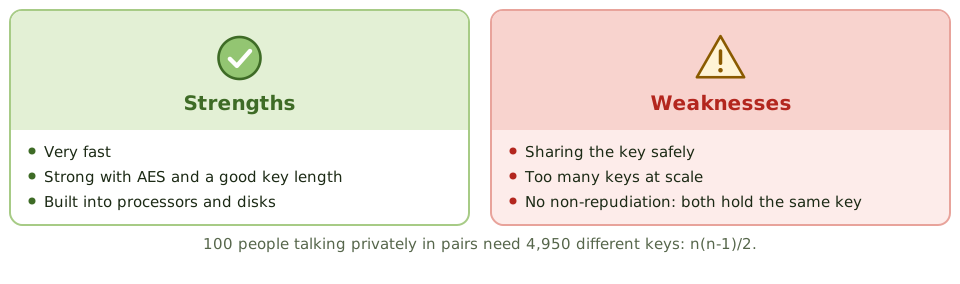
Symmetric encryption works the same way: the same secret key encrypts and decrypts. Anyone with the key can read the data.
The key-sharing problem
How do two people agree a secret key without anyone overhearing? Posting it, emailing it or phoning it all risk interception. This is symmetric encryption's main weakness.
The answer in practice: use asymmetric cryptography to exchange or wrap a symmetric session key, as TLS does.
ExampleA company sends files to 30 partners using one AES key for all of them, emailed in the clear. Anyone who intercepts that email, or any single partner, can read every partner's files.
Where you'll find it
- 1Full-disk and file encryption.
- 2Database and backup encryption.
- 3VPN and TLS traffic, after the key exchange.
- 4Wi-Fi encryption (WPA2, WPA3).
How the exam asks about it
| If the question asks… | Answer |
|---|
| Main disadvantage of symmetric | Distributing the key securely |
| Keys needed for n users | n(n-1)/2 |
| Main advantage over asymmetric | Speed for large data |
| Current standard algorithm | AES |
| Can it give non-repudiation? | No |
Key takeaways
- ✓Symmetric encryption uses the same secret key to encrypt and decrypt.
- ✓It's fast and efficient, so it's used for bulk data: disks, databases, files, network sessions.
- ✓The main problem is key distribution: both parties need the key, and it must be shared securely.
- ✓Scalability: n users communicating privately need n(n-1)/2 keys.
- ✓Symmetric encryption alone doesn't provide non-repudiation, because both parties hold the same key.
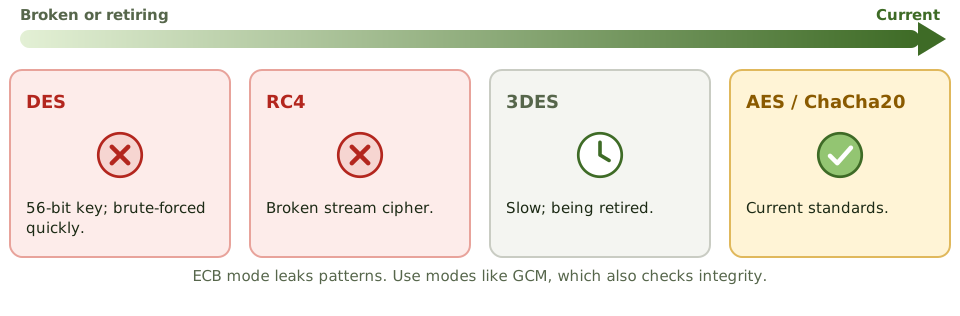
- ✓AES is the current standard; DES is obsolete and 3DES is being retired.
Exam traps
- !Biggest disadvantage of symmetric encryption: securely distributing the key.
- !Symmetric can't prove which party sent a message, so no non-repudiation.
- !ECB mode leaks patterns; use modes such as GCM or CBC with proper initialisation vectors.
- !Key length matters: 56-bit DES can be brute-forced quickly.
Cryptography Asymmetric Encryption
Public and private keys explained with a padlock, why they solve the 'how do we share the key?' problem, and the 'whose key?' rule the exam keeps testing.
The problem it solves
With ordinary (symmetric) encryption, both people use the same secret key. That works, but it raises an awkward question: how do you get the key to the other person safely in the first place? Send it by email and anyone reading the email has it.
Asymmetric encryption removes that problem. There's nothing secret to send.
ExampleA customer in another country wants to send their bank a confidential document. They've never met and have no safe way to agree a shared password first.
Two keys that belong together
Everyone gets a matching pair of keys. They're mathematically linked: whatever one key locks, only the other key of the same pair can unlock.
Public keyShared openly with the world, often inside a certificate. Think of it as an open padlock you hand out.
Private keyKept secret by its owner and never shared. Think of it as the only key that opens those padlocks.
Exam tipYou can't work out someone's private key from their public key. That's what makes it safe to publish the public one.
Sending a secret, step by step
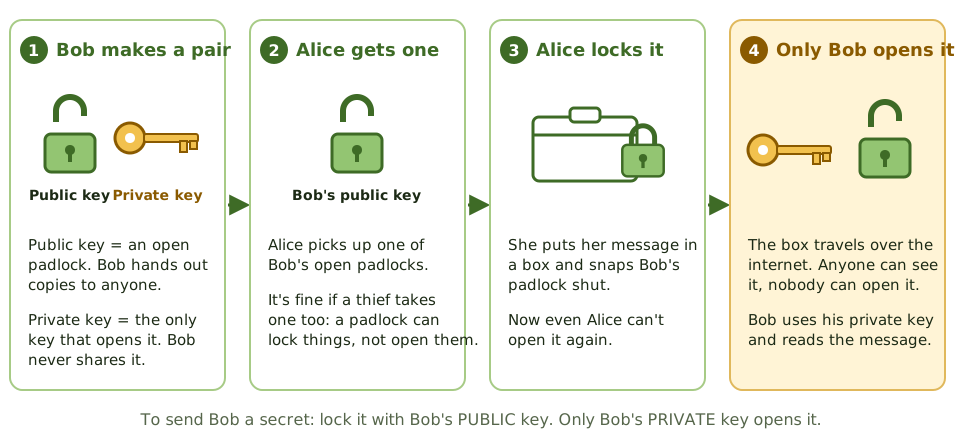
Alice wants to send Bob something only Bob can read. Bob has handed out copies of his open padlock (public key) and kept the key (private key).
Whose key? The rule to remember
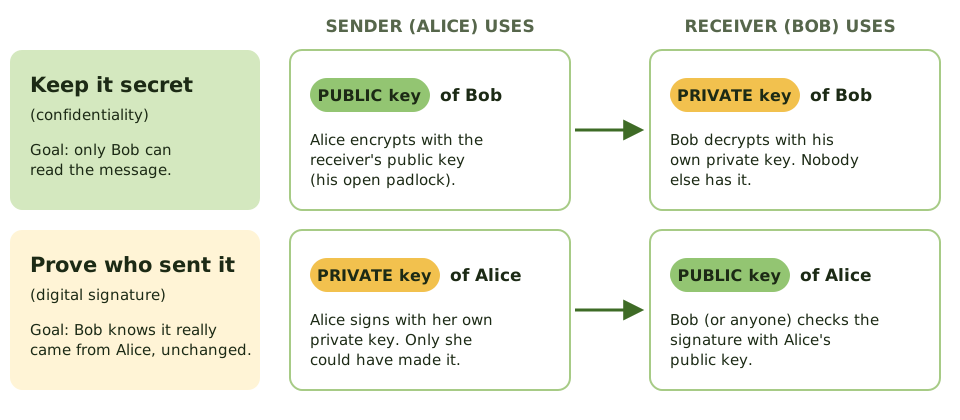
Exam questions love to ask which key is used. There are only two situations, and each has one answer.
Why not use it for everything?
Asymmetric encryption is slow, often hundreds of times slower than symmetric encryption. Encrypting a large file or a video call with it would be painfully slow.
So real systems mix the two. This is called hybrid encryption, and it's how HTTPS works every time you open a website.
- 1 Make a session key A random symmetric key for this conversation.
- 2 Lock the session key With the receiver's public key (slow, but it's tiny).
- 3 Send the data Encrypted with the fast session key.
- 4 Receiver unlocks Private key opens the session key, which opens the data.
Symmetric vs asymmetric
| Symmetric | Asymmetric |
|---|
| Keys | One shared secret key | Public and private pair |
| Speed | Fast | Slow |
| Sharing keys | Hard: must be sent secretly | Easy: public keys can be published |
| Keys for 100 people | 4,950 (one per pair) | 200 (a pair each) |
| Proves who sent it? | No: both sides have the same key | Yes, with digital signatures |
| Examples | AES | RSA, ECC, Diffie-Hellman |
Algorithms you'll see named
RSAThe classic. Used for encryption and signatures. Keys of 2,048 bits or more.
Elliptic curve (ECC)Same strength with much shorter keys. Popular on phones and small devices.
Diffie-HellmanLets two parties agree a shared secret over an open network. Used to set up session keys.
How the exam asks about it
| If the question asks… | Answer |
|---|
| Key to encrypt a message only the receiver can read | Receiver's public key |
| Key to create a digital signature | Sender's private key |
| Key to verify a signature | Sender's public key |
| Why combine asymmetric with symmetric | Asymmetric is slow; it's used to exchange the symmetric key |
| What proves a public key really belongs to Bob | A digital certificate from a trusted CA |
Key takeaways
- ✓Asymmetric encryption uses a pair of keys: a public key you can give to anyone, and a private key only you keep.
- ✓What one key of the pair locks, only the other key can unlock.
- ✓To send someone a secret, encrypt with THEIR public key. Only their private key can decrypt it.
- ✓To prove a message came from you (a digital signature), sign with YOUR private key. Anyone can check it with your public key.
- ✓It solves the key-sharing problem of symmetric encryption, because public keys can be shared openly.
- ✓It's slow, so real systems use it to swap a symmetric key, then use the fast symmetric key for the data (hybrid encryption).
- ✓Common algorithms: RSA, elliptic curve cryptography (ECC), and Diffie-Hellman for agreeing keys.
Exam traps
- !Secret message: RECEIVER's PUBLIC key. Signature: SENDER's PRIVATE key. Most wrong answers swap one of these.
- !Encrypting with your own private key doesn't keep anything secret: anyone with your public key can undo it.
- !Secret AND signed: sign with the sender's private key, then encrypt with the receiver's public key.
- !If a private key leaks, everything it protects is exposed and its certificate must be revoked.
- !Diffie-Hellman is for agreeing a shared key, not for encrypting messages directly.
Cryptography Hashing and Integrity
A fingerprint for data: what a hash is, why it can't be reversed, how keyed hashes and signatures stop deliberate tampering, how passwords should be stored, and where hashes turn up in audit work.
A fingerprint for data
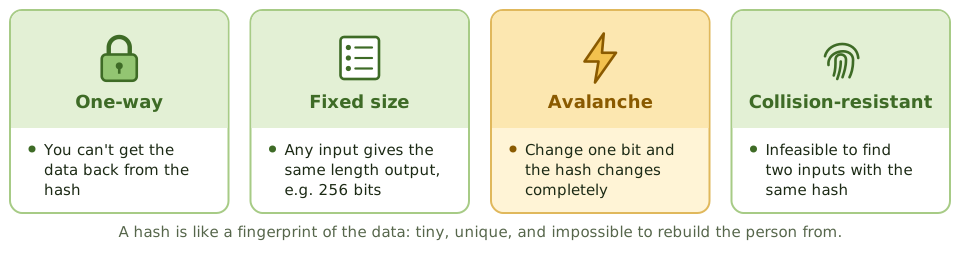
A fingerprint is tiny, unique to you, and you can't rebuild a person from it. But if someone claims to be you, comparing fingerprints settles it.
A hash does the same for data. Any file, of any size, goes in; a short fixed-length 'digest' comes out. Change one comma in the file and the digest changes completely.
Exam tipHashing gives integrity, not confidentiality. The original data isn't hidden.
Algorithms
| Algorithm | Size | Status |
|---|
| MD5 | 128 bits | Broken; not for security |
| SHA-1 | 160 bits | Broken for collisions; retiring |
| SHA-2 (SHA-256, SHA-512) | 256 / 512 bits | Current standard |
| SHA-3 | Variable | Current standard, different design |
Stopping deliberate tampering
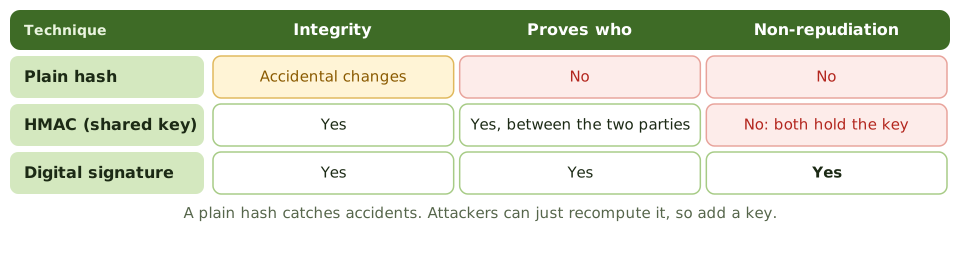
Exam tipAn attacker who changes a message can simply recompute a plain hash. Adding a key fixes that.
Storing passwords
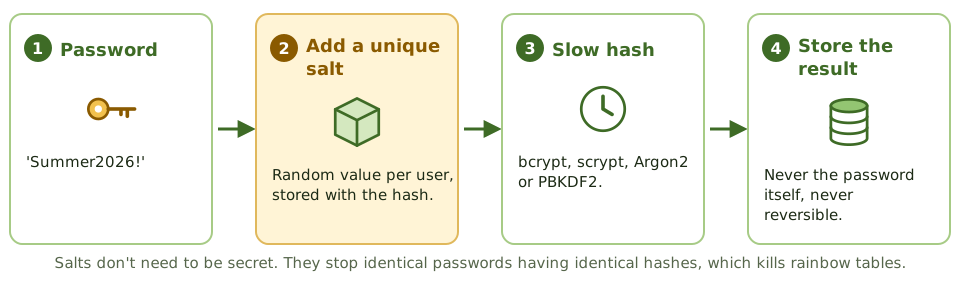
ExampleA breached database holds unsalted SHA-1 password hashes. Attackers crack most in hours with precomputed tables. With per-user salts and Argon2, each password would take years.
How the exam asks about it
| If the question asks… | Answer |
|---|
| Purpose of hashing | Integrity: detect changes |
| Does hashing give confidentiality? | No |
| Hash combined with a secret key | HMAC |
| Defence against rainbow tables | Salting |
| Proving a forensic copy is exact | Matching hash values |
| Weak hash algorithms | MD5, SHA-1 |
Key takeaways
- ✓A hash function turns any input into a fixed-length digest; it's one-way and should be collision-resistant.
- ✓Any change to the input, even one bit, produces a very different hash, so hashes detect alteration.
- ✓Hashing provides integrity, not confidentiality: the original data isn't hidden or encrypted.
- ✓A plain hash doesn't prove who created it; an HMAC (hash with a secret key) or a digital signature adds authentication.
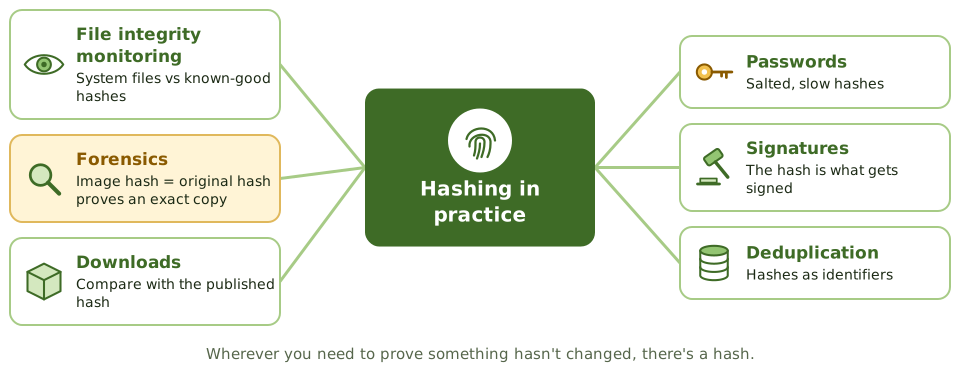
- ✓Passwords are stored as salted hashes using deliberately slow algorithms (bcrypt, scrypt, Argon2, PBKDF2).
- ✓MD5 and SHA-1 are broken for collision resistance; use SHA-2 or SHA-3.
Exam traps
- !Hashing is not encryption and can't be reversed to recover data.
- !An attacker who alters a message can recompute a plain hash; integrity against attackers needs an HMAC or signature.
- !Salts defeat precomputed (rainbow table) attacks; they don't need to be secret.
- !Fast hashes like SHA-256 alone are poor for passwords because they make guessing fast.
- !Forensic images are verified by comparing hashes of the original and the copy.
Cryptography Digital Signatures
The electronic version of a signature that can't be forged: how it's made and checked, which key does what, what it proves, what it doesn't, and why it depends on a certificate.
A wax seal for the digital age
In the past, a letter was sealed with wax pressed by the sender's personal ring. Only the ring's owner could make that mark, and a broken seal showed tampering.
A digital signature does both jobs electronically. Only the holder of the private key can make it, and any change to the message breaks it.
Signing and verifying
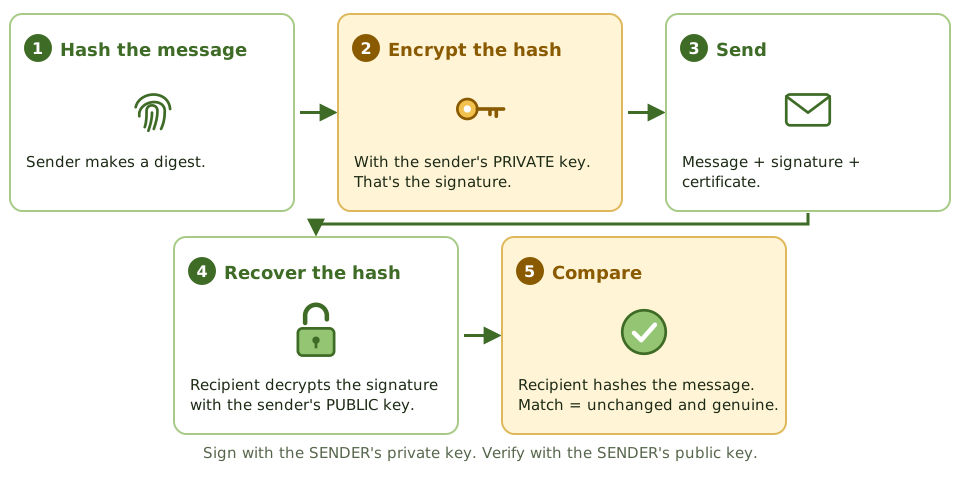
Exam tipOnly the hash is encrypted, not the whole message. Asymmetric crypto is slow, so this keeps it quick.
What it proves, and what it doesn't
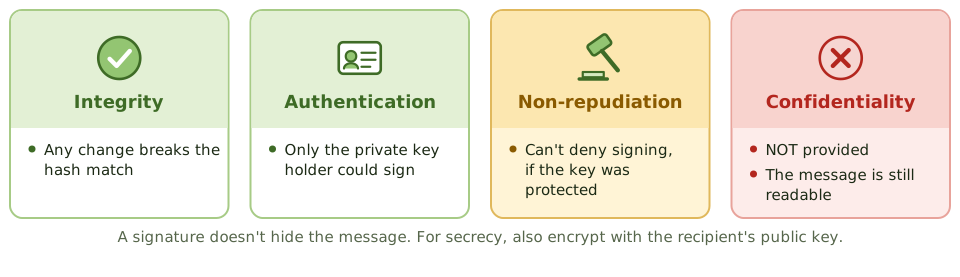
Exam tipFor secrecy too: sign with your private key, then encrypt with the recipient's public key.
Whose public key is it?
Verification only means something if the public key really belongs to the claimed sender. A digital certificate from a trusted certificate authority provides that link.
Non-repudiation also needs the private key under its owner's sole control: on a smart card, token or HSM, protected by a PIN. A shared or stolen key breaks it. A timestamp proves when something was signed.
ExampleA supplier disputes a purchase order. It was signed with the supplier's private key, held on its sales director's smart card. Verification with the supplier's certificate shows the order is genuine and unchanged.
Where signatures are used
- 1Signed contracts and documents.
- 2Signed email (S/MIME).
- 3Code signing, so software can be checked before installing.
- 4Banking and EDI transactions.
- 5Certificates themselves, signed by the CA.
How the exam asks about it
| If the question asks… | Answer |
|---|
| Key that creates a signature | Sender's private key |
| Key that verifies a signature | Sender's public key |
| Property a signature does NOT give | Confidentiality |
| What actually gets encrypted | The hash (message digest) |
| Proof the public key is the sender's | Certificate from a trusted CA |
Key takeaways
- ✓A digital signature is created by hashing the message and encrypting the hash with the sender's private key.
- ✓The recipient decrypts the signature with the sender's public key and compares the result with their own hash of the message.
- ✓A valid signature proves integrity (unchanged), authentication (from the key holder) and non-repudiation (the sender can't deny it).
- ✓A digital signature doesn't provide confidentiality; the message itself is still readable.
- ✓Trust in the signature depends on trust that the public key belongs to the claimed sender, provided by a certificate.
- ✓Non-repudiation only holds if the private key is protected and used only by its owner.
Exam traps
- !Signing uses the SENDER's private key; verifying uses the SENDER's public key.
- !Digital signatures don't encrypt the message; add encryption with the recipient's public key for confidentiality.
- !If the private key is shared or compromised, non-repudiation is lost.
- !A signature verifies the content at signing time; a timestamp proves when it was signed.
Cryptography PKI and Certificates
How we know a public key really belongs to who it claims: certificate authorities and their helpers, what's in a certificate, the chain of trust, revocation, and the controls an auditor checks.
A passport for public keys
A passport links your photo and name, and a government you trust vouches for it. Border staff check it's genuine, in date and not reported stolen.
A digital certificate does the same for a public key. A public key infrastructure (PKI) is the system of trusted issuers, identity checks and revocation lists that makes it work.
The parts of a PKI
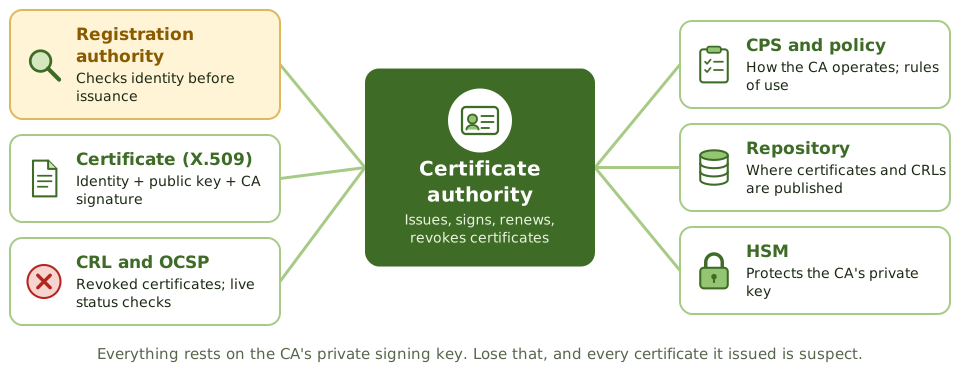
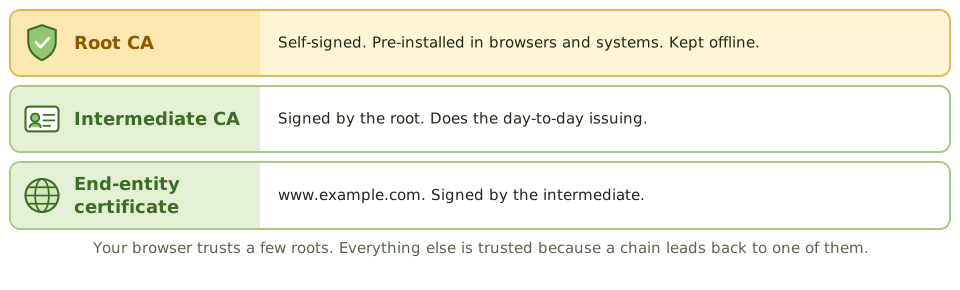
Exam tipThe RA checks identity (like the passport office checking your documents). The CA issues and signs (like the government). A certificate holds the public key, never the private key.
Controls the auditor checks
- 1CPS and certificate policy exist and are followed.
- 2Strong identity checks by the RA.
- 3CA keys in HSMs with dual control; root CA offline.
- 4Timely revocation; CRLs published, OCSP available.
- 5Certificate inventory and expiry monitoring.
- 6Escrow encryption keys if needed, never signing keys.
ExampleAn online shop goes offline for six hours when its TLS certificate expires on a Sunday. Nobody owned renewals and there was no certificate inventory.
How the exam asks about it
| If the question asks… | Answer |
|---|
| Verifies identity before issuance | Registration authority |
| Issues and signs certificates | Certificate authority |
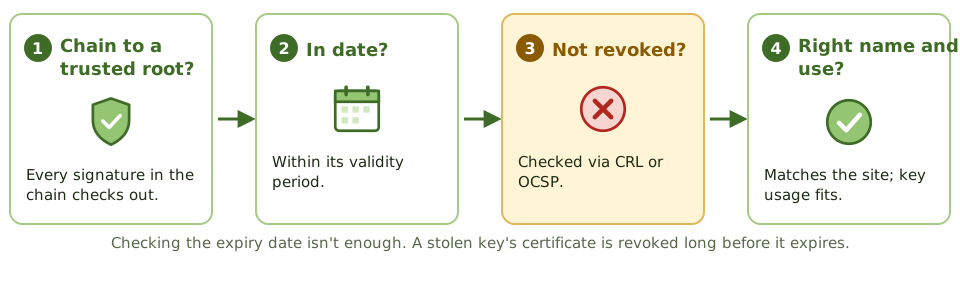
| Check if a certificate is revoked | CRL or OCSP |
| Describes CA operating practices | Certification practice statement |
| Most critical PKI asset | The CA's private signing key |
| Escrow signing keys? | No: it breaks non-repudiation |
Key takeaways
- ✓A public key infrastructure (PKI) binds public keys to identities through digital certificates issued by trusted certificate authorities.
- ✓The certificate authority (CA) issues and signs certificates; the registration authority (RA) verifies identities before issuance.
- ✓A certificate (X.509) contains the subject's identity, public key, issuer, validity period and the CA's signature.
- ✓Revoked certificates are published in a certificate revocation list (CRL) or checked in real time with OCSP.
- ✓The certification practice statement (CPS) describes how the CA operates; the certificate policy sets the rules.
- ✓Root CA private keys are the most sensitive asset; root CAs are often kept offline and keys stored in HSMs.
Exam traps
- !The RA verifies identity; the CA issues and signs the certificate.
- !A certificate contains the public key, never the private key.
- !Relying parties must check revocation status, not just expiry date.
- !Compromise of a CA's private key undermines every certificate it issued.
- !Expired certificates cause outages; certificate inventory and renewal tracking are operational controls.
Network and platform security Firewalls
The gatekeepers between networks: firewall types from simple packet filters to web application firewalls, the DMZ design, how rule sets go wrong, and what firewalls can't stop.
The security desk
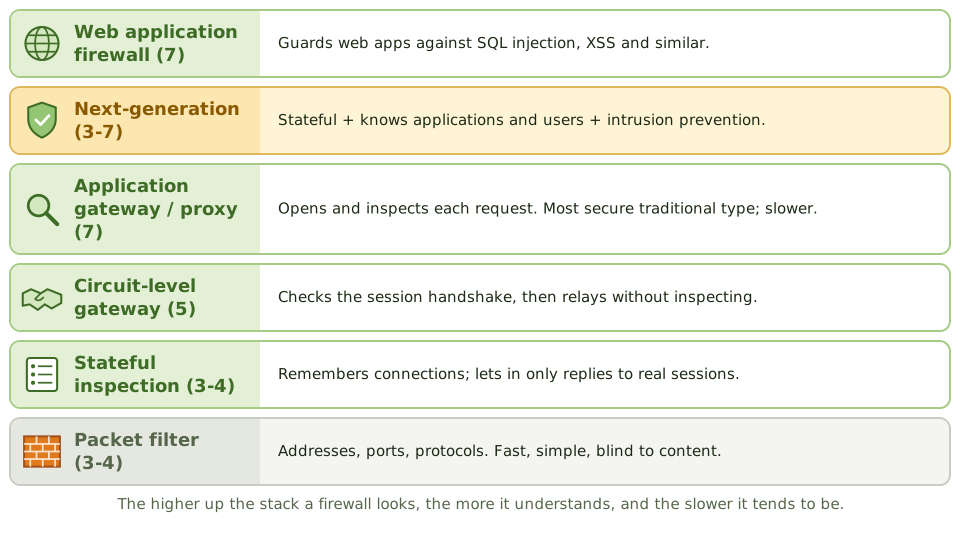
An office security desk checks everyone coming in. A basic one just checks you're heading for a real floor. A better one remembers who signed in, so only their visitors get back out. The best one opens your bag and reads your paperwork.
Firewalls work at those same levels, enforcing a policy on traffic between networks: allow what's permitted, block the rest.
The DMZ
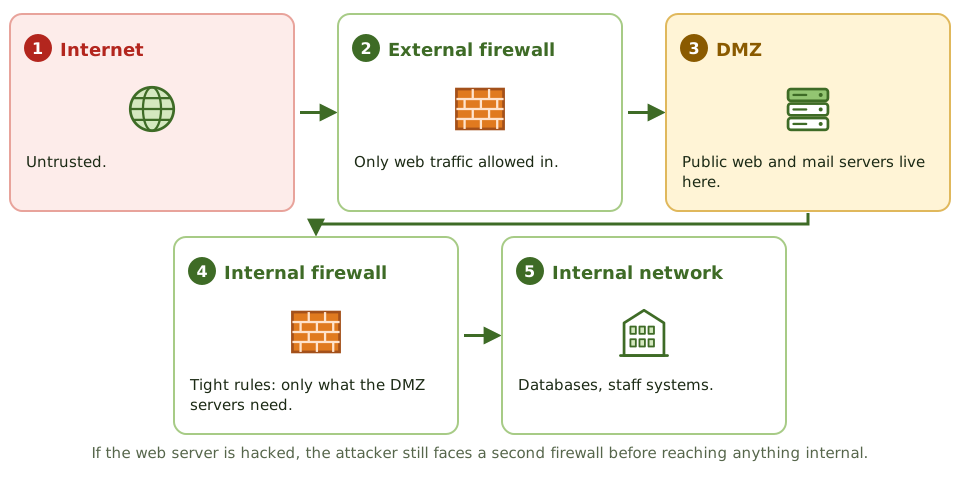
Exam tipOlder designs: screened host (a router allows traffic only to a hardened bastion host) and dual-homed host (two network cards, routing off).
Rule sets
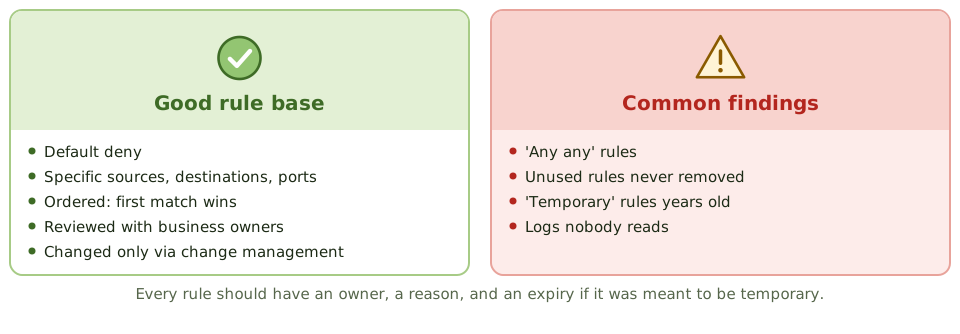
ExampleA review finds 1,800 rules. 400 haven't matched traffic in a year, and one lets anything reach the database server on any port, added 'temporarily' during a migration three years ago.
What firewalls can't do
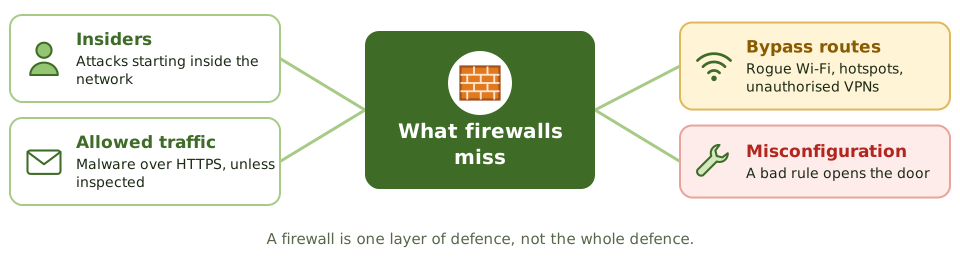
Exam tipHarden the firewall itself: patched, restricted admin access, MFA. Send logs to a SIEM and review them.
How the exam asks about it
| If the question asks… | Answer |
|---|
| Most secure traditional firewall | Application-level gateway (proxy) |
| Firewall that tracks connections | Stateful inspection |
| Where a public web server goes | In a DMZ (screened subnet) |
| Protects against SQL injection | Web application firewall |
| Best practice for rules | Default deny; least privilege; regular review |
| Limitation of firewalls | Insider attacks; threats in allowed traffic |
Key takeaways
- ✓Packet-filtering firewalls check addresses, ports and protocols (layers 3-4); fast but can't see application content.
- ✓Stateful inspection firewalls track connections, allowing only responses to legitimate sessions.
- ✓Application-level gateways (proxies) inspect traffic at layer 7; most secure of the traditional types but slower.
- ✓Next-generation firewalls combine stateful filtering, application awareness, intrusion prevention and user identity.
- ✓A screened subnet (DMZ) between two firewalls is the most secure common architecture for internet-facing servers.
- ✓Rule sets should default-deny, be ordered correctly, be reviewed regularly, and changes should follow change management.
- ✓Firewalls don't stop attacks from inside, attacks in allowed traffic, or threats that bypass them (such as unmanaged connections).
Exam traps
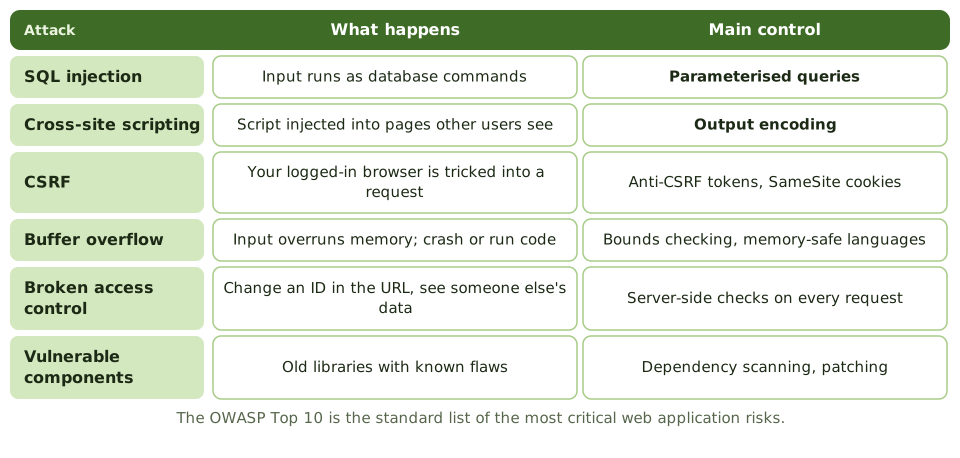
- !A web application firewall protects web applications from attacks such as SQL injection; a network firewall doesn't inspect that deeply.
- !The most secure firewall type in the traditional list is the application-level gateway.
- !Placing a public web server on the internal network is wrong; it belongs in the DMZ.
- !Rules allowing 'any any' or unused rules left in place are common findings.
- !Firewall logs that aren't reviewed provide no detection.
Network and platform security IDS/IPS
Alarms and guards for networks: intrusion detection versus prevention, network versus host based, signature versus anomaly detection, the two kinds of error, and honeypots.
Alarm or guard?
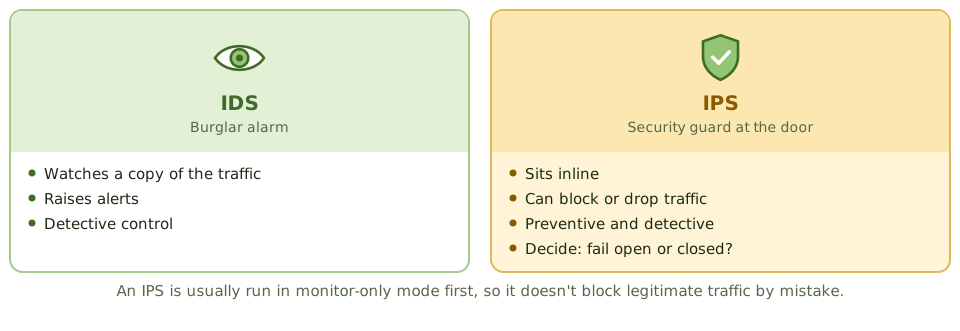
A burglar alarm tells you someone's broken in. A guard at the door stops them coming in at all. Both are useless if nobody answers the alarm or the guard falls asleep.
An intrusion detection system (IDS) is the alarm. An intrusion prevention system (IPS) is the guard.
How it spots attacks
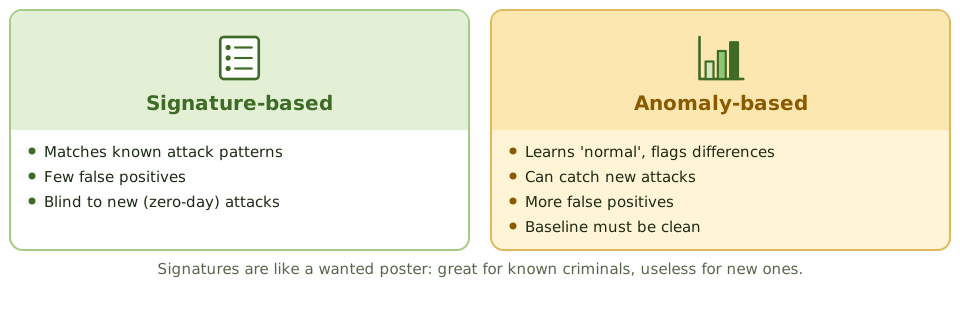
Exam tipAn anomaly baseline taken during an attack learns the attack as 'normal'.
Two kinds of error
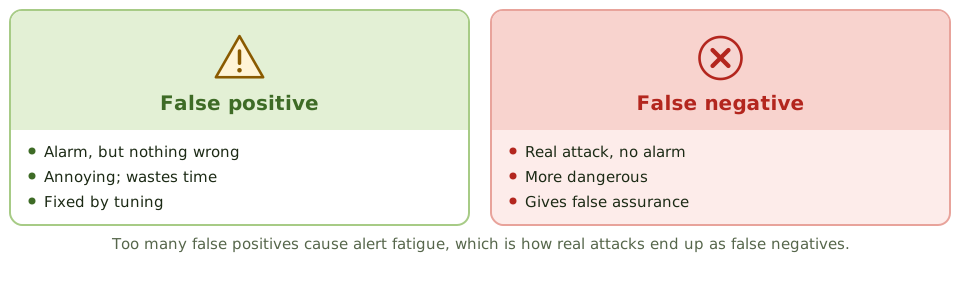
ExampleAn untuned IDS produces 30,000 alerts a day, almost all false. The team stopped reading them months ago, and a real data-theft alert was buried in the pile.
Placement and honeypots
- 1Behind the external firewall, to see what gets through.
- 2In front of critical segments: data centre, payment zone.
- 3On critical hosts (HIDS), and with cloud-native tools.
- 4Honeypot: a decoy with no real use, so any touch is suspicious.
- 5Honeynet: a network of honeypots, isolated from real systems.
How the exam asks about it
| If the question asks… | Answer |
|---|
| Method that finds new attacks | Anomaly / statistical-based |
| Fewest false positives on known attacks | Signature-based |
| More dangerous IDS error | False negative |
| IDS vs IPS | IPS is inline and can block |
| Decoy to attract attackers | Honeypot |
| What makes an IDS effective | Tuning plus timely monitoring and response |
Key takeaways
- ✓An IDS detects and alerts on suspicious activity; an IPS sits inline and can block it.
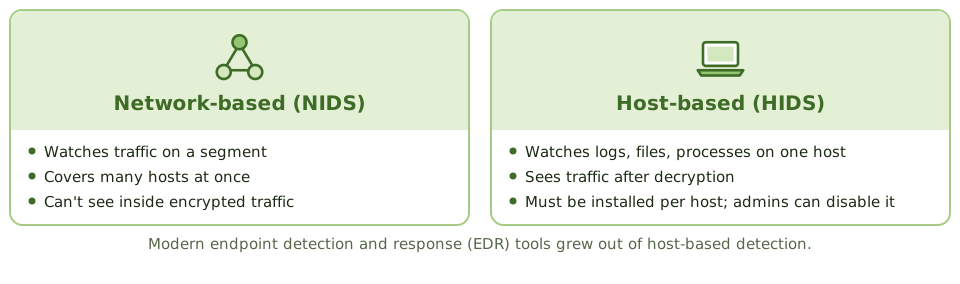
- ✓Network-based IDS (NIDS) monitors traffic on a segment; host-based IDS (HIDS) monitors activity and files on a single host.
- ✓Signature-based detection matches known attack patterns: accurate for known attacks, blind to new ones.
- ✓Anomaly (statistical or behaviour-based) detection flags deviations from normal: can find new attacks but produces more false positives.
- ✓A false positive is an alert on legitimate activity; a false negative is a missed attack, which is more dangerous.
- ✓An IPS can block legitimate traffic if poorly tuned, so it's usually introduced in monitoring mode first.
- ✓Detection is useless without monitoring and response: alerts must be reviewed and acted on.
Exam traps
- !Signature-based IDS can't detect zero-day attacks without a signature.
- !Anomaly-based IDS needs a baseline of normal activity; a baseline taken during an attack treats the attack as normal.
- !Encrypted traffic can hide attacks from a network IDS unless decrypted or monitored at the host.
- !An IPS failure can disrupt traffic; decide whether it fails open or closed.
- !Too many false positives lead to alert fatigue and real attacks being ignored.
Network and platform security VPN, SSL/TLS, IPsec
Private tunnels through a public internet: what a VPN does, IPsec's parts and modes, how TLS secures a web connection, and the remote-access weaknesses auditors find.
A private tunnel on a public road
Imagine driving through a busy city in a sealed, armoured lorry. Everyone can see the lorry, but nobody can see or touch what's inside.
A virtual private network (VPN) does that for data crossing the internet. Site-to-site VPNs join offices or data centres; remote-access VPNs connect individual users.
IPsec's parts
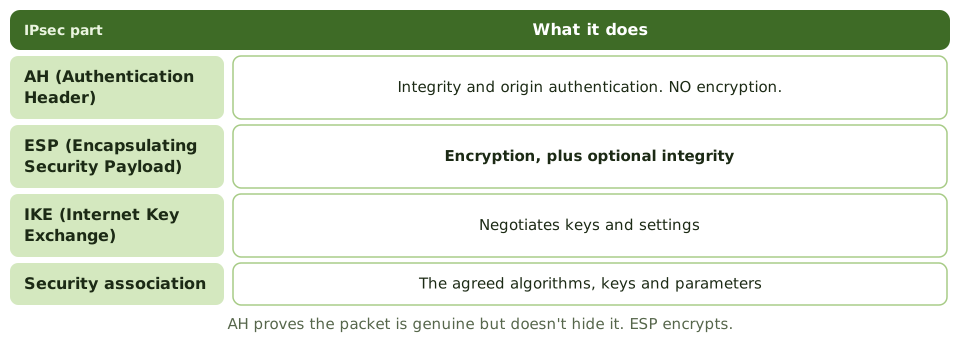
Exam tipIPsec works at the network layer, so it protects every application without changing them.
How TLS works
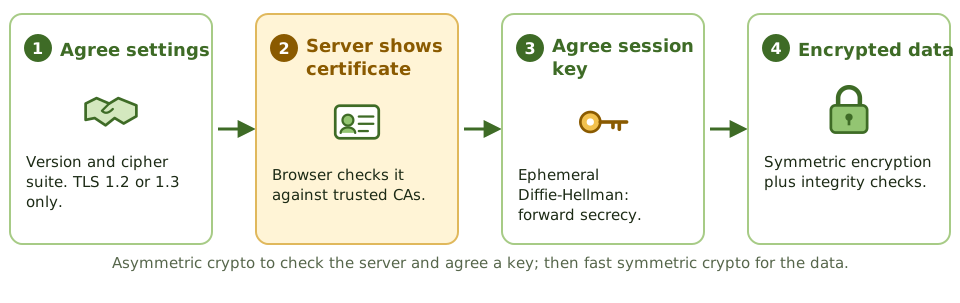
Exam tipTurn off SSL 2/3 and TLS 1.0/1.1 and weak ciphers. Don't train users to click through certificate warnings.
Remote access weaknesses
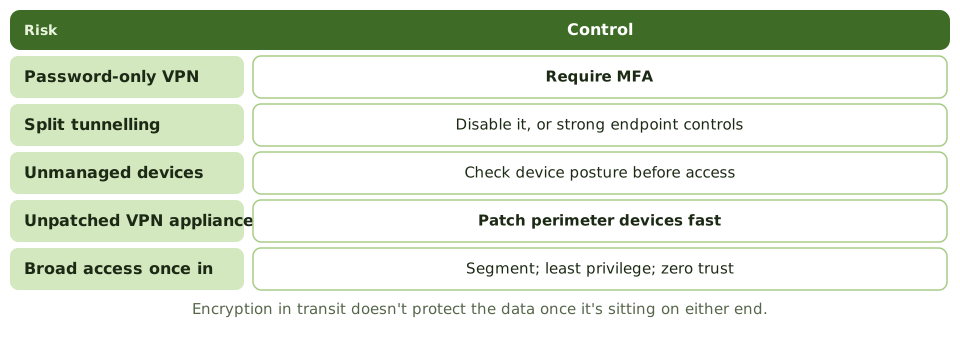
ExampleAttackers use a known flaw in an unpatched VPN appliance to steal session tokens and get in without passwords. MFA was on, but the appliance hadn't been patched for eight months.
How the exam asks about it
| If the question asks… | Answer |
|---|
| IPsec part that encrypts | ESP |
| IPsec part with integrity, no encryption | AH |
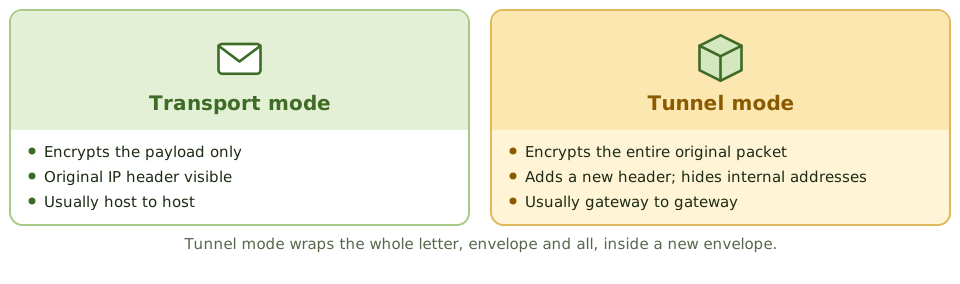
| Mode encrypting the whole packet | Tunnel mode |
| How TLS authenticates the server | The server's certificate |
| Risk of split tunnelling | Device bridges internet and corporate network |
| Best remote access control | MFA plus patched, monitored VPN |
Key takeaways
- ✓A VPN creates an encrypted tunnel over an untrusted network; site-to-site VPNs connect networks, remote-access VPNs connect users.
- ✓IPsec works at the network layer: AH provides integrity and authentication; ESP provides confidentiality (encryption) plus optional integrity.
- ✓IPsec transport mode encrypts only the payload; tunnel mode encrypts the entire original packet and adds a new header.
- ✓IKE negotiates IPsec security associations and keys.
- ✓TLS (successor to SSL) secures application traffic such as HTTPS, using certificates for server authentication and symmetric session keys for data.
- ✓SSL and early TLS versions are deprecated; use TLS 1.2 or 1.3 with strong cipher suites.
- ✓Split tunnelling lets remote users reach the internet directly while connected, which can expose the corporate network.
Exam traps
- !AH doesn't encrypt; ESP does.
- !Tunnel mode hides the original IP header; transport mode doesn't.
- !An expired or self-signed certificate that users click through defeats TLS's server authentication.
- !VPN access with only a password is a common finding; require MFA.
- !Encryption in transit doesn't protect data at rest on either end.
Network and platform security Wireless Security
Securing a network that leaks through the walls: Wi-Fi protocols from WEP to WPA3, personal versus enterprise mode, rogue and fake access points, and which controls are strong or just for show.
A network that leaks through the walls
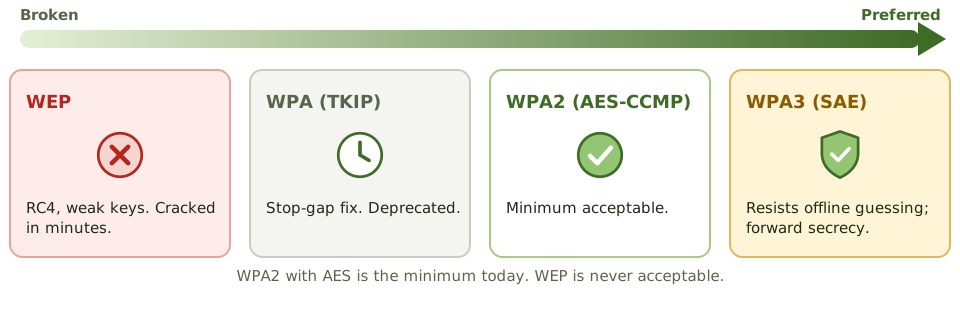
A cable network is like a conversation in a closed room. Wi-Fi is like shouting across a car park: anyone within range can listen, from outside the building or next door.
Locked doors don't help. Wi-Fi security depends on encryption and on checking who's connecting.
Wireless threats
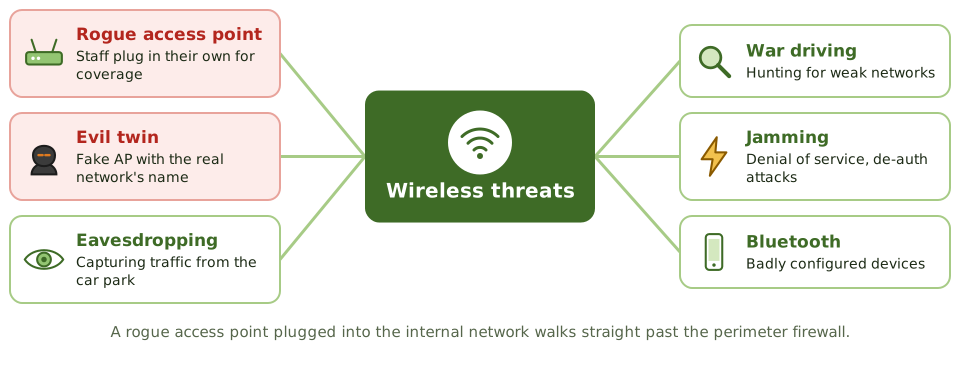
ExampleA survey finds an access point called 'Finance-Fast'. A staff member bought it for better coverage and plugged it into a network port. Weak passphrase, direct access to the internal network.
How the exam asks about it
| If the question asks… | Answer |
|---|
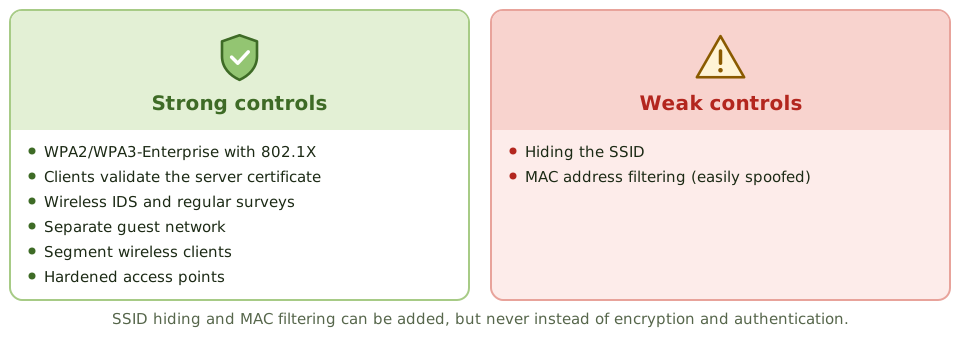
| Best corporate Wi-Fi set-up | WPA3 (or WPA2)-Enterprise with 802.1X |
| Protocol never to use | WEP |
| Weak wireless controls | MAC filtering, SSID hiding |
| Best way to find rogue APs | Wireless IDS and regular surveys |
| Guest Wi-Fi requirement | Separated from the corporate network |
Key takeaways
- ✓Wireless signals travel beyond physical boundaries, so encryption and strong authentication are essential.
- ✓WEP is broken and must not be used; WPA2 with AES (CCMP) is the minimum; WPA3 is preferred.
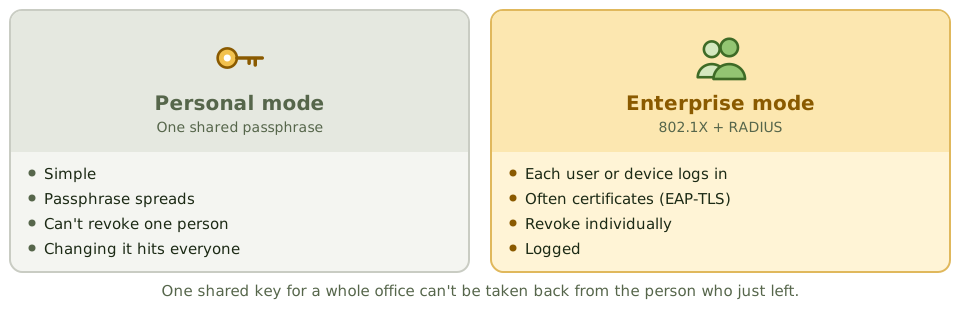
- ✓Enterprise mode (802.1X with RADIUS) authenticates each user or device individually; personal mode uses a shared passphrase.
- ✓Rogue access points and evil twins are major threats; wireless intrusion detection and regular surveys detect them.
- ✓Hiding the SSID and filtering MAC addresses are weak controls that are easily bypassed.
- ✓Guest wireless should be separated from the corporate network.
Exam traps
- !MAC filtering isn't strong security; MAC addresses can be spoofed.
- !A shared passphrase can't be revoked for one person; enterprise mode can.
- !SSID hiding doesn't stop a determined attacker.
- !A rogue access point plugged into the internal network bypasses the perimeter firewall.
- !Bluetooth and other short-range wireless also need controls.
Network and platform security Endpoint and Mobile (BYOD)
Protecting the laptops and phones where people actually work: the core endpoint controls, why encryption matters for lost devices, mobile device management, BYOD policies and data loss prevention.
Where the work happens
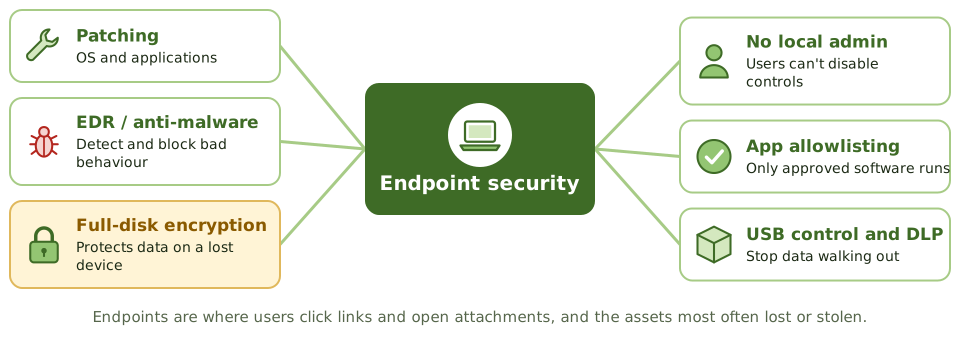
Laptops, desktops, phones and tablets are where people open email, click links and handle data. They're the most common way in for attackers, and the things most often left on trains.
Endpoint security protects the devices themselves.
The lost laptop
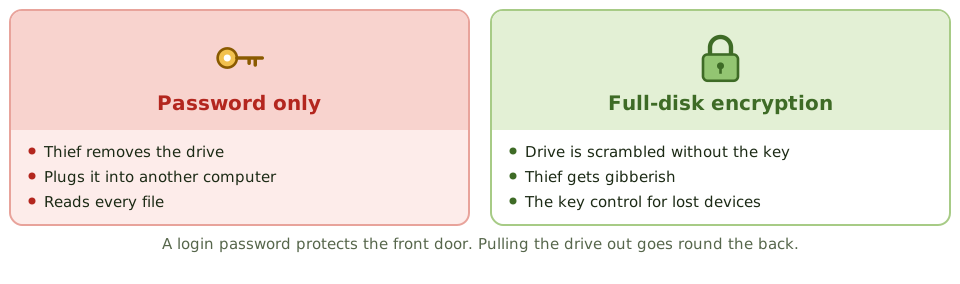
Exam tipUsers with local admin rights can switch off security tools and install malware. Standard users shouldn't have them.
Bring your own device
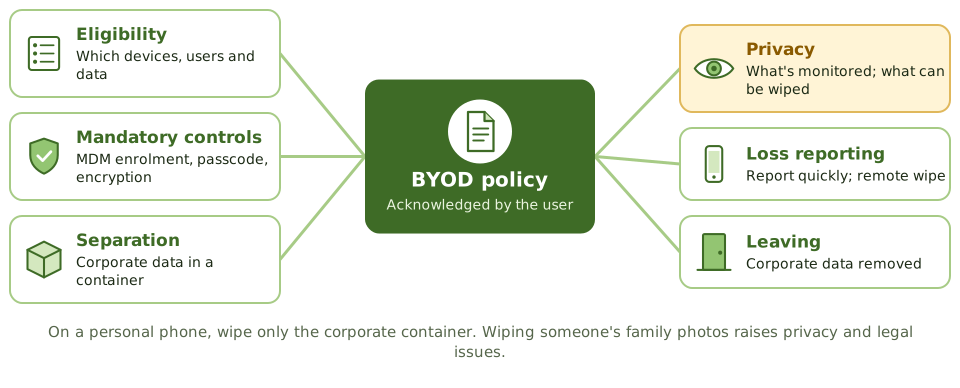
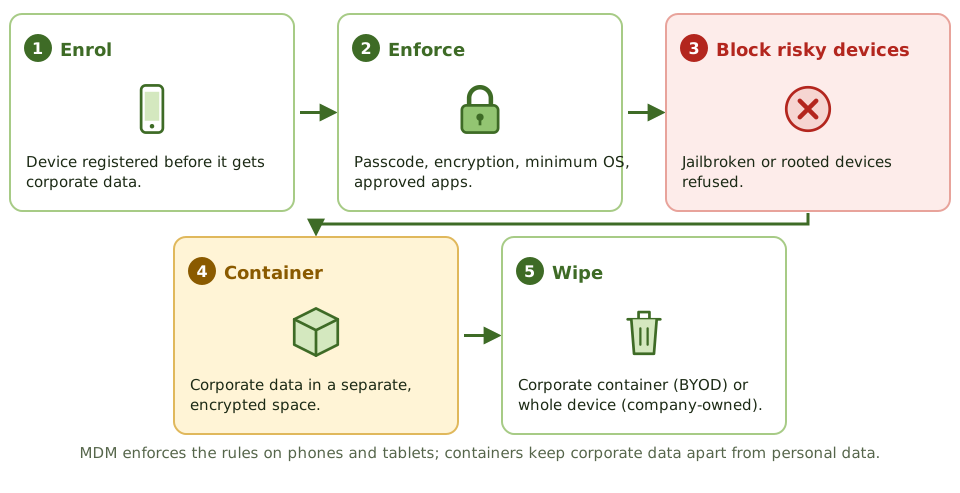
ExampleA sales manager's personal phone, used for work email without MDM or a passcode, is stolen. The thief can read customer contracts, and the company can't wipe anything because the phone was never enrolled.
Data loss prevention
DLP tools look for sensitive content in use (on devices), in motion (email, web) and at rest (file shares, cloud), and alert or block when a rule is broken.
They rely on data classification to know what counts as sensitive.
How the exam asks about it
| If the question asks… | Answer |
|---|
| Best control for data on lost laptops | Full-disk encryption |
| Enforces policy on mobile devices | Mobile device management |
| Protecting work data on personal phones | Containerisation with selective wipe |
| Risk of local admin rights | Users can disable controls, install malware |
| Finds sensitive data leaving | Data loss prevention |
Key takeaways
- ✓Endpoints are the most common entry point for attacks and the most frequently lost or stolen assets.
- ✓Core endpoint controls: patching, endpoint detection and response (EDR) or anti-malware, host firewall, full-disk encryption, least privilege and application control.
- ✓Full-disk encryption is the best control for data on lost or stolen laptops.
- ✓Mobile device management (MDM) enforces policies on mobile devices: passcodes, encryption, remote wipe, app restrictions.
- ✓BYOD needs a policy covering eligibility, required controls, separation of corporate data (containerisation), monitoring and privacy, and offboarding.
- ✓Data loss prevention (DLP) detects and blocks sensitive data leaving through endpoints, email or web.
Exam traps
- !A strong login password doesn't protect data if the disk can be removed and read; encryption does.
- !On BYOD devices, remote wipe of the whole device raises privacy and legal issues; wiping only the corporate container is preferred.
- !Users with local administrator rights can disable security tools and install malware.
- !Jailbroken or rooted devices bypass platform security and should be blocked.
- !USB ports allow data theft and malware introduction; control removable media.
Network and platform security Cloud and Virtualization Security
Many computers on one machine, and computers you rent from someone else: hypervisor risks, VM sprawl and snapshots, containers, and the misconfiguration and identity mistakes behind most cloud breaches.
Many flats in one building
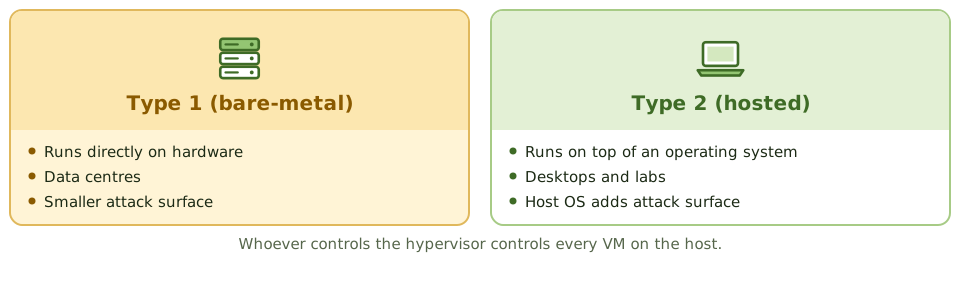
A block of flats gives each household its own front door, but they all share the same foundations, plumbing and caretaker. If the caretaker's master key is stolen, every flat is open.
Virtualisation runs many virtual machines (VMs) on one physical server. The hypervisor is the caretaker: whoever controls it controls every VM.
Virtualisation risks
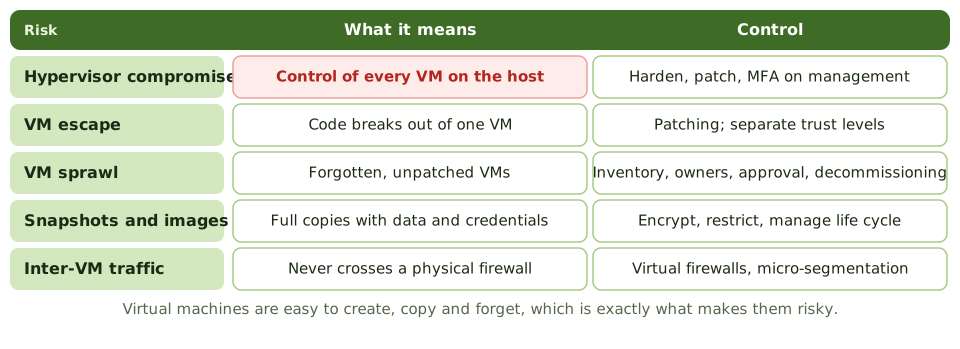
Exam tipAlso: keep workloads of different sensitivity on separate hosts, and use hardened 'golden image' templates.
Cloud security
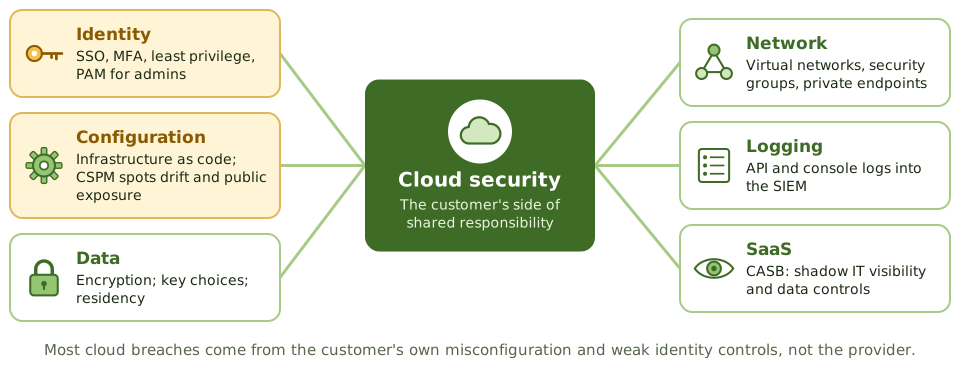
ExampleDevelopers make a storage bucket public to share test files with a contractor. The 'test' data is a copy of real customer records. CSPM alerts, or a rule against unmasked production data in test, would each have stopped it.
How the exam asks about it
| If the question asks… | Answer |
|---|
| Greatest risk to VMs on a shared host | Hypervisor compromise |
| Risk of uncontrolled VM creation | VM sprawl: unpatched, unmanaged |
| Most common cause of cloud data exposure | Customer misconfiguration |
| Detects cloud misconfiguration | Cloud security posture management |
| Visibility of SaaS use | Cloud access security broker |
| Protecting VM snapshots | Encrypt, restrict, manage life cycle |
Key takeaways
- ✓The hypervisor controls all virtual machines on a host; its compromise affects every guest, so it must be hardened, patched and tightly access-controlled.
- ✓Type 1 (bare-metal) hypervisors run directly on hardware; type 2 (hosted) run on top of an operating system and have a larger attack surface.
- ✓Virtualisation risks include VM escape, VM sprawl, insecure snapshots and images, and unmonitored traffic between VMs.
- ✓In the cloud, misconfiguration and weak identity management cause most incidents.
- ✓Cloud controls include strong IAM with MFA, least privilege, configuration monitoring (CSPM), encryption with customer-managed keys where needed, and centralised logging.
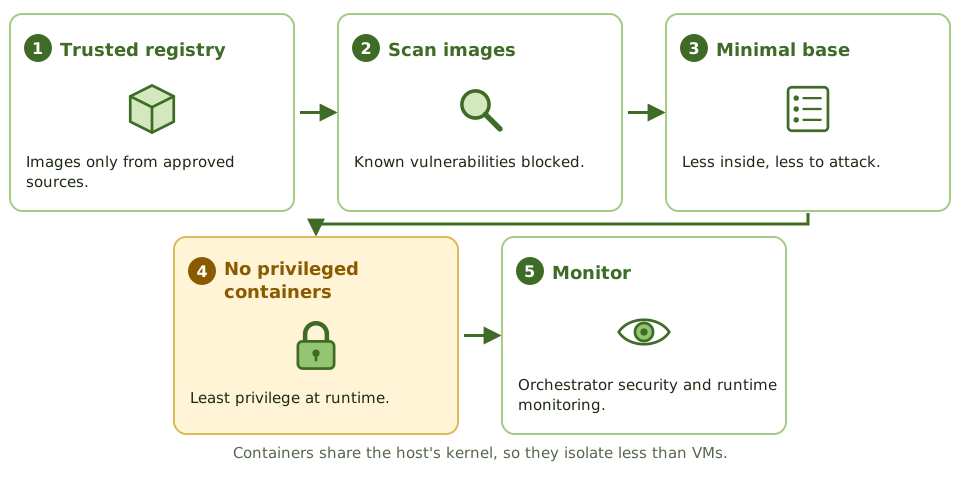
- ✓Containers share the host kernel; images should come from trusted registries, be scanned, and run with minimal privileges.
Exam traps
- !Greatest risk on a shared virtual host: compromise of the hypervisor.
- !VM snapshots and images can contain sensitive data and credentials; protect and manage them.
- !Cloud administrator accounts are extremely powerful; protect them with MFA and PAM.
- !Publicly accessible storage buckets are a classic cloud misconfiguration.
- !Bring-your-own-key gives more control over encryption keys but adds key management responsibility.
Physical Physical Access Controls
Keeping the wrong people away from the hardware: layers of physical security, locks from keys to biometrics, mantraps against tailgating, guards, CCTV and visitors, and where to put a data centre.
Layers, like an onion
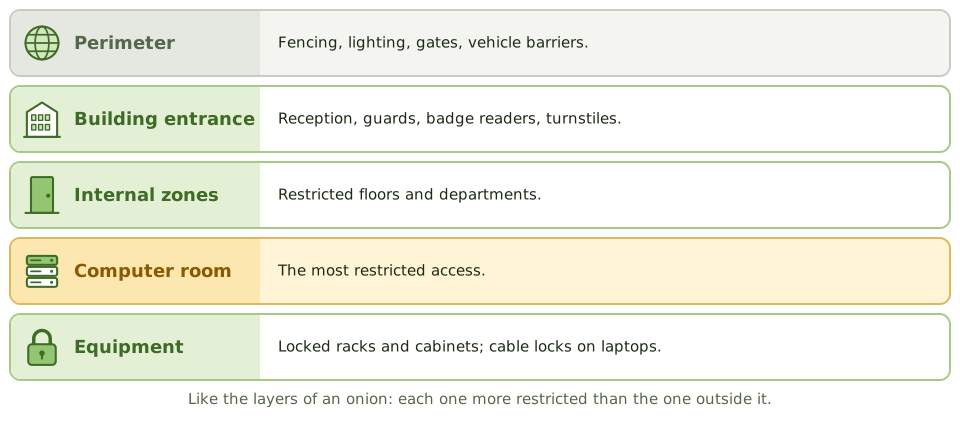
A bank doesn't rely on one locked door. There's the street door, the counter, the back office, and finally the vault, each harder to reach than the last.
Physical security uses the same layers to keep people away from equipment and data. Every logical control can be bypassed by someone who can pick up the server.
Stopping tailgating
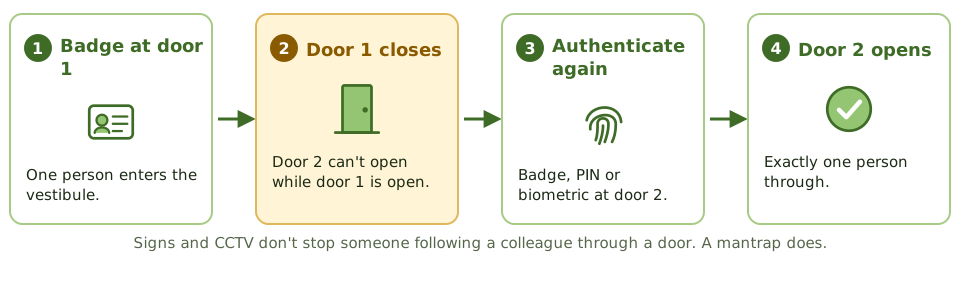
ExampleStaff hold the data centre door open for colleagues carrying kit. Badge logs show one entry for groups of four, so the logs don't show who was really inside. Fix: a mantrap and a door-held-open alarm.
Guards, cameras and visitors
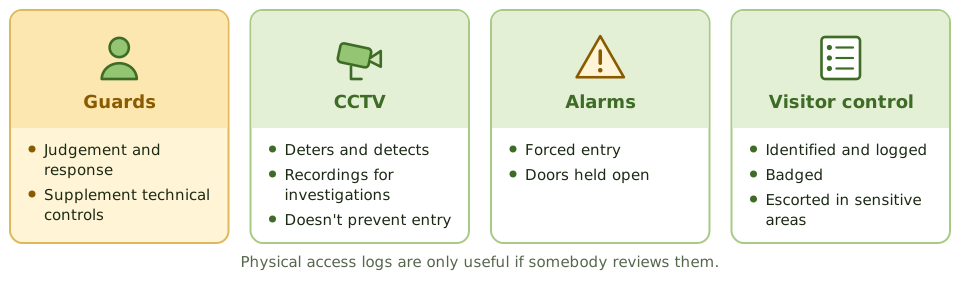
Exam tipBadge rights removed promptly when people leave or move; access lists reviewed regularly by the area owner.
Where to put the data centre
How the exam asks about it
| If the question asks… | Answer |
|---|
| Best control against tailgating | Mantrap / access vestibule or turnstile |
| Badges vs keys | Individual rights, logging, quick revocation |
| Visitors in the data centre | Logged, badged and escorted |
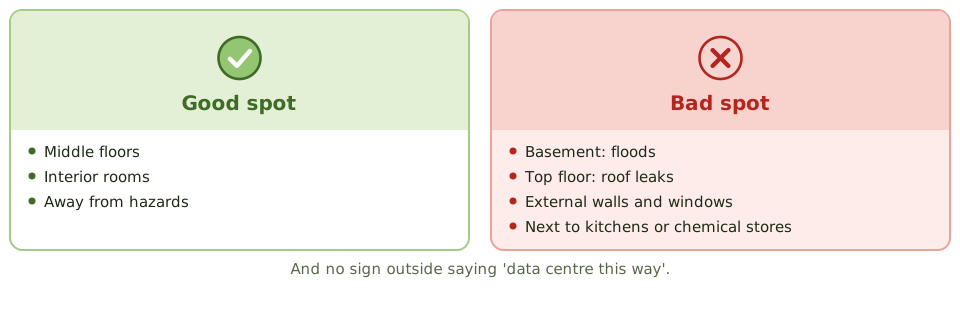
| Best data centre location in a building | Middle floors, interior, no signage |
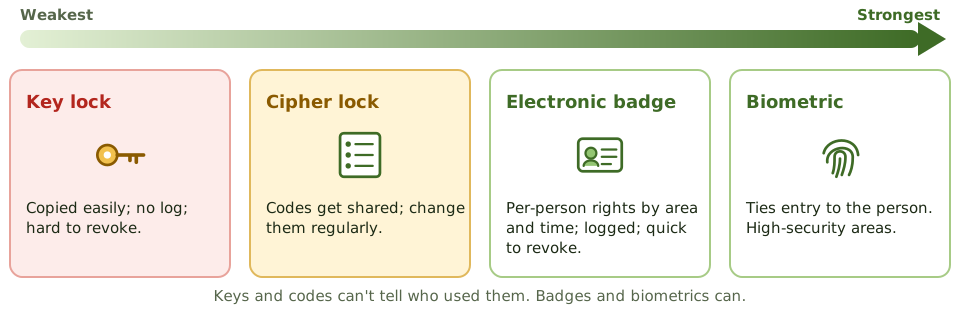
| Weakness of cipher locks | Shared codes; need regular changes |
Key takeaways
- ✓Physical security uses layers: site perimeter, building entrance, internal zones and the computer room itself.
- ✓Access to sensitive areas should be restricted to authorised people, logged, and reviewed periodically.
- ✓Mantraps (access vestibules) and turnstiles prevent tailgating and piggybacking.
- ✓Electronic badge systems allow individual access rights, logging and quick revocation; key locks and combination locks don't.
- ✓Visitors should be identified, logged, badged and escorted in sensitive areas.
- ✓CCTV is mainly detective and deterrent; guards add judgement and response.
- ✓Computer rooms are best located away from external walls, ground floors and basements (flooding), and top floors (roof leaks), without signage.
Exam traps
- !Best control against tailgating: a mantrap, not a sign or CCTV.
- !Combination (cipher) locks need regular code changes and are weak if codes are shared.
- !Badge access lists must be updated when people leave or change roles; review them periodically.
- !Dead-man (two-door) systems only let one person through at a time.
- !Logs of physical access are only useful if reviewed.
Physical Environmental Controls: Fire, Power, HVAC
Protecting computer rooms from the elements: power problems and their fixes, fire detection, water and gas suppression (and which one suits a computer room), cooling, water leaks and testing.
Fire, water, power, heat
Servers hate the same things your phone does: being dropped in water, overheating, and power cuts in the middle of something important.
Environmental controls protect computer rooms from power problems, fire, water and heat, and they only work if they're tested.
Power problems
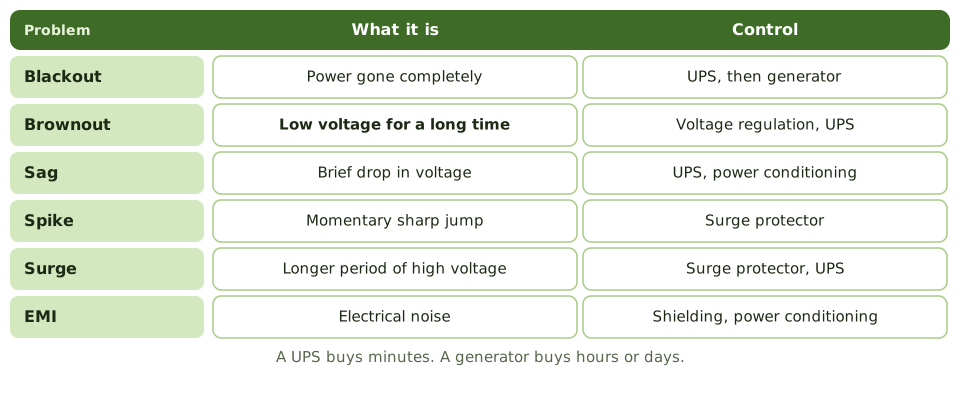
Exam tipDual power feeds from separate substations add resilience. Generators need fuel, maintenance and testing under load.
The rest of the room
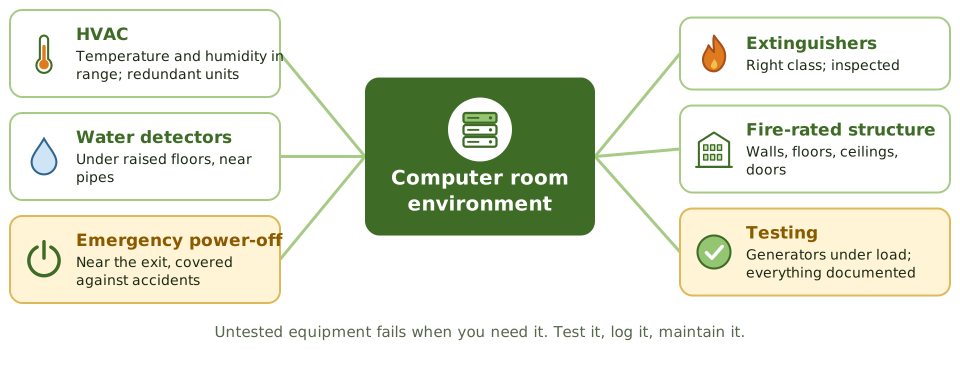
ExampleDuring a power cut, the UPS runs the data centre for 12 minutes, but the generator won't start: its fuel had degraded and it hadn't been tested under load for two years. Systems crash.
How the exam asks about it
| If the question asks… | Answer |
|---|
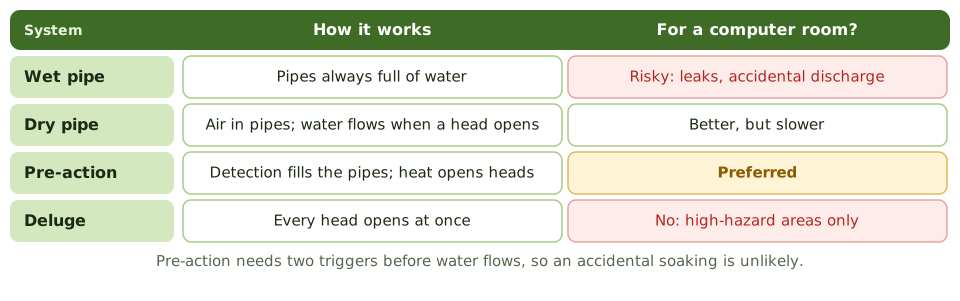
| Preferred water system for computer rooms | Pre-action |
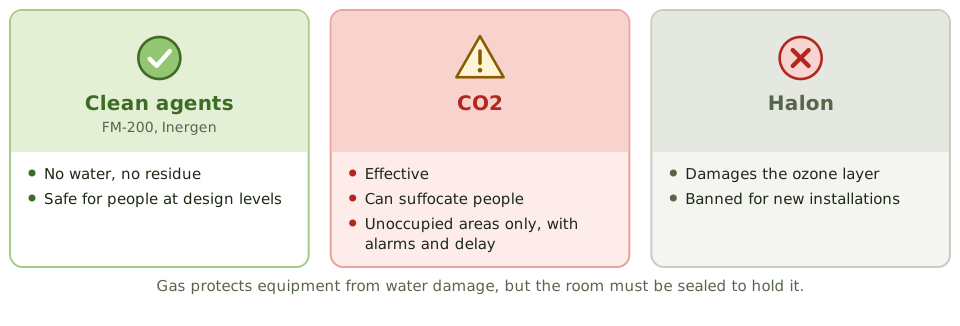
| Suppression dangerous to people | CO2 |
| Short outages and power conditioning | UPS |
| Prolonged outages | Generator |
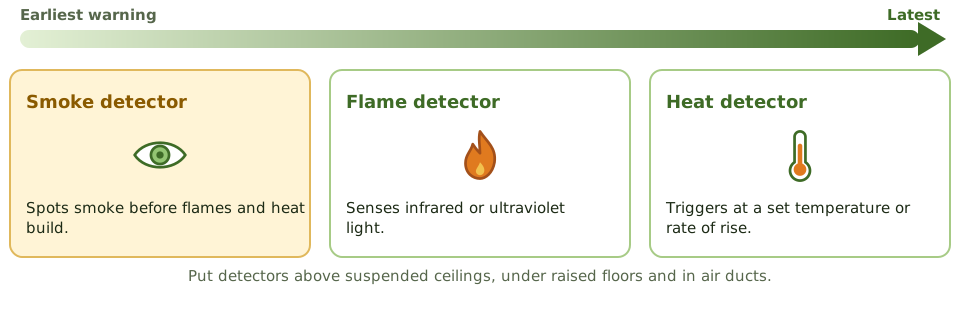
| Earliest fire detection | Smoke detectors |
| Prolonged low voltage | Brownout |
Key takeaways
- ✓Power problems include blackouts, brownouts (prolonged low voltage), sags, spikes, surges and electromagnetic interference.
- ✓Surge protectors handle spikes; UPS bridges short outages and conditions power; generators cover prolonged outages.
- ✓Water-based suppression: wet pipe (always charged), dry pipe (water enters on activation), pre-action (two triggers, preferred for computer rooms), deluge (all heads open).
- ✓Gas-based suppression (FM-200, Inergen, other clean agents) protects equipment without water damage; CO2 is dangerous to people; Halon is banned for new installations.
- ✓Smoke detectors give earlier warning than heat detectors; detectors should be above the ceiling, below raised floors and in air ducts.
- ✓HVAC controls temperature and humidity; water detectors under raised floors detect leaks.
- ✓Emergency power-off switches, fire extinguishers and regular testing and inspection complete the picture.
Exam traps
- !Pre-action is the preferred water system for computer rooms because it reduces accidental discharge.
- !Wet-pipe systems risk leaks and accidental discharge; deluge systems are unsuitable for computer rooms.
- !CO2 suppression is dangerous to humans in occupied areas.
- !A UPS isn't designed for long outages; a generator is.
- !Environmental controls must be tested and maintained; an untested generator may not start.
Threats Social Engineering
Hacking people instead of computers: the psychological levers attackers pull, the phishing family and its relatives, business email compromise, and the controls that actually work.
Hacking the person
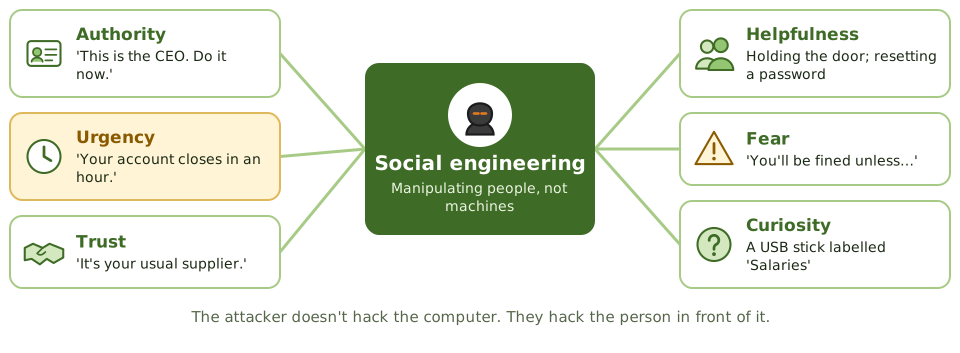
Why pick a lock when someone will open the door for you? A confident person in a hi-vis vest carrying a ladder can walk into most buildings.
Social engineering exploits human nature, not technical flaws. Attackers lean on authority, urgency, trust and helpfulness to get people to hand over information, access or money.
Business email compromise
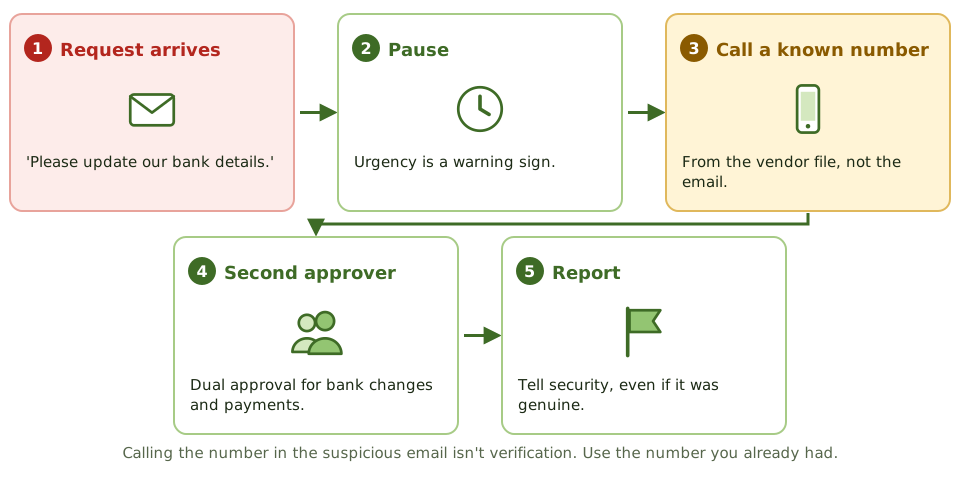
ExampleA real (but hacked) supplier mailbox asks accounts payable to change bank details. The clerk calls the number in the vendor master file, not the one in the email, and finds out it's fraud.
What works
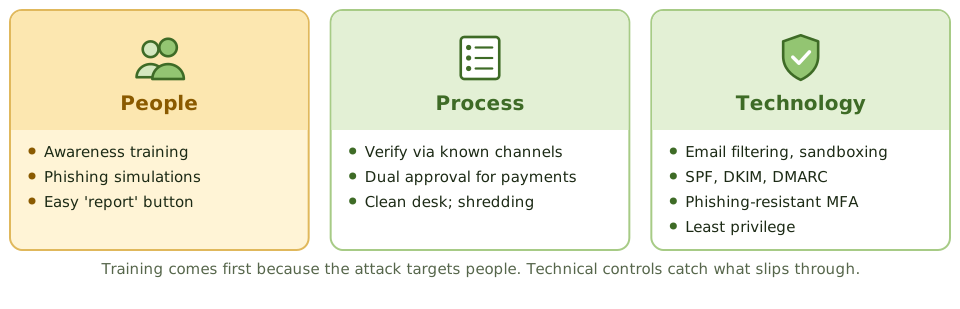
Exam tipGood awareness programmes use real examples and phishing simulations, make reporting easy, and measure whether behaviour changes.
How the exam asks about it
| If the question asks… | Answer |
|---|
| Most effective control | Security awareness training |
| Best control against BEC | Verify via known contacts; dual approval |
| Phishing aimed at executives | Whaling |
| Following someone through a door | Tailgating / piggybacking |
| Control against dumpster diving | Shredding and a clean desk policy |
Key takeaways
- ✓Social engineering manipulates people into revealing information, granting access or taking actions that benefit the attacker.
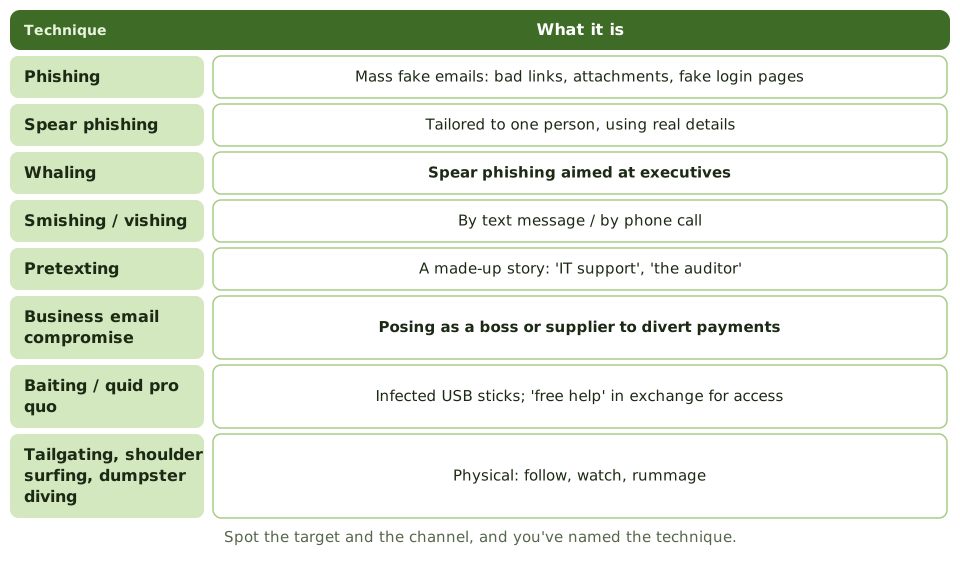
- ✓Phishing uses fraudulent messages; spear phishing targets individuals; whaling targets executives; smishing and vishing use SMS and voice.
- ✓Pretexting creates a believable scenario, such as posing as IT support or an auditor.
- ✓Business email compromise (BEC) tricks staff into paying fraudulent invoices or changing bank details.
- ✓Physical techniques include tailgating, shoulder surfing, dumpster diving and baiting with infected USB drives.
- ✓The most effective control is security awareness training, supported by technical controls and verification procedures.
Exam traps
- !Technical controls alone don't stop social engineering; awareness is the primary control.
- !For BEC, the key control is independent verification of payment changes through a known contact channel, plus dual approval.
- !Calling back a number provided in the suspicious message isn't independent verification.
- !Phishing-resistant MFA limits the damage of stolen passwords.
- !Clean desk and secure disposal policies counter dumpster diving.
Threats Malware
The zoo of malicious software, from viruses and worms to ransomware, the old-fashioned crime terms the exam still uses, and the layers of defence that stop, spot, contain and recover from it.
Software with bad intentions
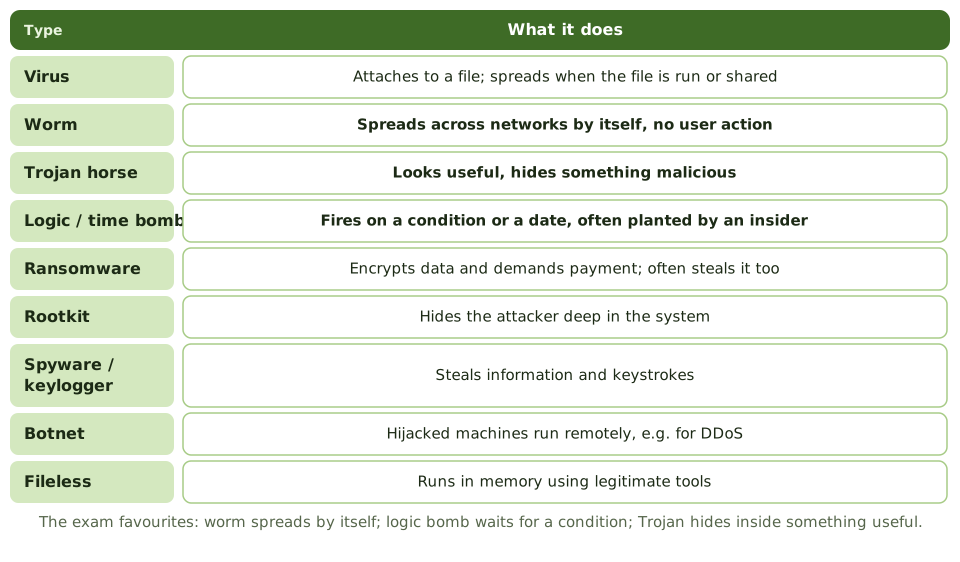
Malware is any software written to cause harm. Like illnesses, the types differ in how they spread and what they do: some need you to pass them on, some spread on their own, some lie dormant until a trigger.
Knowing the names matters for the exam, but so does knowing which control stops which.
The old crime terms
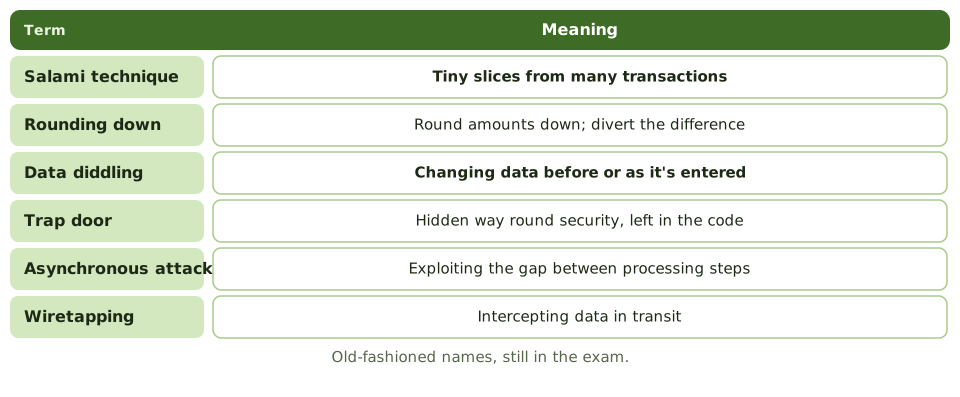
Exam tipInsider threats like logic bombs and trap doors: code review, segregation of duties, change management, monitoring privileged activity.
Layers of defence
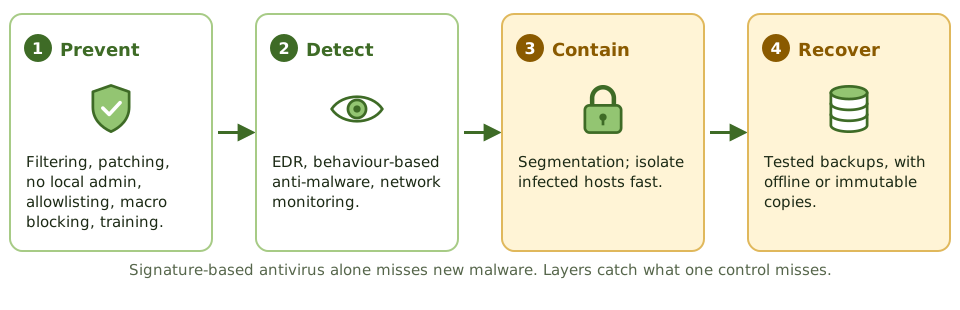
Exam tipSignature-based antivirus alone misses new variants. Behaviour-based detection and allowlisting add protection.
Ransomware goes for the backups
Online, writeable backups reachable with the same admin credentials get encrypted along with everything else. Keep offline or immutable copies with separate credentials.
ExampleRansomware encrypts the file servers and the backup server, which used the same admin accounts. The only usable copy is a four-week-old monthly tape set stored offsite.
How the exam asks about it
| If the question asks… | Answer |
|---|
| Spreads without user action | Worm |
| Triggered by a condition | Logic bomb |
| Hides inside a useful program | Trojan horse |
| Tiny amounts from many transactions | Salami technique |
| Altering data before entry | Data diddling |
| Key ransomware recovery control | Offline or immutable backups |
| Limit of signature antivirus | Can't detect new malware |
Key takeaways
- ✓A virus attaches to a host file and needs user action to spread; a worm spreads by itself across networks.
- ✓A Trojan horse hides malicious functions inside apparently legitimate software.
- ✓A logic bomb triggers on a condition, such as a date or an event; a time bomb triggers on a date.
- ✓Ransomware encrypts data and demands payment; offline or immutable backups are the key recovery control.
- ✓Rootkits hide the attacker's presence; spyware and keyloggers steal information; botnets enlist compromised machines.
- ✓Older exam terms: salami technique (shaving small amounts), data diddling (altering input), trap doors (hidden entry points), asynchronous attacks.
- ✓Controls are layered: user awareness, patching, least privilege, EDR/anti-malware, application allowlisting, email and web filtering, and backups.
Exam traps
- !Signature-based antivirus can't detect new malware; behaviour-based detection and EDR help.
- !Logic bomb = condition-triggered, often planted by an insider.
- !Salami technique takes tiny amounts from many transactions, such as rounding fractions of a cent.
- !Data diddling changes data before or during input; input controls and reconciliation help detect it.
- !Backups that are online and writeable may be encrypted by ransomware too.
Threats Network Attacks: DoS, Spoofing, Sniffing
Attacks on the network itself, grouped by what they damage (availability, identity, confidentiality), and the one control that best matches each, which is what the exam asks for.
Three things attackers go after
Think of a postal service. An attacker can block the post office door so nothing gets through (availability). They can forge the return address (identity). Or they can steam open letters, read them and even change them (confidentiality and integrity).
Network attacks fall into the same three groups, and each has a matching control.
Denial of service
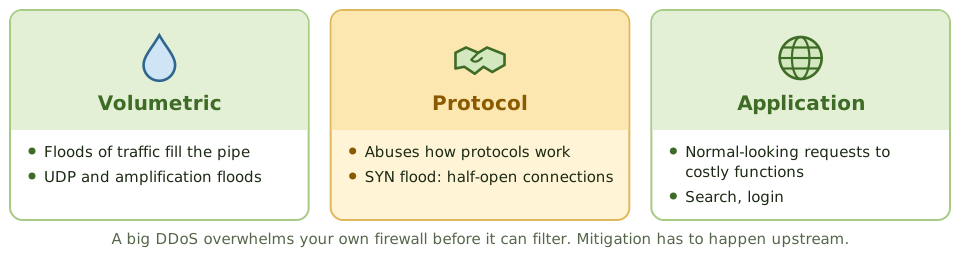
ExampleA retailer's site is knocked offline on its busiest day. Its own firewall is overwhelmed before it can filter anything. The fix has to sit upstream: the ISP or a cloud DDoS protection service.
Attack and matching control
Spoofing and reconnaissance
- 1Ingress filtering: block incoming packets claiming internal addresses.
- 2Egress filtering: stop internal hosts sending forged source addresses.
- 3ARP spoofing on a LAN: dynamic ARP inspection, port security.
- 4Port scans often come first: firewall logs and IDS can spot them.
- 5Fewer exposed services means less for attackers to find.
How the exam asks about it
| If the question asks… | Answer |
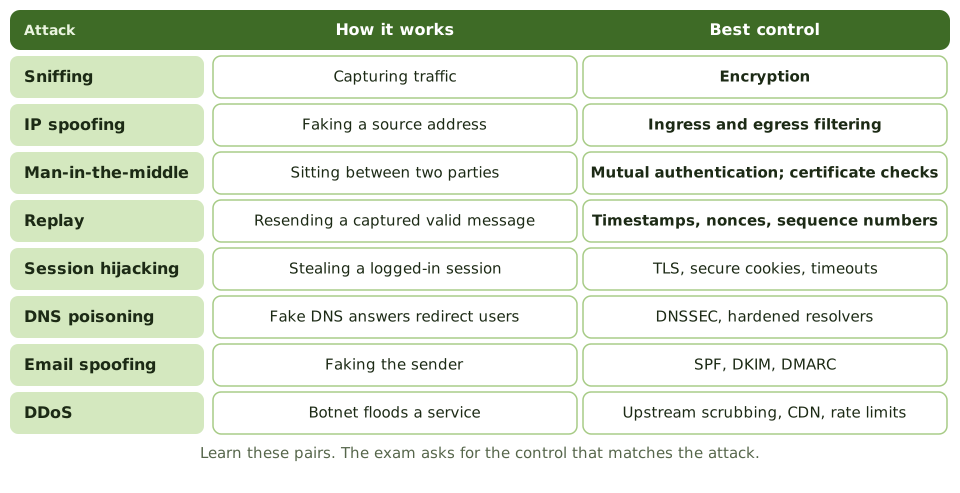
|---|
| Best control against sniffing | Encryption |
| Control against replay attacks | Timestamps, nonces, sequence numbers |
| Control against IP spoofing | Ingress and egress filtering |
| Control against man-in-the-middle | Mutual authentication / certificate checks |
| Attack from many hijacked computers | DDoS (botnet) |
| Control against email spoofing | SPF, DKIM, DMARC |
Key takeaways
- ✓A denial-of-service (DoS) attack overwhelms a system so legitimate users can't use it; a distributed DoS (DDoS) uses many sources, often a botnet.
- ✓Spoofing falsifies an identity, such as an IP address, MAC address, email sender or caller ID.
- ✓Sniffing (eavesdropping) captures network traffic; encryption is the main countermeasure.
- ✓Man-in-the-middle (on-path) attacks intercept and possibly alter communications between two parties.
- ✓Replay attacks resend captured valid messages; timestamps, nonces and session tokens prevent them.
- ✓DNS attacks (poisoning, hijacking) redirect users to malicious sites.
- ✓Port scanning and reconnaissance often precede attacks; monitoring can detect them.
Exam traps
- !Best defence against sniffing is encryption, not switches alone.
- !Mutual authentication and certificate validation counter man-in-the-middle attacks.
- !Ingress and egress filtering stops spoofed source addresses entering or leaving the network.
- !DDoS mitigation usually needs upstream help: ISP or cloud scrubbing services.
- !A SYN flood exploits the TCP handshake by leaving half-open connections.
Threats Application Attacks: SQLi, XSS
Attacks that trick an application into doing something it shouldn't, especially SQL injection, cross-site scripting and buffer overflows, and why secure code beats a firewall in front of bad code.
Tricking the application
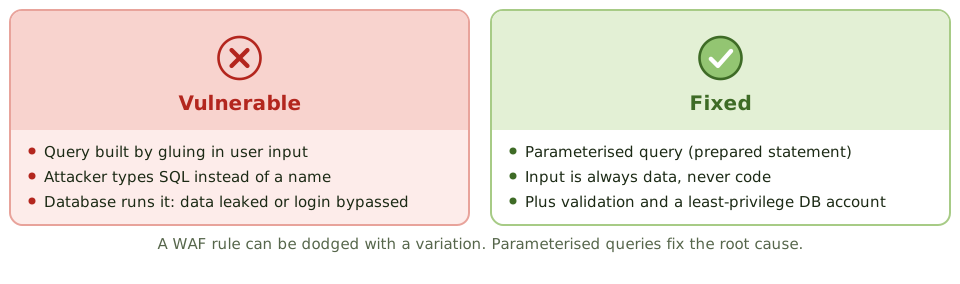
Imagine a form at the bank that says 'Name: ____'. Instead of a name, someone writes 'Bob, and also give the bearer all the money in the safe'. A sensible clerk ignores the extra bit. A badly written program might just do it.
That's the idea behind injection attacks: input that the application mistakes for instructions.
The attacks and their fixes
Cross-site scripting
The attacker plants a script in a page that other users then view: in a comment (stored XSS), in a link (reflected XSS), or by tweaking the page in the browser (DOM-based XSS). The script runs with the site's trust and can steal session cookies.
Key fix: output encoding, so data is displayed as text, never run as code. Also input validation, a content security policy and HttpOnly cookies.
Security across the life cycle
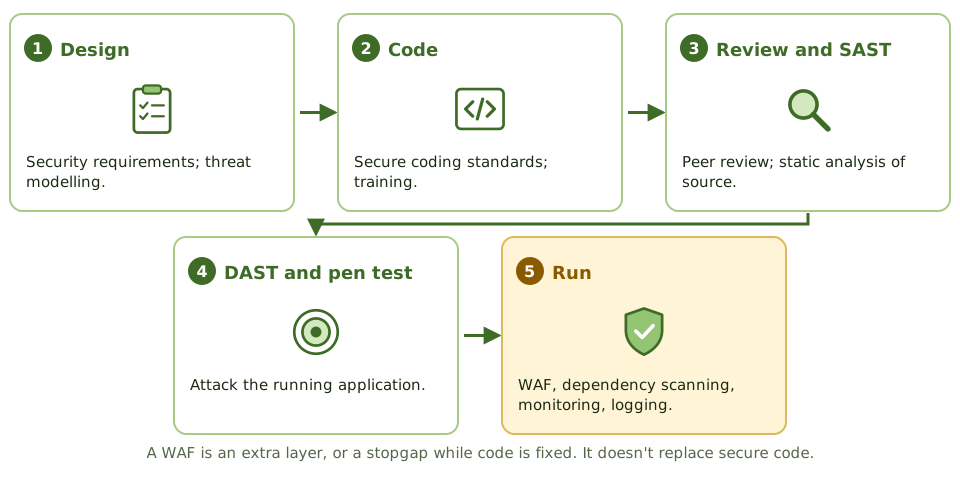
ExampleA pen tester logs into a portal by typing a crafted string as the username. After a previous test the developers had added a WAF rule, but a small variation slipped past it. Only rewriting the query with parameters fixes it.
How the exam asks about it
| If the question asks… | Answer |
|---|
| Best defence against SQL injection | Parameterised queries |
| Best defence against XSS | Output encoding (plus input validation) |
| Role of a WAF | Extra layer; stopgap while code is fixed |
| Writing past allocated memory | Buffer overflow |
| List of top web risks | OWASP Top 10 |
| Testing source code for flaws | Static analysis (SAST) |
Key takeaways
- ✓SQL injection inserts SQL commands through input fields; parameterised queries (prepared statements) prevent it.
- ✓Cross-site scripting (XSS) injects scripts into pages viewed by other users; output encoding and input validation prevent it.
- ✓Cross-site request forgery (CSRF) tricks a logged-in user's browser into sending unwanted requests; anti-CSRF tokens prevent it.
- ✓Buffer overflows write beyond allocated memory to crash programs or run code; bounds checking and safe languages prevent them.
- ✓Broken access control (such as changing an ID in a URL to see someone else's data) is the most common web weakness.
- ✓The OWASP Top 10 lists the most critical web application risks.
- ✓Controls: secure coding, input validation, code review, security testing (SAST/DAST), and a web application firewall as an extra layer.
Exam traps
- !The best defence against SQL injection is parameterised queries, not a WAF alone.
- !Input validation helps, but output encoding is the key defence against XSS.
- !Hiding error messages reduces information leakage but doesn't fix the vulnerability.
- !Client-side validation can be bypassed; validate on the server.
- !A WAF is a compensating control while code is fixed.
Threats Vulnerability Management and Pen Testing
Finding the holes before attackers do: the vulnerability management cycle, how a scan differs from a penetration test, the kinds of pen test, and why written permission comes first.
Finding the holes first
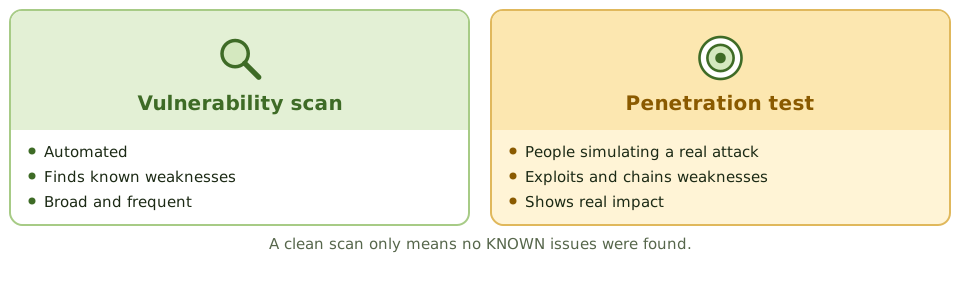
A home inspection before you buy a house finds the damp and the dodgy wiring before they cost you. A burglar-proofing expert who actually tries to break in tells you which weakness really matters.
Vulnerability scanning is the inspection. Penetration testing is the friendly burglar.
The vulnerability management cycle
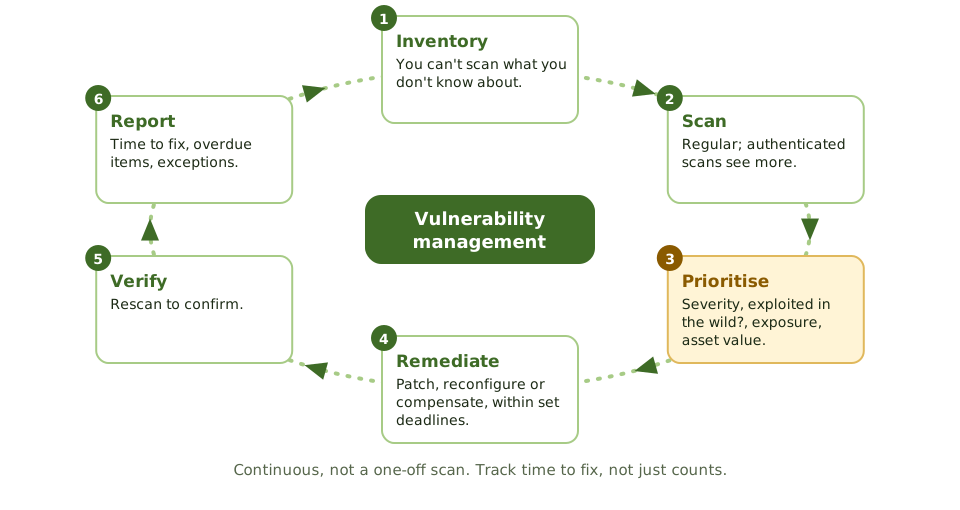
ExampleMonthly scans always show about 40 critical issues, so management thinks things are stable. In fact they're different issues each month on the same servers: the team fixes last month's list but never the patch process.
Kinds of penetration test
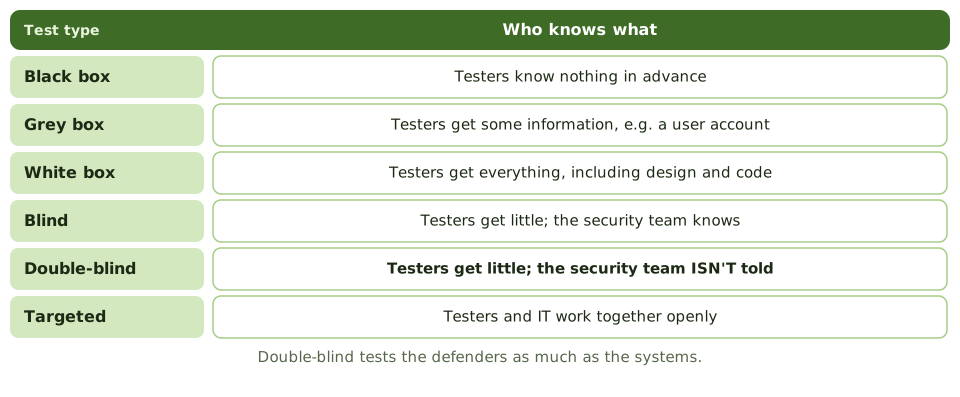
Exam tipBy position: external (from the internet) or internal (from inside the network).
How a test runs
- 1Plan and agree the rules of engagement.
- 2Reconnaissance, scanning and enumeration.
- 3Exploitation.
- 4Post-exploitation: privilege escalation, lateral movement.
- 5Report with prioritised recommendations.
- 6Management fixes; testers retest. Testers don't fix things themselves.
How the exam asks about it
| If the question asks… | Answer |
|---|
| Most important requirement before a pen test | Written management authorisation with agreed scope |
| Defenders not told about the test | Double-blind |
| Tester with full knowledge | White box |
| Scanning vs pen testing | Scanning finds; pen testing exploits to show impact |
| Scan that finds the most | Authenticated / credentialed |
| Prioritising vulnerabilities | Severity, exploitability, exposure, asset value |
Key takeaways
- ✓Vulnerability management is a continuous cycle: discover assets, scan, prioritise, remediate, verify and report.
- ✓Prioritisation considers severity (such as CVSS), exploitability, exposure and asset criticality.
- ✓A vulnerability scan identifies known weaknesses automatically; a penetration test actively exploits them to show real impact.
- ✓Penetration test knowledge levels: black box (no prior knowledge), grey box (some), white box (full knowledge).
- ✓Before any penetration test, written authorisation from management with agreed scope and rules of engagement is essential.
- ✓Blind and double-blind tests evaluate detection and response; in double-blind, the defenders aren't told.
- ✓Findings must be tracked to remediation and retested.
Exam traps
- !Penetration testing without written authorisation may be illegal and can disrupt systems.
- !A scan reporting no vulnerabilities doesn't mean the system is secure; scans only find known issues.
- !Authenticated (credentialed) scans find more than unauthenticated ones.
- !Testers shouldn't fix findings themselves during the test; they report.
- !Pen test scope must avoid unapproved third-party systems.
Response and monitoring Incident Response
What to do when a security incident happens: the response life cycle, why preparation matters most, containing damage without destroying evidence, who must be told, and learning from it.
The fire brigade
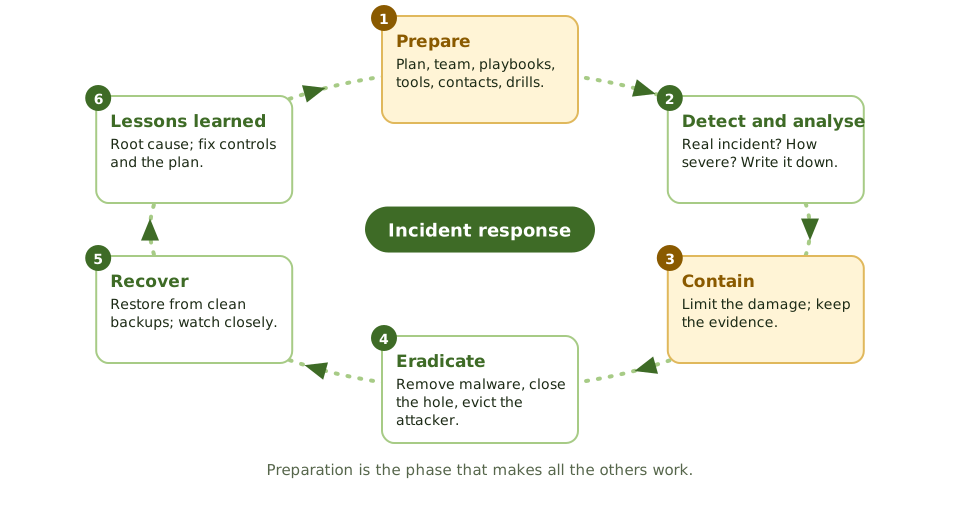
A fire brigade doesn't write its plan when the alarm rings. It trains, checks its kit and knows the streets in advance. At the fire, it contains the blaze first, then puts it out, then investigates the cause.
Security incident response works the same way, with one addition: the scene is also evidence.
Not just IT incident management
Contain, but keep the evidence
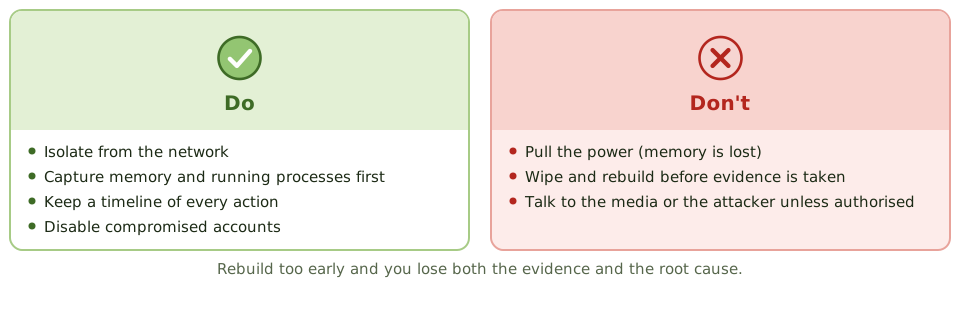
ExampleA technician reimages a file server showing ransomware to get it back quickly. A week later the infection reappears elsewhere, and with the original wiped, nobody can tell how the attacker got in.
Who needs telling
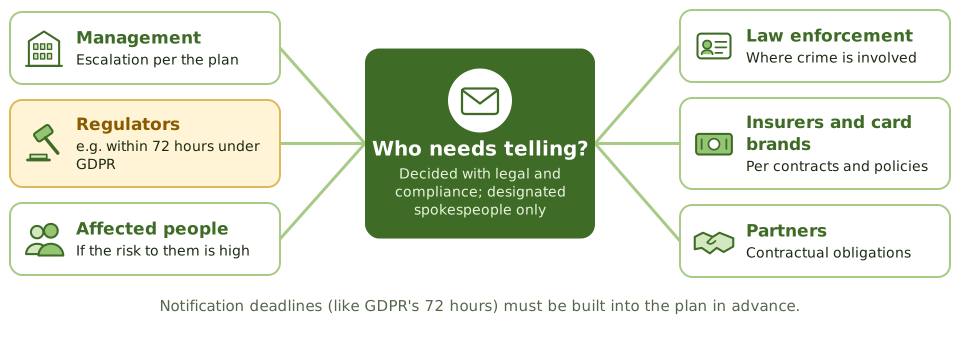
Exam tipSometimes watching an attacker briefly gives useful intelligence, but that's a senior management decision, with legal advice.
Measuring and learning
- 1Mean time to detect, contain and recover.
- 2Incidents by type, and repeats.
- 3Lessons-learned review: root cause, report to management.
- 4Update controls and the plan; skip this and it happens again.
How the exam asks about it
| If the question asks… | Answer |
|---|
| First action when an incident is confirmed | Contain it, preserving evidence |
| Most important phase | Preparation |
| Risk of rebuilding straight away | Evidence and root cause lost |
| Who talks to the media | Designated spokespeople |
| Purpose of lessons learned | Improve controls and the process |
| Why not just switch it off? | Memory evidence is lost |
Key takeaways
- ✓Incident response phases: preparation, detection and analysis (identification), containment, eradication, recovery, and post-incident review (lessons learned).
- ✓Preparation is the most important phase: a documented plan, a trained team, tools, contacts and playbooks.
- ✓When an incident is confirmed, the first priority is containment, limiting damage while preserving evidence.
- ✓Evidence must be preserved from the start if legal action or regulatory reporting is possible.
- ✓Communication follows the plan: management, legal, regulators, customers and media, through designated people.
- ✓Regulatory notification deadlines (such as 72 hours under GDPR) must be built into the plan.
- ✓The lessons-learned review improves controls and the plan itself.
Exam traps
- !Wiping and rebuilding a system before evidence is collected destroys evidence.
- !Pulling the power can lose volatile memory evidence; containment by network isolation is often preferred.
- !Staff shouldn't speak to the media or the attacker unless authorised.
- !Incident response for security differs from IT incident management: evidence and legal considerations matter.
- !Skipping the post-incident review means the same incident can happen again.
Response and monitoring Digital Forensics and Chain of Custody
Handling digital evidence so it stands up in court: the forensic process, collecting the most fragile evidence first, imaging and hashing, the chain of custody, and the auditor's limited role.
A crime scene, but digital
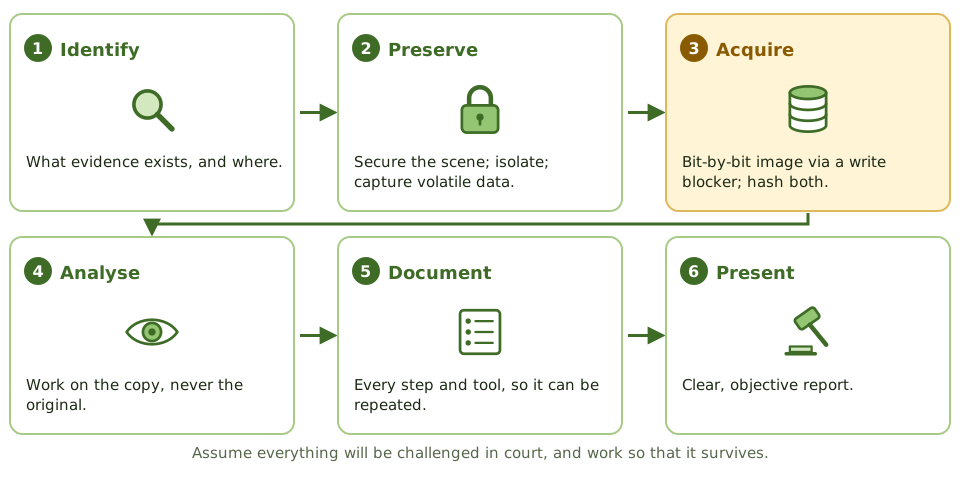
Police at a crime scene wear gloves, bag every item, label it, and log who held it and when. Touch the wrong thing, or lose track of a bag, and the evidence is thrown out in court.
Digital forensics applies the same discipline to computers, phones and logs. Assume everything will be challenged, and work so it survives.
Most fragile first
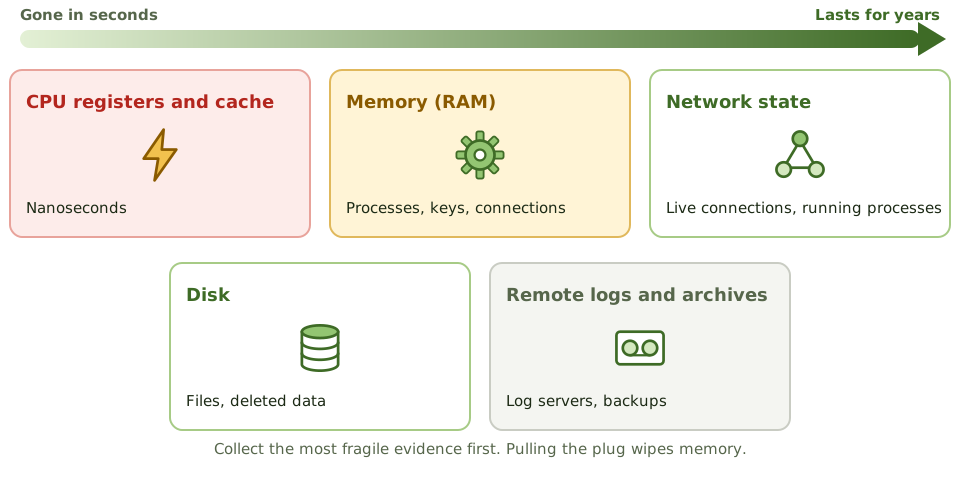
Exam tipPulling the plug wipes memory. Whether to power down is a call for trained responders.
Imaging and hashing
A forensic image is a bit-by-bit copy, made through a write blocker so the original can't change. Hashes of the original and the copy must match, proving they're identical.
All analysis is done on the copy. Switching on a seized device, or opening its files, changes the evidence.
Chain of custody
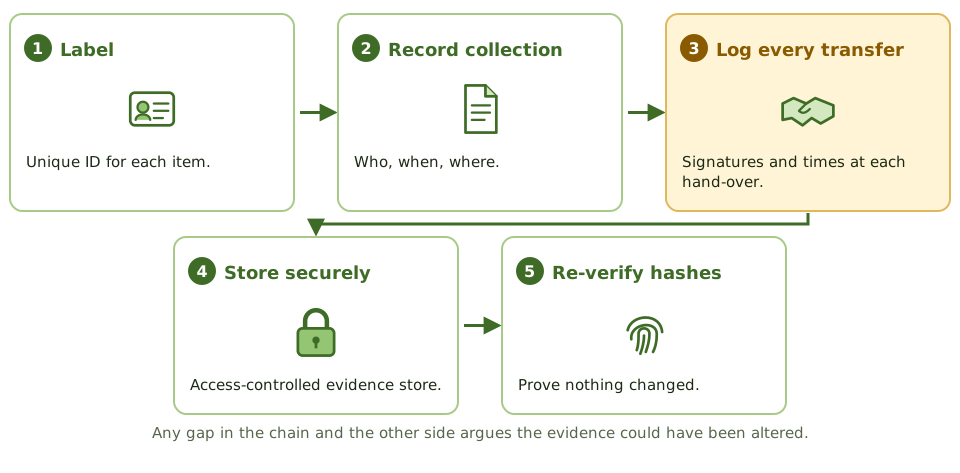
ExampleAn internal investigator drags files from a suspect's laptop onto a USB stick and opens them to have a look. Access times change, there's no hash and no custody record. At the tribunal, the evidence is excluded.
The auditor's role
- 1Recognise when forensics is needed.
- 2Don't damage the evidence.
- 3Bring in qualified specialists and legal counsel early.
- 4Collection must be lawful and respect privacy and employee rights.
- 5Follow documented procedures (e.g. ISO/IEC 27037) and validated tools.
- 6Cloud and mobile evidence add challenges: location, provider cooperation, encryption.
How the exam asks about it
| If the question asks… | Answer |
|---|
| Collect first from a running system | Memory and other volatile data |
| Prove a forensic copy is identical | Matching hash values |
| Stops changes to the original disk | Write blocker |
| Record of who handled evidence | Chain of custody |
| Where analysis is done | On a verified copy |
| Auditor finds possible evidence of a crime | Preserve it; involve specialists and legal |
Key takeaways
- ✓Digital forensics identifies, preserves, analyses and presents digital evidence in a way that is legally acceptable.
- ✓Evidence is collected in order of volatility: CPU registers and cache, memory, network state and running processes, then disk, then logs and archives.
- ✓A forensic image (bit-by-bit copy) is made with a write blocker, and its hash is compared with the original to prove it's identical.
- ✓Analysis is performed on a copy, never the original evidence.
- ✓Chain of custody documents who collected, handled, transferred and stored the evidence, and when.
- ✓Evidence must be collected lawfully, by qualified people, following documented procedures, to be admissible.
Exam traps
- !Memory evidence is lost on shutdown, so it's collected first.
- !Turning on a seized device or opening files on it changes evidence.
- !Any gap in chain of custody can make evidence inadmissible.
- !The IS auditor's role is to recognise when forensics is needed and involve specialists, not to perform it untrained.
- !Hashes prove integrity of the copy; they don't encrypt it.
Response and monitoring Security Awareness Training
Turning staff into a line of defence: what a good awareness programme includes, extra training for high-risk roles, phishing simulations, and measuring behaviour rather than attendance.
People as a line of defence
Road safety isn't just about seatbelts and airbags. It's also about drivers who check their mirrors and slow down near schools. Good habits, practised often, prevent most accidents.
Many security incidents start with a person: clicking a phishing link, reusing a password, emailing the wrong file, holding a door for a stranger. Awareness training builds the habits that stop them.
Extra training for high-risk roles
AdministratorsPrivileged access, secure configuration.
DevelopersSecure coding.
Finance and procurementPayment fraud and business email compromise.
Executives and HRTargeted attacks, travel security; handling personal data.
Measure behaviour, not attendance
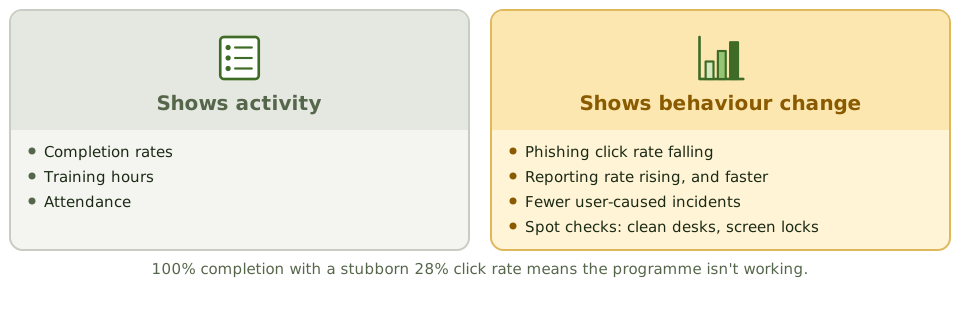
ExampleCompletion is 100% every year. But the phishing click rate has sat at 28% for two years, and fewer than 2% of staff report simulated phish. The programme isn't changing behaviour.
Culture
Make reporting easy (a 'report phishing' button, a hotline) and thank people who report, even when they clicked first.
If staff fear punishment for a mistake, they hide it, and the security team loses precious time.
How the exam asks about it
| If the question asks… | Answer |
|---|
| Best measure of programme effectiveness | Behaviour change: fewer clicks, more reports |
| Most effective control against social engineering | Security awareness training |
| When training should start | At onboarding, before system access |
| Who needs extra training | Admins, developers, finance, executives |
Key takeaways
- ✓Security awareness training is the primary control against social engineering and a key part of every security program.
- ✓Training starts at onboarding, is repeated regularly, and is updated as threats change.
- ✓Role-based training gives extra content to high-risk roles: administrators, developers, finance, executives.
- ✓Phishing simulations measure and improve how staff respond to realistic attacks.
- ✓Effectiveness is measured by behaviour change (fewer clicks, more reports), not by attendance or completion rates.
- ✓A simple, well-known way to report suspicious activity is essential.
Exam traps
- !Completion rates show activity, not effectiveness.
- !Annual training alone isn't enough; reinforcement through the year works better.
- !Punishing people who report mistakes discourages reporting.
- !Executives are high-value targets and need training too.
Response and monitoring Logging, SIEM, and Auditing Security
Keeping a trustworthy record of what happened and actually reading it: what to log, protecting logs from the people they record, what a SIEM adds, and how an auditor approaches a security audit.
The flight recorder
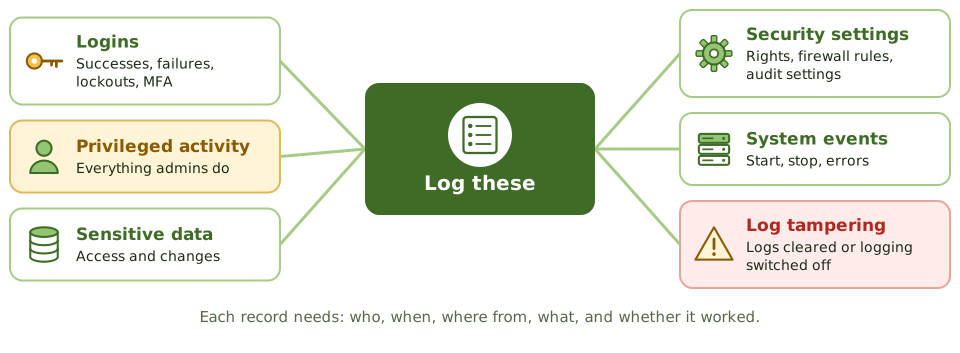
Every aircraft carries a flight recorder: it captures what happened, it's built to survive the crash, and investigators read it afterwards to work out why.
Logs are an organisation's flight recorder. They give accountability (who did what, when), help detect attacks, and support investigations, as long as they record the right things, can't be tampered with, and someone reads them.
Protect the logs
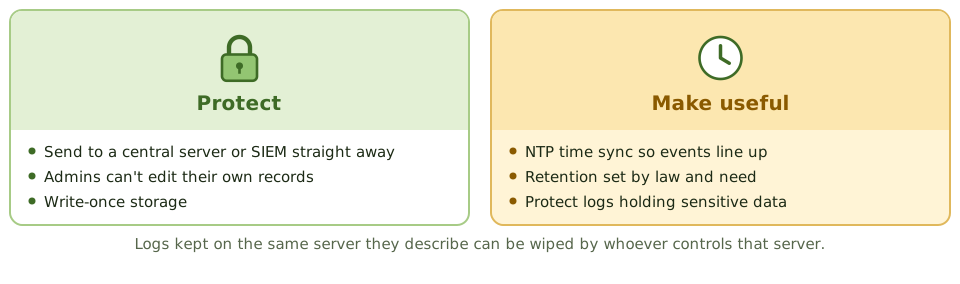
Exam tipLog too little and you miss incidents; log everything unfiltered and you bury them.
What a SIEM does
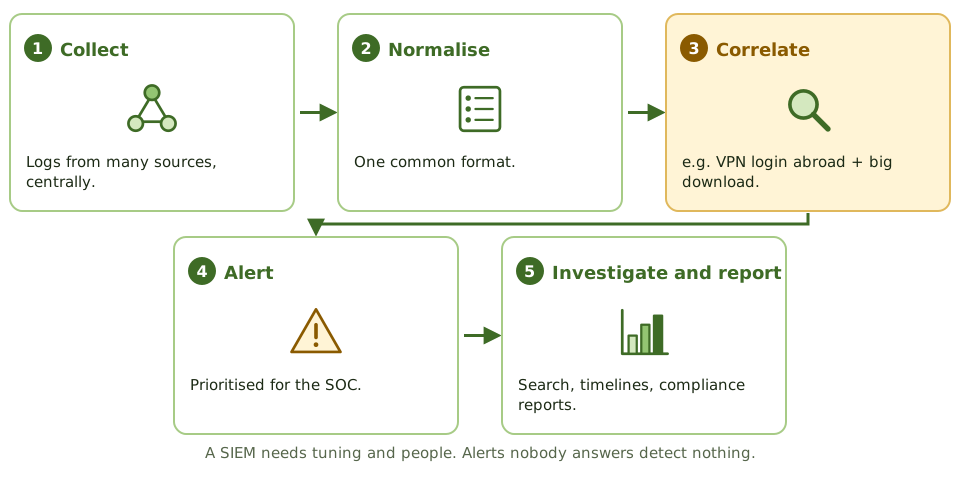
ExampleThe SIEM alerts that an admin account cleared a domain controller's security log at 2 a.m. The SOC treats it as low priority. Two weeks later, investigators find the attacker used that window to create backdoor accounts.
Reviewing logs
Logs nobody reviews aren't a detective control. Review should be risk-based: automated alerts for high-risk events, regular independent review of privileged activity, and periodic trend reviews. SOAR tools automate parts of the response; a SOC watches around the clock.
Auditing information security
How the exam asks about it
| If the question asks… | Answer |
|---|
| Primary purpose of a SIEM | Collect and correlate events to detect incidents |
| Why time sync matters | Events across systems can be lined up |
| Protecting logs from admins | Central storage they can't change |
| Logs collected, never reviewed | Ineffective detective control |
| Strong sign of tampering | Logs cleared or logging switched off |
| Best evidence in a security audit | System evidence and configurations |
Key takeaways
- ✓Logs provide accountability and support detection and investigation, but only if they capture the right events and are reviewed.
- ✓Key events: logins and failures, privileged actions, access to sensitive data, changes to security settings, and log tampering.
- ✓Logs must be protected from alteration and deletion, especially by the administrators whose activity they record.
- ✓Time synchronisation (NTP) across systems is essential to correlate events.
- ✓A SIEM collects, normalises and correlates logs from many sources to detect incidents and support investigations.
- ✓Retention periods follow legal, regulatory and investigative needs.
- ✓Auditing security: start from policy and risk, test controls across governance, identity, network, endpoint, data and monitoring, and verify through evidence rather than interviews.
Exam traps
- !Logs that nobody reviews are not a detective control.
- !Storing logs on the same server they describe lets an attacker or administrator erase them.
- !Logging too little misses incidents; logging everything without filtering buries them.
- !Logs containing sensitive data need protection themselves.
- !Without accurate timestamps, events from different systems can't be reconstructed.