Topics in this domain
- ISACA Code of Professional Ethics
- ITAF: The Standards Framework
- Standards vs. Guidelines vs. Tools
- Auditor Independence and Objectivity
- Audit Charter: Purpose and Contents
- Audit Testing: Compliance vs. Substantive
- Financial vs. Operational vs. Integrated Audits
- Forensic and Specialized Audits
- Risk-Based Audit Approach
- Inherent, Control, Detection, and Audit Risk
- Audit Universe and Annual Audit Plan
- Audit Objectives, Scope, and the Audit Program
- Types and Reliability of Audit Evidence
- Sampling: Statistical vs. Non-Statistical
- Sampling Terms: Confidence Level, Tolerable Error and Friends
- Interviews, Observation, and Walkthroughs
- CAATs and Data Analytics
- Continuous Auditing and Monitoring
- Preventive, Detective, Corrective Controls
- General vs. Application Controls
- Compensating Controls and Segregation of Duties
- Materiality and Evaluating Findings
- Audit Report Structure and Communication
- Follow-Up and Management Action Plans
- Control Self-Assessment (CSA)
- Audit Quality and Using Other Experts' Work
CAATs and Data Analytics
Using computers to audit computers
When a company processes millions of transactions with no paper in sight, the evidence only exists as data. Testing 25 transactions by hand would barely scratch the surface. CAATs (computer-assisted audit techniques) let the auditor use software to read that data directly, often testing every single transaction.
They’re especially useful when:
- volumes are too large for manual testing
- there are no paper documents
- the auditor wants to test the whole population and remove sampling risk
- the same test will be repeated regularly
Audit software (GAS)
Generalised audit software (tools such as ACL or IDEA, or scripts in Python or SQL) reads data files and runs audit tests on them. It’s mainly used for substantive testing of data. Because it works on a copy of the data, it doesn’t affect production.
Typical tests:
- duplicates: the same invoice paid twice
- gaps: missing numbers in a sequence of invoices or cheques
- matching: HR leavers against active user accounts; supplier bank accounts against employee bank accounts
- recalculation: interest, depreciation, payroll
- odd patterns: postings at weekends, round amounts, Benford’s law tests
- stratification and ageing: grouping by size or age to focus testing
Example. An auditor matches the HR leavers list against the active directory and finds 23 enabled accounts belonging to people who left more than a month ago. Before reporting it, they check that both files’ record counts match the source systems, to make sure the extract was complete.
Testing the program itself
Sometimes the auditor wants to test the program’s logic rather than the data. Three techniques do this, and the exam loves to mix them up.
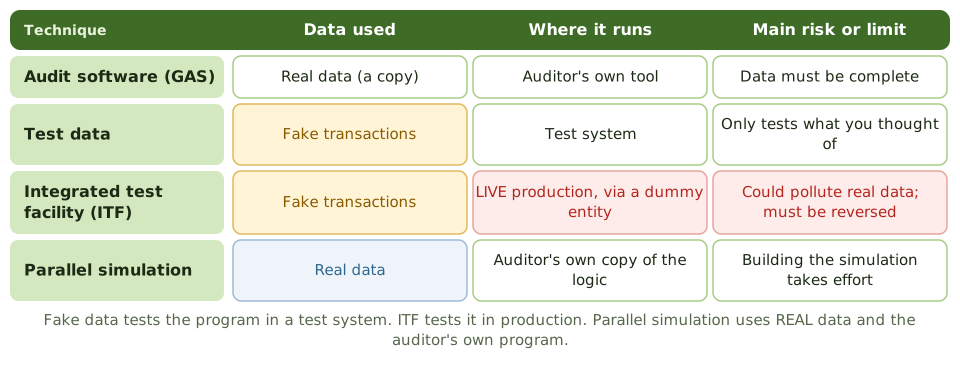
Test data. The auditor makes up transactions, some valid and some deliberately wrong, and runs them through the application, usually in a test system, to see whether the edits and calculations work. Limits: it only tests the situations the auditor thought of, and only the program version tested. The auditor should confirm it’s the same version running in production.
Integrated test facility (ITF). A dummy entity (a fictitious branch, department or customer) is created inside the live system, and the auditor’s fake transactions are processed alongside real ones.
- Advantage: tests the real production program, and can be repeated regularly.
- Risk: the fake transactions could pollute real data and reports. They must be clearly marked and removed or reversed, with management’s agreement.
Example. A bank creates “Branch 999 – Audit” in its live core banking system. Each quarter the auditor posts test deposits and withdrawals there and checks the results. Afterwards they’re reversed so they never appear in real balances or regulatory reports.
Parallel simulation. The auditor writes (or uses) a program that copies the application’s key logic, runs real production data through it, and compares the results with the real system’s output. Differences point to errors in the application.
Other techniques
- Code review: reading source code for errors or unauthorised logic; needs skill and time.
- Mapping: finding code that never runs, which might be unused or hiding something malicious.
- Tracing: following a transaction’s path through the program.
- Continuous techniques such as embedded audit modules, snapshots and audit hooks are covered in the next topic.
Using CAATs safely
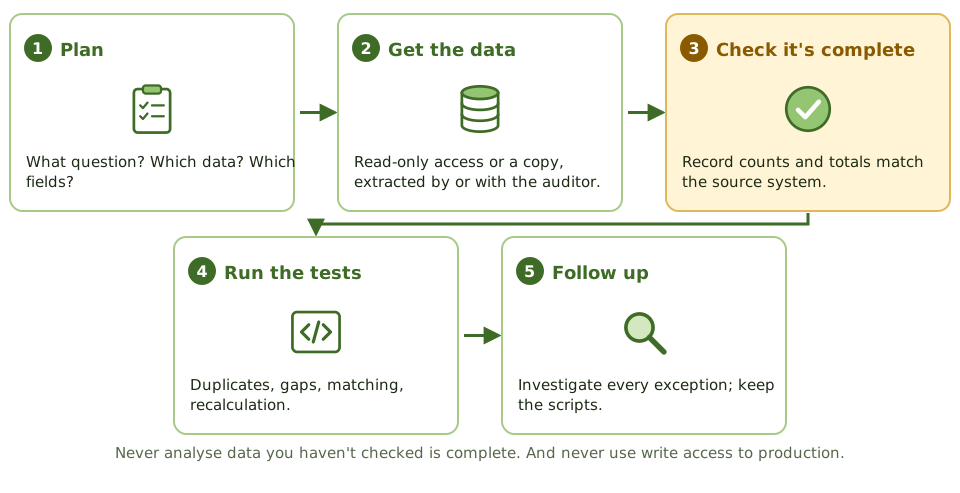
- Use read-only access or a copy of the data, never write access to production.
- Check the data is complete before relying on it: match record counts and control totals to the source, and confirm the whole period is covered.
- Run heavy queries outside peak hours.
- Protect extracted personal data, and delete it when no longer needed.
- Keep the scripts and results in the work papers, so the work can be repeated and reviewed.
How the exam asks about it
| If the question asks… | The answer is usually… |
|---|---|
| Greatest advantage of CAATs | Testing whole populations efficiently and independently |
| Main risk of an ITF | Polluting production data; test transactions must be reversed |
| Technique using real data and the auditor’s own program | Parallel simulation |
| Technique using fake transactions in a test environment | Test data |
| First step before analysing extracted data | Check its completeness and accuracy |
| Tool to identify duplicate payments | Generalised audit software |
In short
- CAATs (computer-assisted audit techniques) let the auditor test large volumes, or every transaction, directly from system data.
- Generalised audit software (GAS), like ACL, IDEA or scripts, reads data to sample, recalculate, match, and find duplicates and gaps.
- Test data: the auditor's fake transactions run through the program, usually in a test system, to check its logic.
- Integrated test facility (ITF): fake transactions for a dummy entity run in LIVE production alongside real ones.
- Parallel simulation: the auditor's own program reprocesses REAL production data and compares results with the real system.
- Before relying on extracted data, check it's complete: record counts and control totals match the source.
- Use read-only access or copies, so the audit can't change production.
Exam traps
- ITF's main risk: fake transactions polluting real data and reports. They must be clearly marked and reversed.
- Test data only proves the logic for the cases you thought of, and only for the program version you tested.
- Parallel simulation uses REAL data; test data uses FAKE data.
- Don't accept data files prepared by the auditee without checking them.
- Running CAATs with write access to live production files is never right.
Slides
Click the slide and use the arrow keys. F toggles full screen.
Testing the program itself
Sometimes the auditor wants to test the program's logic, not the data. Three techniques do that, and the exam loves to mix them up.
Using CAATs safely