Topics in this domain
- IT Governance vs. IT Management
- Board and Senior Management Roles
- IT Steering Committee
- IT Strategy and Business Alignment
- Balanced Scorecard
- COBIT
- ITIL
- ISO 27001/27002
- COSO: ERM and Internal Control
- Policies, Standards, Procedures, Guidelines
- IT Organizational Structure and Key Roles
- Segregation of Duties in IT
- Enterprise Architecture (Zachman, TOGAF)
- Risk Management Process
- Qualitative vs. Quantitative Risk Assessment
- Risk Responses: Mitigate, Transfer, Avoid, Accept
- Risk Appetite and Residual Risk
- Maturity Models (CMMI)
- KPIs and KGIs
- Outsourcing: Benefits and Risks
- Vendor Selection, Contracts, SLAs, Right to Audit
- Cloud and Offshore Governance
- Portfolio and Resource Management
- HR: Hiring, Training, Termination
- Legal and Regulatory Compliance
- Quality Management
Portfolio and Resource Management
IT spending as an investment portfolio
A sensible investor doesn’t put all their money into whichever stock a friend recommends most loudly. They pick a balanced mix, review it regularly, and sell what’s no longer working. IT portfolio management does the same with IT projects and services.
IT portfolio management treats all IT spending, new projects and the cost of running existing services, as one portfolio that should deliver the most value for the organisation’s strategy and risk appetite.
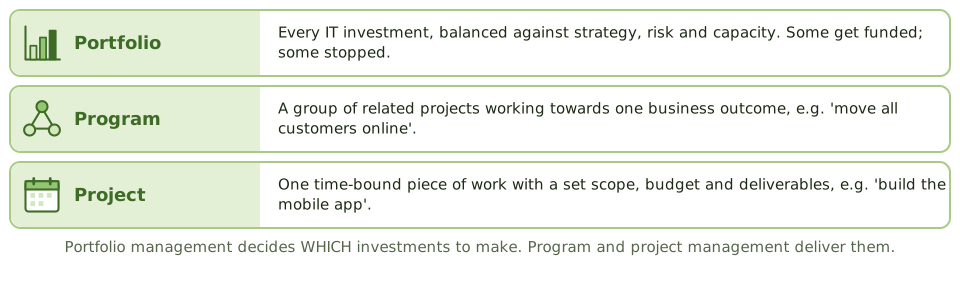
| Level | Meaning |
|---|---|
| Portfolio | Everything the organisation invests in: programs, projects and services |
| Program | Related projects managed together for one business outcome |
| Project | One temporary piece of work with a set scope, time, budget and deliverables |
What portfolio management does
- Evaluate proposals using business cases: value, fit with strategy, risk, cost, dependencies.
- Select the best mix within the money and people available.
- Balance the portfolio: keeping the lights on, growth and transformation, and a spread of risk.
- Monitor progress and benefits.
- Adjust or stop investments that no longer make sense. Money already spent (sunk cost) is never a reason to carry on.
Without a portfolio view, projects get approved one at a time, often on the strength of whoever argues loudest. The result: duplicated systems, fights over the same people, and spending that doesn’t support the strategy.
Budgets and cost allocation
- The IT budget should follow the strategy and the portfolio decisions.
- Actual spending is tracked against the budget, with differences explained.
- Cost allocation makes IT costs visible to the business: chargeback bills departments for what they use; showback reports the costs without billing. Either way, it must be fair and based on real use.
Managing IT resources
- People: skills inventory and planning; avoiding dependence on one key person.
- Infrastructure: capacity planning and asset management (covered in Domain 4).
- Software licences: compare licences owned with what’s actually installed and used. Unlicensed software creates legal and financial risk; too many licences waste money. Controls include central purchasing, software asset management tools, restricting who can install software, and regular reconciliation.
Example. A licence check finds 1,200 copies of a design tool installed but only 800 licences, because users have admin rights on their laptops and install it themselves. The auditor recommends removing local admin rights, offering approved software through a catalogue, and reconciling licences every quarter.
How the exam asks about it
| If the question asks… | The answer is usually… |
|---|---|
| Main purpose of IT portfolio management | Get the most value from IT investment, aligned with strategy |
| Basis for prioritising projects | Business cases: value, alignment, risk, resources |
| A project is no longer viable but a lot has been spent | Stop or redirect it; sunk cost isn’t a reason to continue |
| Best control over software licence compliance | Inventory and reconciliation; restricted installation rights |
| Difference between a program and a project | A program groups related projects for a shared outcome |
In short
- Portfolio management treats IT investments as a portfolio, selected and balanced to deliver the most value for strategy and risk.
- Projects are prioritised using business cases, strategic fit, risk and available resources.
- The portfolio is reviewed regularly; failing investments are changed or stopped.
- IT budgets should follow the strategy; chargeback or showback makes IT costs visible to the business.
- Resource management covers people, infrastructure, applications and information, including software licence compliance.
- Portfolio = all investments; program = related projects with a shared outcome; project = one time-bound piece of work.
Exam traps
- Approving projects one at a time, with no portfolio view, leads to duplicated and misaligned spending.
- Continuing a failing project because of money already spent (sunk cost) is a governance failure.
- Unlicensed software is a legal and financial risk.
- Chargeback can encourage efficient use, but must be fair and transparent.
Slides
Click the slide and use the arrow keys. F toggles full screen.
Portfolio, program, project