Topics in this domain
- Security Governance and Roles
- Data Classification and Ownership
- Security Policies
- Privacy Principles and GDPR
- Identity Management
- Authentication Factors
- Biometrics
- Access Models: DAC, MAC, RBAC
- Logical and Privileged Access
- Cryptography Basics
- Symmetric Encryption
- Asymmetric Encryption
- Hashing and Integrity
- Digital Signatures
- PKI and Certificates
- Firewalls
- IDS/IPS
- VPN, SSL/TLS, IPsec
- Wireless Security
- Endpoint and Mobile (BYOD)
- Cloud and Virtualization Security
- Physical Access Controls
- Environmental Controls: Fire, Power, HVAC
- Social Engineering
- Malware
- Network Attacks: DoS, Spoofing, Sniffing
- Application Attacks: SQLi, XSS
- Vulnerability Management and Pen Testing
- Incident Response
- Digital Forensics and Chain of Custody
- Security Awareness Training
- Logging, SIEM, and Auditing Security
Cloud and Virtualization Security
Many flats in one building
A block of flats gives each household its own front door, but they all share the foundations, the plumbing and the caretaker. If the caretaker’s master key is stolen, every flat is open.
Virtualisation runs many virtual machines (VMs) on one physical server. The hypervisor is the caretaker: whoever controls it controls every VM on the host.
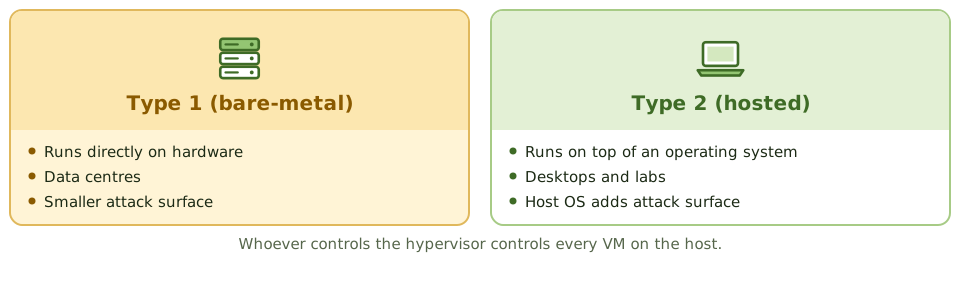
- Type 1 (bare-metal) hypervisors run directly on the hardware. Used in data centres; smaller attack surface.
- Type 2 (hosted) hypervisors run on top of an operating system. Used on desktops; the host OS adds attack surface.
Virtualisation risks
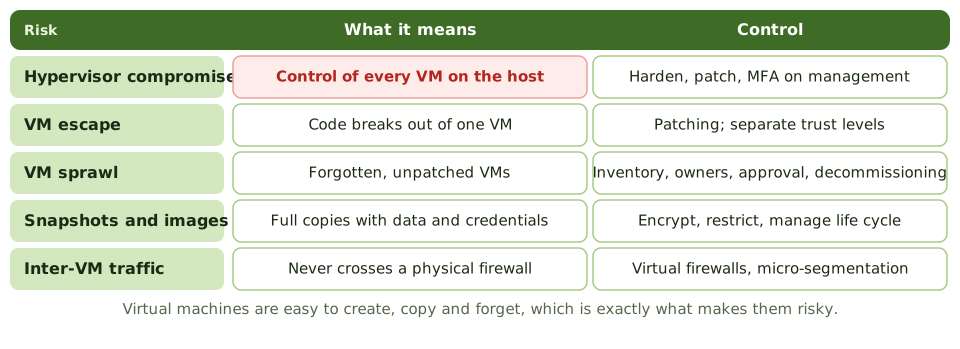
| Risk | What it means |
|---|---|
| Hypervisor compromise | Control over every VM on the host. The greatest single risk |
| VM escape | Malicious code in one VM breaks out to the hypervisor or other VMs |
| VM sprawl | VMs are easy to create and easy to forget, so they sit unpatched and unwatched |
| Snapshots and images | Complete copies of systems, including data and passwords, that can be stolen or restored outside control |
| Inter-VM traffic | Traffic between VMs on one host may never pass a physical firewall or monitoring point |
| Mixed trust levels | Sensitive and untrusted workloads sharing a host |
| Management console | Admin access to the virtual environment is extremely powerful |
Controls
- harden and patch hypervisors; restrict and log management access, with MFA
- a separate management network
- a VM inventory with owners, approval to create VMs, and a decommissioning process
- secure, hardened templates (“golden images”)
- encrypt and restrict snapshots and backups, and manage their life cycle
- virtual firewalls and micro-segmentation
- different sensitivity levels on separate hosts or clusters
Containers
Containers bundle an application with everything it needs and share the host’s operating system kernel. They’re lightweight, but they isolate less than VMs do.
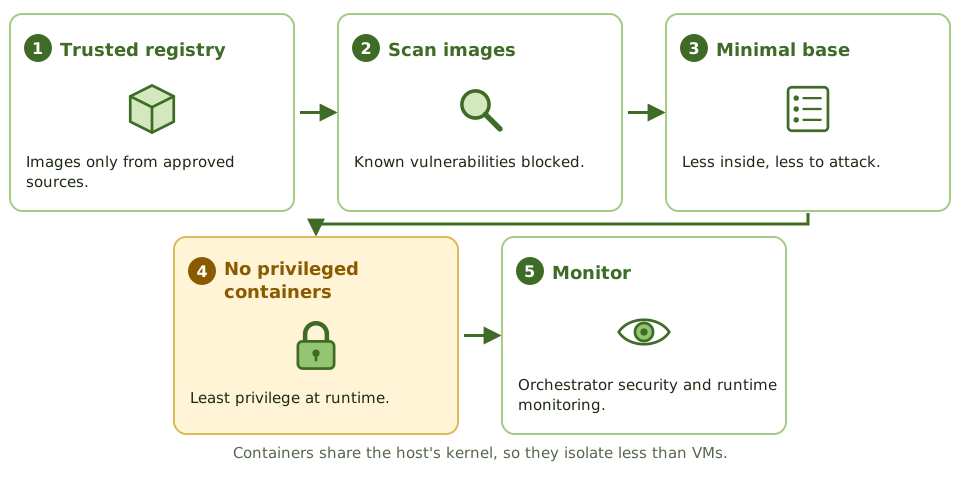
Controls: images only from trusted registries, image scanning, minimal base images, no privileged containers, secure orchestration (Kubernetes) and runtime monitoring.
Cloud security
Governance and the shared responsibility model are covered in Domain 2. On the technical side, most cloud incidents come from the customer’s own misconfiguration and weak identity controls, not from provider failures.
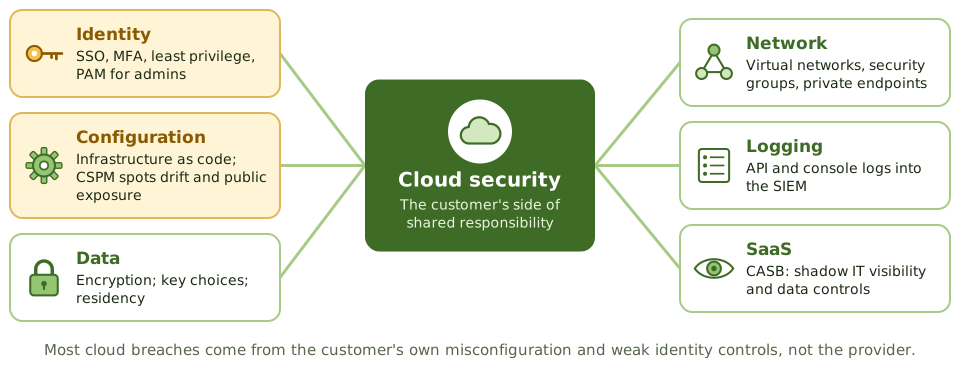
| Area | Controls |
|---|---|
| Identity and access | Federated SSO, MFA, least-privilege roles, no shared root accounts, short-lived credentials, PAM for administrators (cloud admins are extremely powerful) |
| Configuration | Infrastructure as code with reviews; secure baselines; cloud security posture management (CSPM) to catch drift and public exposure |
| Data | Encryption at rest and in transit; key choices (provider-managed, customer-managed, or bring-your-own-key, which gives more control but more responsibility); data residency |
| Network | Virtual networks, security groups, private endpoints, WAF |
| Logging | Central audit logs (API calls, console logins), cloud-native threat detection, SIEM integration |
| SaaS | Cloud access security broker (CASB) for visibility of shadow IT, data controls and policy enforcement |
Example. A development team creates a storage bucket for test data and makes it public to share files with a contractor. The “test” data is a copy of real customer records. CSPM alerts on public buckets, or a rule against unmasked production data in test, would each have prevented the exposure.
How the exam asks about it
| If the question asks… | The answer is usually… |
|---|---|
| Greatest risk to VMs on a shared host | Hypervisor compromise |
| Risk of uncontrolled VM creation | VM sprawl: unpatched, unmanaged systems |
| Most common cause of cloud data exposure | Customer misconfiguration |
| Tool detecting cloud misconfigurations | Cloud security posture management |
| Tool giving visibility of SaaS use | Cloud access security broker |
| Protecting VM snapshots | Encrypt and restrict access; manage their life cycle |
In short
- The hypervisor controls all virtual machines on a host; its compromise affects every guest, so it must be hardened, patched and tightly access-controlled.
- Type 1 (bare-metal) hypervisors run directly on hardware; type 2 (hosted) run on top of an operating system and have a larger attack surface.
- Virtualisation risks include VM escape, VM sprawl, insecure snapshots and images, and unmonitored traffic between VMs.
- In the cloud, misconfiguration and weak identity management cause most incidents.
- Cloud controls include strong IAM with MFA, least privilege, configuration monitoring (CSPM), encryption with customer-managed keys where needed, and centralised logging.
- Containers share the host kernel; images should come from trusted registries, be scanned, and run with minimal privileges.
Exam traps
- Greatest risk on a shared virtual host: compromise of the hypervisor.
- VM snapshots and images can contain sensitive data and credentials; protect and manage them.
- Cloud administrator accounts are extremely powerful; protect them with MFA and PAM.
- Publicly accessible storage buckets are a classic cloud misconfiguration.
- Bring-your-own-key gives more control over encryption keys but adds key management responsibility.
Slides
Click the slide and use the arrow keys. F toggles full screen.
Many flats in one building
A block of flats gives each household its own front door, but they all share the same foundations, plumbing and caretaker. If the caretaker's master key is stolen, every flat is open.
Virtualisation runs many virtual machines (VMs) on one physical server. The hypervisor is the caretaker: whoever controls it controls every VM.
Virtualisation risks
Containers
Cloud security