Topics in this domain
- Security Governance and Roles
- Data Classification and Ownership
- Security Policies
- Privacy Principles and GDPR
- Identity Management
- Authentication Factors
- Biometrics
- Access Models: DAC, MAC, RBAC
- Logical and Privileged Access
- Cryptography Basics
- Symmetric Encryption
- Asymmetric Encryption
- Hashing and Integrity
- Digital Signatures
- PKI and Certificates
- Firewalls
- IDS/IPS
- VPN, SSL/TLS, IPsec
- Wireless Security
- Endpoint and Mobile (BYOD)
- Cloud and Virtualization Security
- Physical Access Controls
- Environmental Controls: Fire, Power, HVAC
- Social Engineering
- Malware
- Network Attacks: DoS, Spoofing, Sniffing
- Application Attacks: SQLi, XSS
- Vulnerability Management and Pen Testing
- Incident Response
- Digital Forensics and Chain of Custody
- Security Awareness Training
- Logging, SIEM, and Auditing Security
Endpoint and Mobile (BYOD)
Where the work happens
Laptops and phones are where the work happens, and where things go wrong: someone clicks a bad link, plugs in a found USB stick, or leaves a laptop on the train.
Endpoints (laptops, desktops, phones, tablets) are the most common entry point for malware and phishing, and the assets most often lost or stolen.
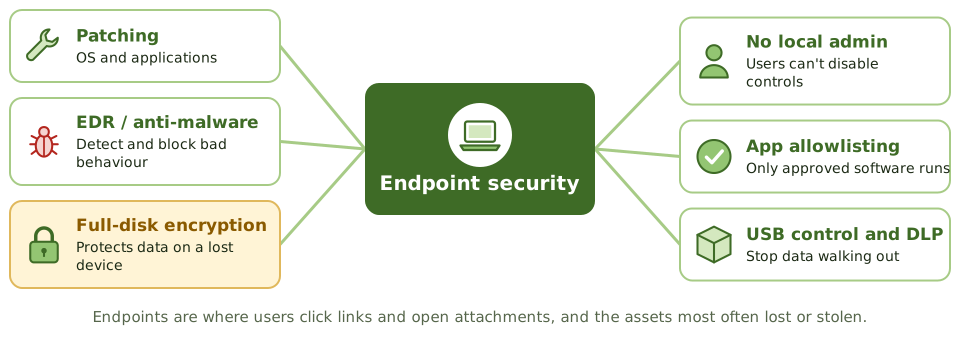
| Control | Purpose |
|---|---|
| Patching | Close known holes in the OS and applications |
| Endpoint detection and response (EDR) / anti-malware | Detect and block malicious behaviour; support investigations |
| Host firewall | Restrict connections in and out |
| Full-disk encryption | Protect data if the device is lost or stolen |
| Least privilege | No local admin rights for standard users, who could otherwise switch off security tools and install malware |
| Application allowlisting | Only approved software can run |
| Secure configuration baseline | Hardened settings; unneeded services off |
| Removable media control | Block, restrict or encrypt USB storage |
| Screen lock and timeout | Protect unattended devices |
| Data loss prevention (DLP) | Spot and stop sensitive data leaving the device |
The lost laptop
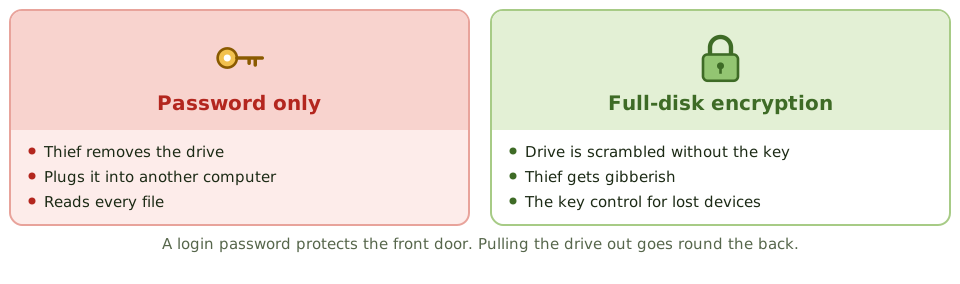
A login password protects the front door, but a thief can simply take the drive out and read it in another computer. Full-disk encryption is the key control for lost or stolen devices: without the key, the drive is gibberish.
Mobile device management
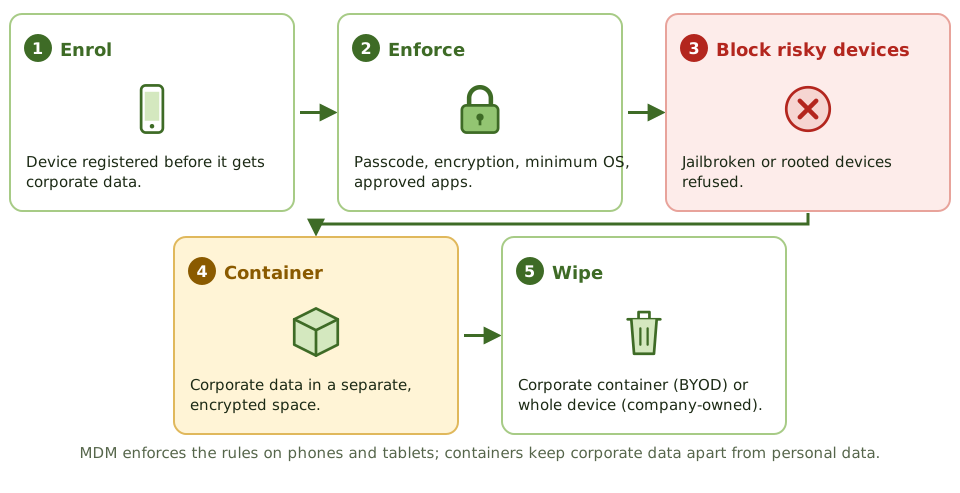
Mobile device management (MDM) and mobile application management (MAM) tools enforce:
- passcodes and biometric unlock
- device encryption
- minimum OS versions and patching
- blocking of jailbroken or rooted devices, which have bypassed the platform’s security
- approved apps and app restrictions
- containerisation: corporate data kept in a managed, encrypted space separate from personal data
- remote wipe of corporate data, or of the whole device if the company owns it
Bring your own device (BYOD)
BYOD saves money and is convenient, but the organisation has less control over a device it doesn’t own.
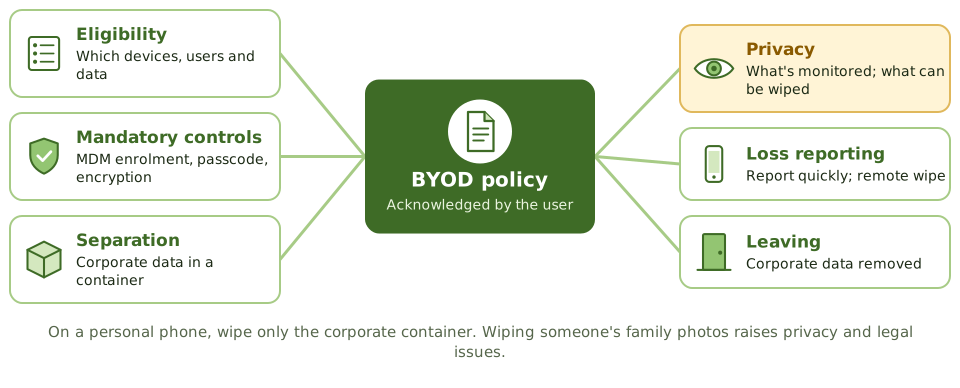
A BYOD policy should cover:
- which devices, users and data are allowed
- mandatory controls and MDM enrolment
- separation of corporate and personal data
- privacy: what the organisation can monitor, and what it can wipe. On a personal phone, wipe only the corporate container; wiping someone’s family photos raises privacy and legal problems.
- reporting loss or theft
- what IT will and won’t support
- removing corporate data when the person leaves
- the user’s signed acknowledgement
Example. A sales manager’s personal phone, used for corporate email without MDM, is stolen. It had no passcode. The thief can read customer contracts in the mailbox, and the organisation can’t wipe them because the phone was never enrolled. The finding: BYOD was allowed without enforcing the policy’s controls.
Data loss prevention
DLP tools look for sensitive content in use (on devices), in motion (email, web) and at rest (file shares, cloud), and alert on or block anything that breaks the rules. They rely on data classification to know what to look for.
How the exam asks about it
| If the question asks… | The answer is usually… |
|---|---|
| Best control for data on lost laptops | Full-disk encryption |
| Tool enforcing security policy on mobile devices | Mobile device management |
| Preferred way to protect corporate data on personal devices | Containerisation with selective wipe |
| Risk of local admin rights | Users can disable controls and install malware |
| Tool to detect sensitive data leaving the organisation | Data loss prevention |
In short
- Endpoints are the most common entry point for attacks and the most frequently lost or stolen assets.
- Core endpoint controls: patching, endpoint detection and response (EDR) or anti-malware, host firewall, full-disk encryption, least privilege and application control.
- Full-disk encryption is the best control for data on lost or stolen laptops.
- Mobile device management (MDM) enforces policies on mobile devices: passcodes, encryption, remote wipe, app restrictions.
- BYOD needs a policy covering eligibility, required controls, separation of corporate data (containerisation), monitoring and privacy, and offboarding.
- Data loss prevention (DLP) detects and blocks sensitive data leaving through endpoints, email or web.
Exam traps
- A strong login password doesn't protect data if the disk can be removed and read; encryption does.
- On BYOD devices, remote wipe of the whole device raises privacy and legal issues; wiping only the corporate container is preferred.
- Users with local administrator rights can disable security tools and install malware.
- Jailbroken or rooted devices bypass platform security and should be blocked.
- USB ports allow data theft and malware introduction; control removable media.
Slides
Click the slide and use the arrow keys. F toggles full screen.
Where the work happens
Laptops, desktops, phones and tablets are where people open email, click links and handle data. They're the most common way in for attackers, and the things most often left on trains.
Endpoint security protects the devices themselves.
The lost laptop
Mobile device management
Bring your own device