Topics in this domain
- Security Governance and Roles
- Data Classification and Ownership
- Security Policies
- Privacy Principles and GDPR
- Identity Management
- Authentication Factors
- Biometrics
- Access Models: DAC, MAC, RBAC
- Logical and Privileged Access
- Cryptography Basics
- Symmetric Encryption
- Asymmetric Encryption
- Hashing and Integrity
- Digital Signatures
- PKI and Certificates
- Firewalls
- IDS/IPS
- VPN, SSL/TLS, IPsec
- Wireless Security
- Endpoint and Mobile (BYOD)
- Cloud and Virtualization Security
- Physical Access Controls
- Environmental Controls: Fire, Power, HVAC
- Social Engineering
- Malware
- Network Attacks: DoS, Spoofing, Sniffing
- Application Attacks: SQLi, XSS
- Vulnerability Management and Pen Testing
- Incident Response
- Digital Forensics and Chain of Custody
- Security Awareness Training
- Logging, SIEM, and Auditing Security
Logging, SIEM, and Auditing Security
The flight recorder
Every aircraft carries a flight recorder. It captures what happened, it’s built to survive the crash, and investigators read it afterwards to work out why.
Logs are an organisation’s flight recorder. They provide accountability (who did what, when), help detect attacks and misuse, and support investigations after incidents. They’re often required by regulation too. But they only help if they record the right things, can’t be tampered with, and someone actually reads them.
What to log
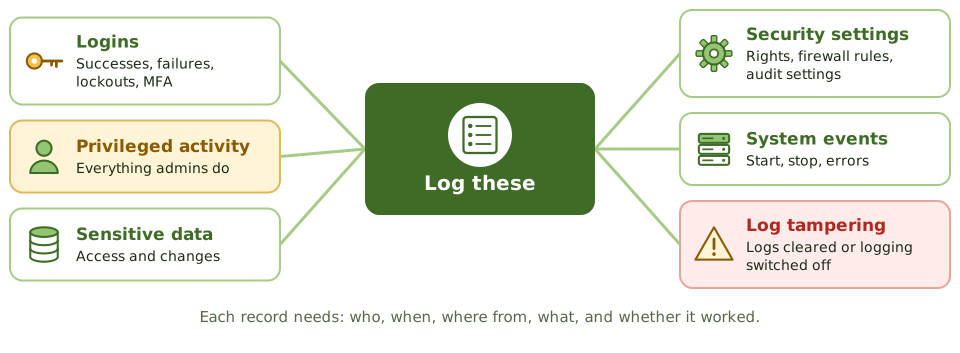
- successful and failed logins, lockouts and MFA events
- privileged and administrator activity
- access to, and changes of, sensitive data
- changes to security settings, user rights, firewall rules and audit settings
- system start, stop and errors
- logs being cleared or logging being switched off: a strong sign of tampering
Each record should include the user ID, timestamp, source, event type and outcome. Log too little and you miss incidents; log everything without filtering and you bury them.
Protect the logs
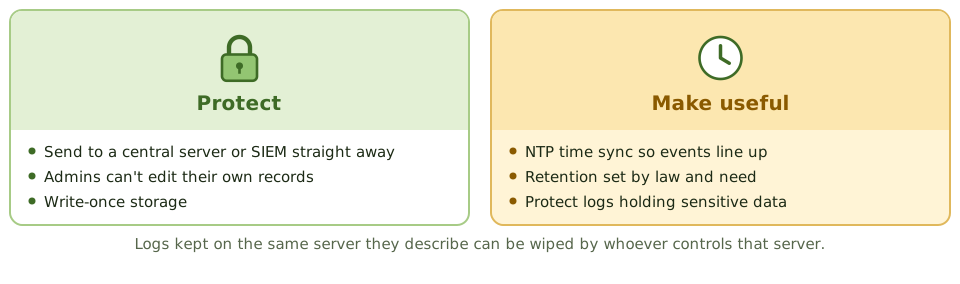
- Send logs to a central log server or SIEM as they’re created, so they can’t be erased on the system they describe.
- Restrict access: administrators mustn’t be able to change or delete records of their own activity.
- Use integrity protection such as write-once storage.
- Synchronise clocks across systems (NTP), so events from different systems can be lined up.
- Set retention periods based on legal, regulatory and investigative needs.
- Protect logs that contain personal or sensitive data.
What a SIEM does
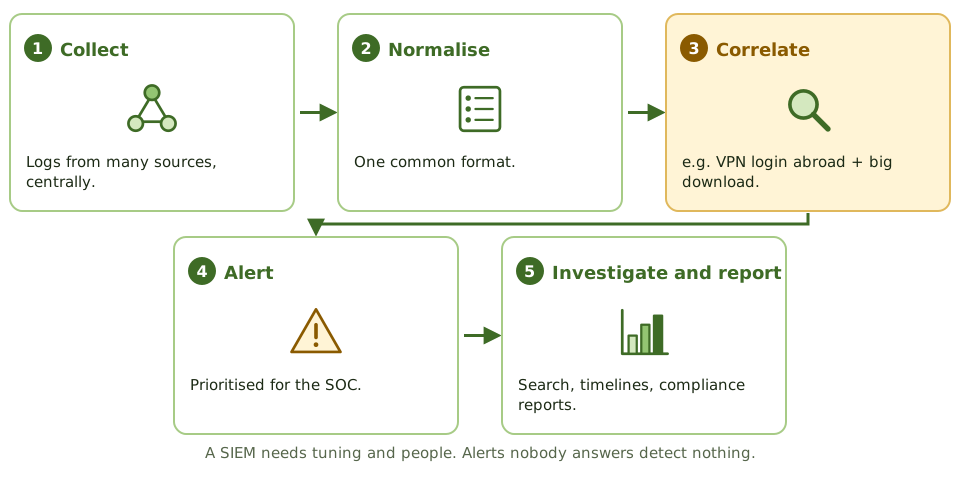
A security information and event management (SIEM) system:
- collects logs from many sources
- normalises them into one format
- correlates events across sources (for example, a VPN login from abroad followed by a huge download)
- raises prioritised alerts
- supports investigations with search and timelines
- produces compliance reports
A SIEM needs tuning and people. SOAR (security orchestration, automation and response) tools can automate parts of the response, and a security operations centre (SOC) watches the alerts around the clock.
Example. The SIEM raises an alert that an administrator account cleared the security log on a domain controller at 2 a.m. Nobody responds, because the SOC treats such alerts as low priority. Two weeks later, an investigation finds the attacker used that window to create backdoor accounts. Alert tuning and response priorities were the gap.
Reviewing logs
Logs nobody reviews aren’t a detective control. Review should be risk-based:
- automated alerts for high-risk events
- regular review of privileged activity by someone independent
- periodic review of trends
Auditing information security
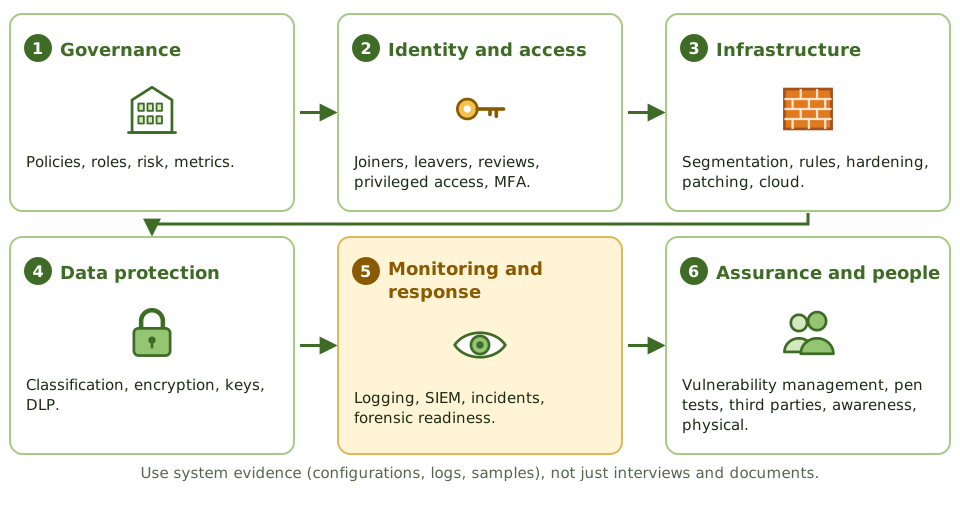
An information security audit typically covers:
- governance: policies, roles, risk assessments, metrics and reporting
- identity and access management: provisioning, removal, reviews, privileged access, MFA
- infrastructure security: segmentation, firewall rules, hardening, patching, cloud configuration
- data protection: classification, encryption, key management, DLP
- monitoring and response: logging coverage, SIEM use, incident handling, forensic readiness
- assurance activities: vulnerability management, penetration tests, third-party security
- awareness and physical security
Evidence should come from system configurations, logs and samples, not only interviews and documents.
How the exam asks about it
| If the question asks… | The answer is usually… |
|---|---|
| Primary purpose of a SIEM | Collect and correlate events from many sources to detect incidents |
| Why time synchronisation matters | Accurate correlation of events across systems |
| Best protection for logs against administrators | Central storage they can’t modify |
| Logs collected but not reviewed | Ineffective detective control |
| Event that strongly indicates tampering | Logs cleared or logging disabled |
| Best evidence in a security audit | System-generated evidence and configurations, not interviews alone |
In short
- Logs provide accountability and support detection and investigation, but only if they capture the right events and are reviewed.
- Key events: logins and failures, privileged actions, access to sensitive data, changes to security settings, and log tampering.
- Logs must be protected from alteration and deletion, especially by the administrators whose activity they record.
- Time synchronisation (NTP) across systems is essential to correlate events.
- A SIEM collects, normalises and correlates logs from many sources to detect incidents and support investigations.
- Retention periods follow legal, regulatory and investigative needs.
- Auditing security: start from policy and risk, test controls across governance, identity, network, endpoint, data and monitoring, and verify through evidence rather than interviews.
Exam traps
- Logs that nobody reviews are not a detective control.
- Storing logs on the same server they describe lets an attacker or administrator erase them.
- Logging too little misses incidents; logging everything without filtering buries them.
- Logs containing sensitive data need protection themselves.
- Without accurate timestamps, events from different systems can't be reconstructed.
Slides
Click the slide and use the arrow keys. F toggles full screen.
The flight recorder
Every aircraft carries a flight recorder: it captures what happened, it's built to survive the crash, and investigators read it afterwards to work out why.
Logs are an organisation's flight recorder. They give accountability (who did what, when), help detect attacks, and support investigations, as long as they record the right things, can't be tampered with, and someone reads them.
Protect the logs
What a SIEM does
Auditing information security