Topics in this domain
- Security Governance and Roles
- Data Classification and Ownership
- Security Policies
- Privacy Principles and GDPR
- Identity Management
- Authentication Factors
- Biometrics
- Access Models: DAC, MAC, RBAC
- Logical and Privileged Access
- Cryptography Basics
- Symmetric Encryption
- Asymmetric Encryption
- Hashing and Integrity
- Digital Signatures
- PKI and Certificates
- Firewalls
- IDS/IPS
- VPN, SSL/TLS, IPsec
- Wireless Security
- Endpoint and Mobile (BYOD)
- Cloud and Virtualization Security
- Physical Access Controls
- Environmental Controls: Fire, Power, HVAC
- Social Engineering
- Malware
- Network Attacks: DoS, Spoofing, Sniffing
- Application Attacks: SQLi, XSS
- Vulnerability Management and Pen Testing
- Incident Response
- Digital Forensics and Chain of Custody
- Security Awareness Training
- Logging, SIEM, and Auditing Security
Incident Response
The fire brigade
A fire brigade doesn’t write its plan when the alarm rings. It trains, checks its kit and learns the streets in advance. At the fire, it contains the blaze first, puts it out, and only then investigates the cause.
Security incident response works the same way, with one addition: the scene is also evidence.
Not just IT incident management
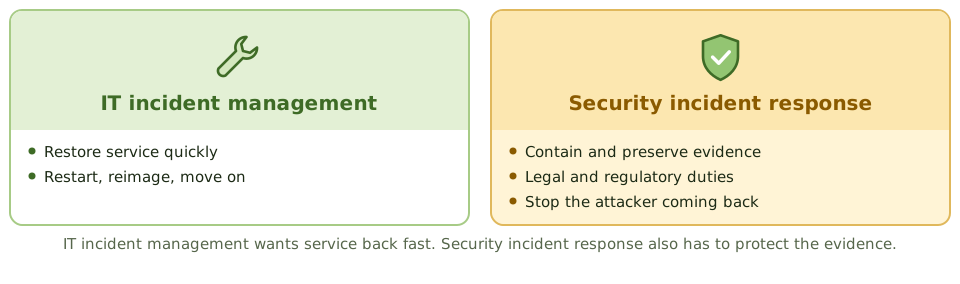
IT incident management (Domain 4) gets the service back as fast as possible. Security incident response deals with events that threaten confidentiality, integrity or availability, and adds three concerns: preserving evidence, legal and regulatory duties, and making sure the attacker can’t come back.
The life cycle
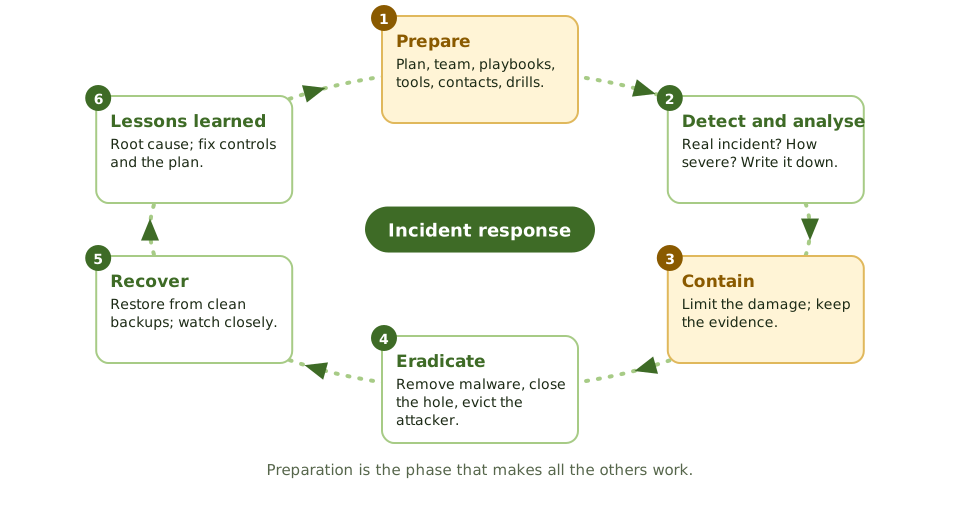
| Phase | Activities |
|---|---|
| Preparation | Policy and plan, a defined team and roles, playbooks for common scenarios, tools, contact lists (external forensics, legal, insurers, regulators), training and exercises |
| Detection and analysis | Alerts from monitoring, users or third parties; is it a real incident? how severe? Document everything |
| Containment | Short-term actions to limit the damage (isolate machines, disable accounts, block addresses), then longer-term containment while a fix is prepared; preserve evidence |
| Eradication | Remove malware, close the vulnerability, remove the attacker’s accounts and footholds |
| Recovery | Restore from clean backups, check everything works, watch closely for a return |
| Post-incident activity | Lessons-learned review, root cause, report to management, update controls and the plan |
Preparation is often called the most important phase. Without a plan, a team and tools, every incident is handled by improvisation.
Contain, but keep the evidence
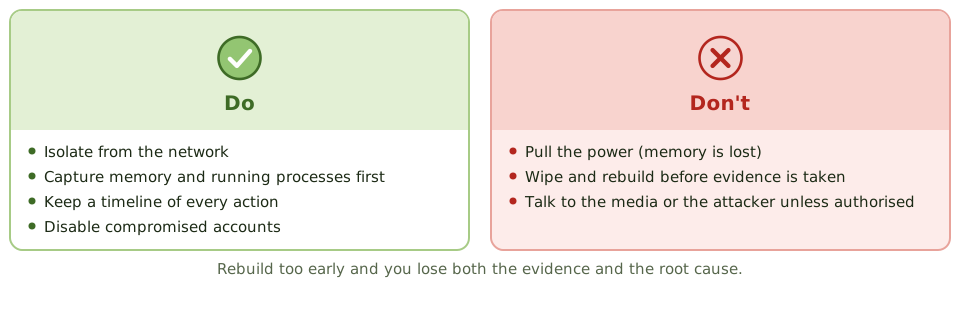
Once an incident is confirmed, the first priority is to contain it, limiting the damage while preserving evidence:
- isolate affected systems from the network rather than switching them off, which would lose what’s in memory
- capture volatile evidence (memory, running processes, network connections) before it disappears
- don’t wipe or rebuild systems until evidence has been collected
- keep a timeline of every action taken
Containment decisions balance business impact against the investigation. Sometimes watching an attacker for a short while gives better intelligence, but that’s a senior management decision, made with legal advice.
Example. A file server shows signs of ransomware, and a technician immediately reimages it to restore service. A week later the infection reappears on other servers. With the original system wiped, investigators can’t work out how the attacker got in. The playbook was missing isolation and evidence capture before rebuilding.
Who needs telling
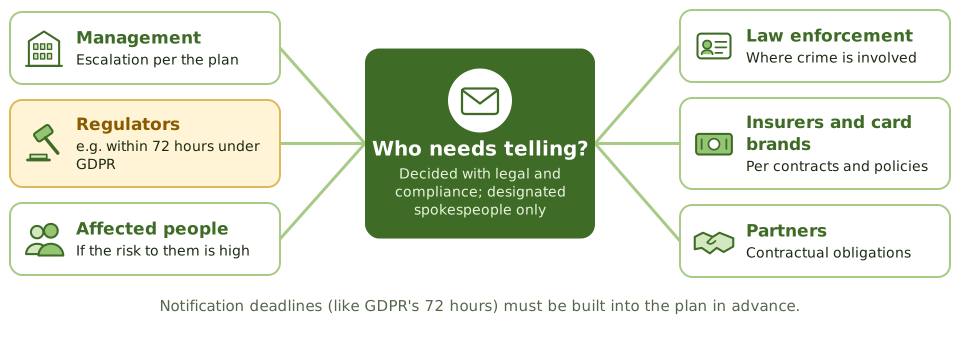
- Communication follows the plan, through designated spokespeople.
- Legal and compliance decide what must be reported: regulators (for example within 72 hours under GDPR for qualifying personal data breaches), affected individuals, law enforcement, card brands, insurers and contractual partners. These deadlines need to be built into the plan in advance.
- Staff are told not to discuss the incident outside the organisation, or with the attacker.
Measuring and learning
Useful metrics: mean time to detect, contain and recover; incidents by type; and repeats. The lessons-learned review finds the root cause and updates controls and the plan. Skip it, and the same incident can happen again.
How the exam asks about it
| If the question asks… | The answer is usually… |
|---|---|
| First action when an incident is confirmed | Contain it while preserving evidence |
| Most important phase of incident response | Preparation |
| Risk of immediately rebuilding the affected system | Loss of evidence and root cause |
| Who communicates with the media | Designated spokespeople per the plan |
| Purpose of the lessons-learned phase | Improve controls and the response process |
| Why switching off a compromised system may be wrong | Volatile memory evidence is lost |
In short
- Incident response phases: preparation, detection and analysis (identification), containment, eradication, recovery, and post-incident review (lessons learned).
- Preparation is the most important phase: a documented plan, a trained team, tools, contacts and playbooks.
- When an incident is confirmed, the first priority is containment, limiting damage while preserving evidence.
- Evidence must be preserved from the start if legal action or regulatory reporting is possible.
- Communication follows the plan: management, legal, regulators, customers and media, through designated people.
- Regulatory notification deadlines (such as 72 hours under GDPR) must be built into the plan.
- The lessons-learned review improves controls and the plan itself.
Exam traps
- Wiping and rebuilding a system before evidence is collected destroys evidence.
- Pulling the power can lose volatile memory evidence; containment by network isolation is often preferred.
- Staff shouldn't speak to the media or the attacker unless authorised.
- Incident response for security differs from IT incident management: evidence and legal considerations matter.
- Skipping the post-incident review means the same incident can happen again.
Slides
Click the slide and use the arrow keys. F toggles full screen.
The fire brigade
A fire brigade doesn't write its plan when the alarm rings. It trains, checks its kit and knows the streets in advance. At the fire, it contains the blaze first, then puts it out, then investigates the cause.
Security incident response works the same way, with one addition: the scene is also evidence.
Not just IT incident management
Contain, but keep the evidence
Who needs telling