Topics in this domain
- Security Governance and Roles
- Data Classification and Ownership
- Security Policies
- Privacy Principles and GDPR
- Identity Management
- Authentication Factors
- Biometrics
- Access Models: DAC, MAC, RBAC
- Logical and Privileged Access
- Cryptography Basics
- Symmetric Encryption
- Asymmetric Encryption
- Hashing and Integrity
- Digital Signatures
- PKI and Certificates
- Firewalls
- IDS/IPS
- VPN, SSL/TLS, IPsec
- Wireless Security
- Endpoint and Mobile (BYOD)
- Cloud and Virtualization Security
- Physical Access Controls
- Environmental Controls: Fire, Power, HVAC
- Social Engineering
- Malware
- Network Attacks: DoS, Spoofing, Sniffing
- Application Attacks: SQLi, XSS
- Vulnerability Management and Pen Testing
- Incident Response
- Digital Forensics and Chain of Custody
- Security Awareness Training
- Logging, SIEM, and Auditing Security
PKI and Certificates
A passport for public keys
A passport links your photo to your name, and a government you trust vouches for it. Border staff check it’s genuine, in date, and not reported stolen.
Public-key cryptography only works if you can trust that a public key really belongs to the person or website it claims to. A digital certificate is the passport for a public key, and a public key infrastructure (PKI) is the system of trusted issuers, identity checks and revocation lists behind it.
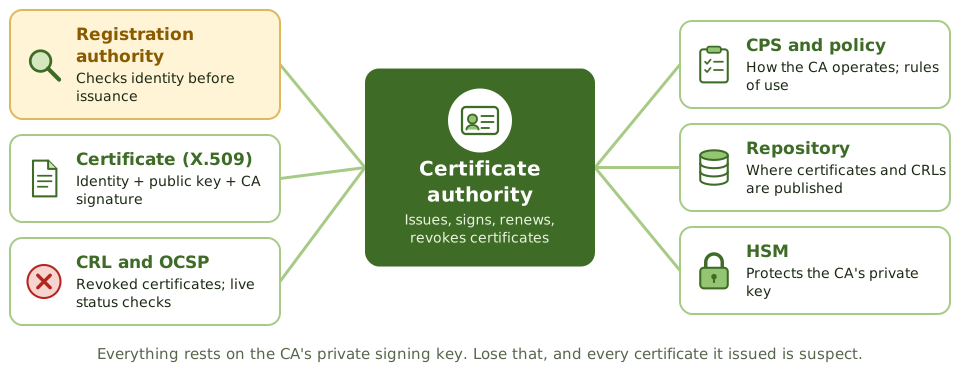
The parts of a PKI
| Component | Function |
|---|---|
| Certificate authority (CA) | The trusted body that issues, signs, renews and revokes certificates (the government) |
| Registration authority (RA) | Checks the identity of applicants on the CA’s behalf (the passport office checking your documents) |
| Digital certificate | Links an identity to a public key, signed by the CA |
| Certificate revocation list (CRL) | A signed list of certificates cancelled before expiry |
| Online Certificate Status Protocol (OCSP) | A live check of a certificate’s status |
| Certification practice statement (CPS) | How the CA operates: identity checks, key protection, revocation |
| Certificate policy (CP) | The rules for using and trusting certificates |
| Repository | Where certificates and CRLs are published |
Most certificates follow the X.509 standard and contain the subject’s name, public key, issuer, serial number, validity dates, permitted key uses and the CA’s digital signature. A certificate never contains the private key.
The chain of trust
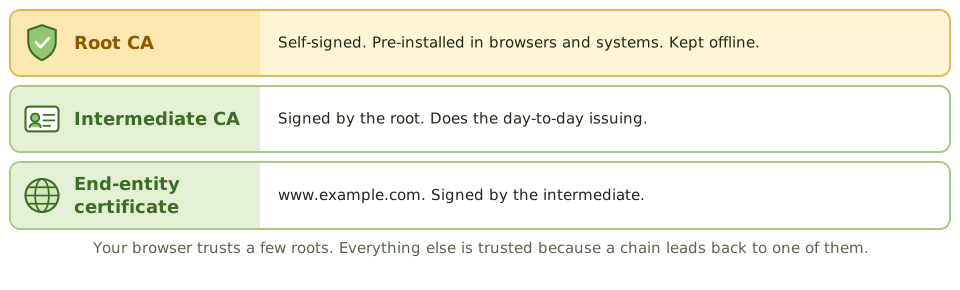
- A root CA signs its own certificate and is trusted directly: its certificate comes pre-installed in browsers and operating systems, or is distributed internally. Root CAs are usually kept offline.
- Intermediate CAs are signed by the root and issue the everyday certificates.
- Your browser follows the chain from a website’s certificate back up to a root it trusts.
The CA’s private signing key is the crown jewel. If it’s compromised, every certificate it issued is suspect.
Checking a certificate
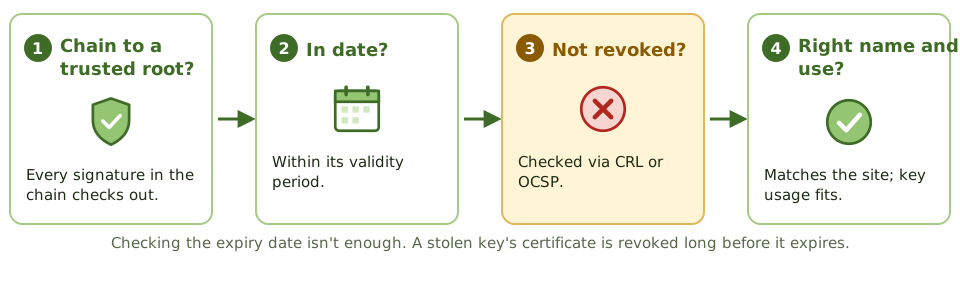
A relying party checks that:
- the chain of signatures leads to a trusted root
- the certificate is within its validity dates
- it hasn’t been revoked (via CRL or OCSP). Checking only the expiry date isn’t enough: a certificate whose key was stolen is revoked long before it expires.
- the name matches and the key usage fits
Certificates are revoked when a private key is compromised, the subject leaves, details change, or one was issued by mistake. Revocation only works if relying parties actually check.
Controls the auditor checks
- a CPS and certificate policy exist and are followed
- strong identity checks by the RA
- CA private keys protected in HSMs, with dual control and split knowledge
- the root CA kept offline and physically secure
- timely revocation; CRLs published and OCSP available
- a certificate inventory and expiry monitoring, to prevent outages
- key escrow or recovery for encryption keys where business data must be recoverable, but never for signing keys (escrowing a signing key means someone else could sign, which breaks non-repudiation)
Example. An online shop goes offline for six hours when its TLS certificate expires on a Sunday. Nobody owned renewals and there was no inventory of certificates. The auditor recommends a certificate inventory with automated expiry alerts, or automated renewal.
How the exam asks about it
| If the question asks… | The answer is usually… |
|---|---|
| Who verifies a requester’s identity before issuance | Registration authority |
| Who issues and signs certificates | Certificate authority |
| How to check if a certificate was revoked | CRL or OCSP |
| Document describing CA operating practices | Certification practice statement |
| Most critical asset in a PKI | The CA’s private (signing) key |
| Should signing keys be escrowed | No; it undermines non-repudiation |
In short
- A public key infrastructure (PKI) binds public keys to identities through digital certificates issued by trusted certificate authorities.
- The certificate authority (CA) issues and signs certificates; the registration authority (RA) verifies identities before issuance.
- A certificate (X.509) contains the subject's identity, public key, issuer, validity period and the CA's signature.
- Revoked certificates are published in a certificate revocation list (CRL) or checked in real time with OCSP.
- The certification practice statement (CPS) describes how the CA operates; the certificate policy sets the rules.
- Root CA private keys are the most sensitive asset; root CAs are often kept offline and keys stored in HSMs.
Exam traps
- The RA verifies identity; the CA issues and signs the certificate.
- A certificate contains the public key, never the private key.
- Relying parties must check revocation status, not just expiry date.
- Compromise of a CA's private key undermines every certificate it issued.
- Expired certificates cause outages; certificate inventory and renewal tracking are operational controls.
Slides
Click the slide and use the arrow keys. F toggles full screen.
The parts of a PKI
The chain of trust
Checking a certificate