Topics in this domain
- Security Governance and Roles
- Data Classification and Ownership
- Security Policies
- Privacy Principles and GDPR
- Identity Management
- Authentication Factors
- Biometrics
- Access Models: DAC, MAC, RBAC
- Logical and Privileged Access
- Cryptography Basics
- Symmetric Encryption
- Asymmetric Encryption
- Hashing and Integrity
- Digital Signatures
- PKI and Certificates
- Firewalls
- IDS/IPS
- VPN, SSL/TLS, IPsec
- Wireless Security
- Endpoint and Mobile (BYOD)
- Cloud and Virtualization Security
- Physical Access Controls
- Environmental Controls: Fire, Power, HVAC
- Social Engineering
- Malware
- Network Attacks: DoS, Spoofing, Sniffing
- Application Attacks: SQLi, XSS
- Vulnerability Management and Pen Testing
- Incident Response
- Digital Forensics and Chain of Custody
- Security Awareness Training
- Logging, SIEM, and Auditing Security
Logical and Privileged Access
Every door counts
A burglar doesn’t care how strong your front door is if the back door is open.
Logical access controls are the software controls over who can reach and use systems and data. They have to apply at every access path, because a gap at one layer undoes the controls at another.
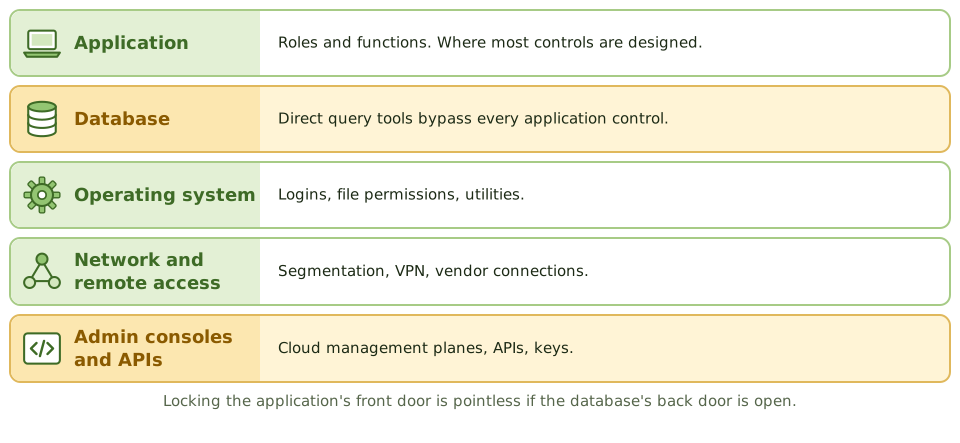
- network access (segmentation, firewalls, network access control)
- operating system logins and file permissions
- database connections and query tools
- application functions and data
- remote access (VPN, remote desktop, vendor connections)
- administrative consoles, cloud management planes and APIs
A beautifully designed application role model doesn’t help if users or support staff can connect straight to the database with a query tool.
Session controls
- automatic logoff or screen lock after inactivity
- limits on concurrent sessions
- restrictions by time, location or device for sensitive functions
- showing the last login time, so users can spot misuse
The most powerful accounts
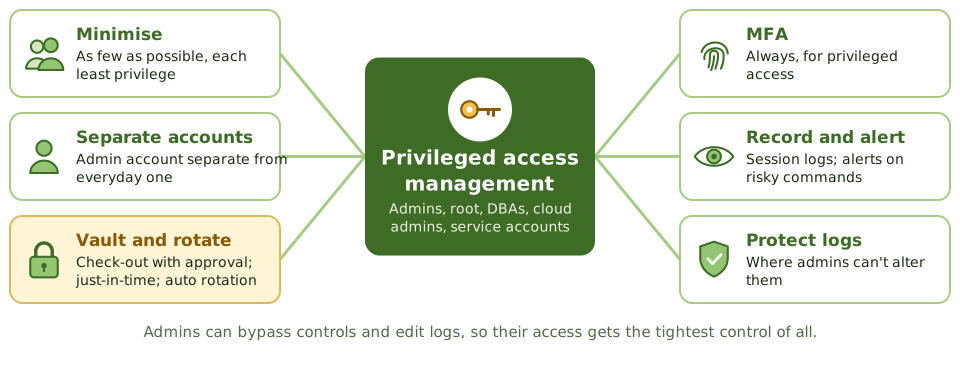
Privileged accounts (system administrators, root, domain admins, DBAs, cloud administrators, service accounts) can change configurations, bypass application controls and alter logs. They need the tightest control of all.
| Control | Detail |
|---|---|
| Minimise | As few privileged accounts as possible, each with least privilege |
| Separate accounts | Admins use a separate account for privileged work, not their everyday email account |
| Approval | Formal request and approval; regular recertification |
| Privileged access management (PAM) | Credentials kept in a vault, checked out with approval, rotated automatically; just-in-time elevation |
| Monitoring | Session logging or recording; alerts on high-risk commands |
| Log protection | Logs sent somewhere administrators can’t alter. Otherwise logging proves nothing. |
| MFA | Required for all privileged access |
| Service accounts | Owned, non-interactive where possible, minimal rights, credentials rotated |
Shared administrator passwords make accountability impossible.
Example. A review finds 37 domain administrator accounts in a 500-person company, including six service accounts with passwords unchanged for five years and two accounts belonging to former contractors. None are in the PAM vault. The auditor reports excessive privileged access and recommends reducing, vaulting and rotating.
Emergency access
Sometimes an urgent fix needs more access than normal. That’s what break-glass or firefighter IDs are for.
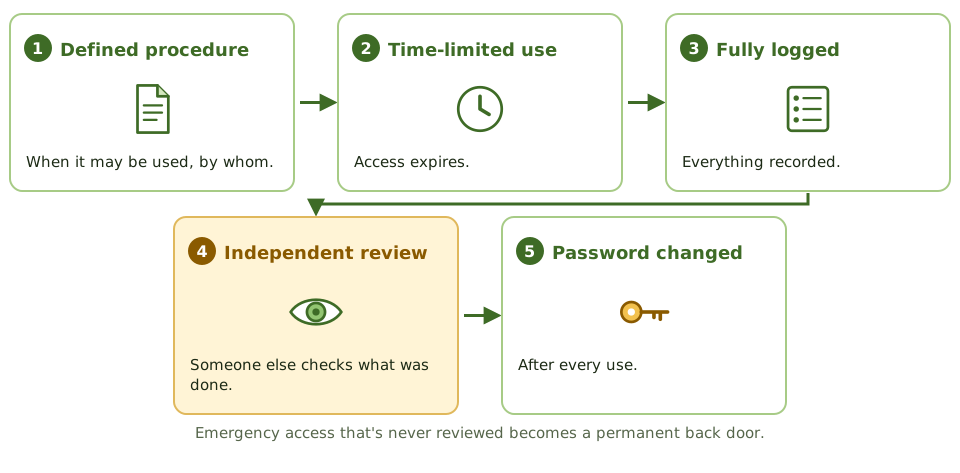
- used only under a defined procedure
- time-limited and fully logged
- reviewed independently afterwards
- password changed after every use
Emergency access that’s never reviewed quietly becomes a permanent back door.
Remote and third-party access
- MFA for all remote access
- vendor access switched on only when needed, through monitored channels, then switched off
- no remote desktop exposed directly to the internet
Auditing
- List privileged accounts at each layer and compare them with approved lists.
- Find shared, default and orphan privileged accounts.
- Review PAM configuration and session logs.
- Sample emergency access uses for review evidence.
- Check privileged activity logs are protected and actually reviewed.
How the exam asks about it
| If the question asks… | The answer is usually… |
|---|---|
| Best control over privileged accounts | PAM: vaulting, approval, monitoring, rotation |
| Control for emergency access | Restricted firefighter IDs, logged and reviewed after use |
| Risk of direct database access | Bypasses application controls |
| Why administrators need separate accounts | Limits exposure of privileged credentials during everyday use |
| Effective control over privileged activity logs | Stored where administrators can’t alter them; reviewed independently |
In short
- Logical access controls protect systems and data through identification, authentication and authorisation at every access path.
- Access paths include the network, operating system, database, application, remote access, APIs and administrative consoles; all must be controlled.
- Privileged accounts (administrators, root, DBAs, service accounts) can bypass controls and must be minimised, approved, monitored and reviewed.
- Privileged access management (PAM) vaults credentials, provides just-in-time access, records sessions and rotates passwords.
- Emergency (break-glass or firefighter) access is pre-approved, time-limited, logged and reviewed afterwards.
- Administrators should use separate accounts for privileged and everyday work.
- Session controls: automatic logoff after inactivity, limited concurrent sessions, and screen locks.
Exam traps
- Controlling access at the application while leaving direct database access open defeats the control.
- Shared administrator passwords prevent accountability.
- Logging privileged activity is pointless if the same administrators can alter the logs.
- Emergency access that's never reviewed becomes a permanent back door.
- Service accounts with interactive login and never-changing passwords are a common finding.
Slides
Click the slide and use the arrow keys. F toggles full screen.
Every door counts
A burglar doesn't care how strong your front door is if the back door is open. Systems are the same: the application might have perfect roles, but if support staff can connect straight to the database with a query tool, those roles mean nothing.
Logical access controls must cover every access path.
The most powerful accounts
Emergency access