Topics in this domain
- Project Roles and Governance
- PMBOK Phases
- Gantt, PERT, Critical Path
- Function Point Analysis
- Earned Value and Project Risk
- Business Case and Feasibility
- Benefits Realization
- SDLC Phases Overview
- Requirements Definition
- System Design
- Waterfall vs. Iterative vs. Prototyping
- Agile
- DevOps and DevSecOps
- RAD, CASE, Low-Code
- Build, Coding Standards, Code Review
- Testing Levels: Unit, Integration, System, UAT
- Regression, Sociability, Parallel, Pilot Testing
- Defect Management
- Data Migration and Conversion
- Change-Over: Parallel, Phased, Abrupt
- Go-Live Readiness and Acceptance
- Post-Implementation Review
- Input Controls
- Processing Controls
- Output Controls
- Data Integrity and ACID
- EDI and E-Commerce Controls
Data Migration and Conversion
Moving house, for data
When you move house, you decide what to take, throw out the junk, label the boxes, and count them at the other end. If a box goes missing, you want to know before the van drives off.
Data conversion (or migration) is moving house for data: taking it out of the old system and loading it into the new one. A new system is only as good as its data. Conversion errors can corrupt balances, lose customer records, break controls that depend on reference data, and wipe out the audit trail.
The exam’s central concern is simple: is the converted data complete and accurate?
The steps
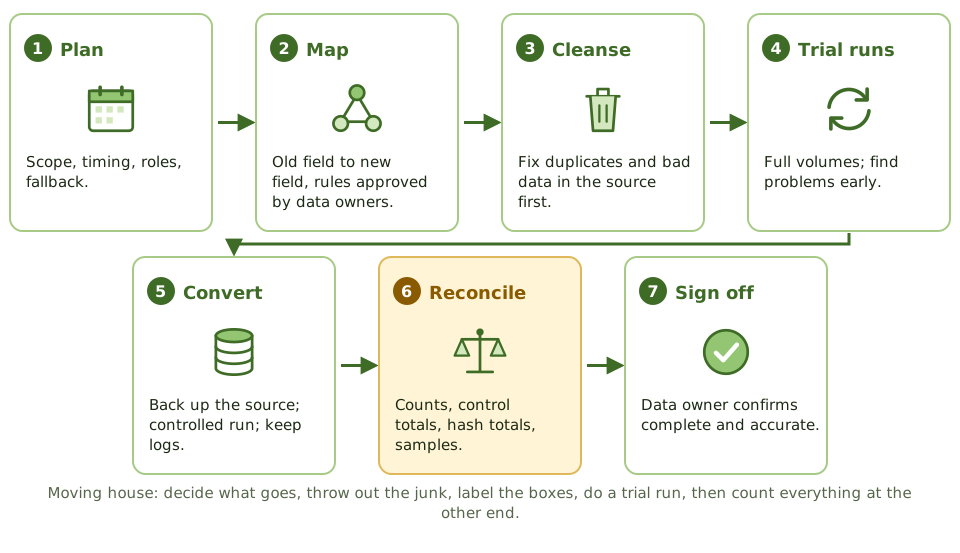
| Step | Controls |
|---|---|
| Plan | What data, cutover timing, roles, fallback plan, approval |
| Map | A documented mapping from each old field to each new field, with transformation rules approved by data owners |
| Cleanse | Duplicates, gaps and invalid data fixed in the source before migration |
| Conversion programs | Built, tested and change-controlled like any other program |
| Trial runs | Test conversions with realistic volumes; results reconciled and issues fixed |
| Convert | Source data backed up; controlled run; logs kept |
| Reconcile | Record counts, control totals, hash totals, sample checks, exception review |
| Sign off | Data owners confirm the data is complete and accurate |
| Retain | Old data archived and accessible for audit and legal needs |
Migrating dirty data doesn’t fix it; it just moves the mess into the new system.
Reconciliation: the key control
Before anyone accepts the converted data, the numbers on both sides must agree.
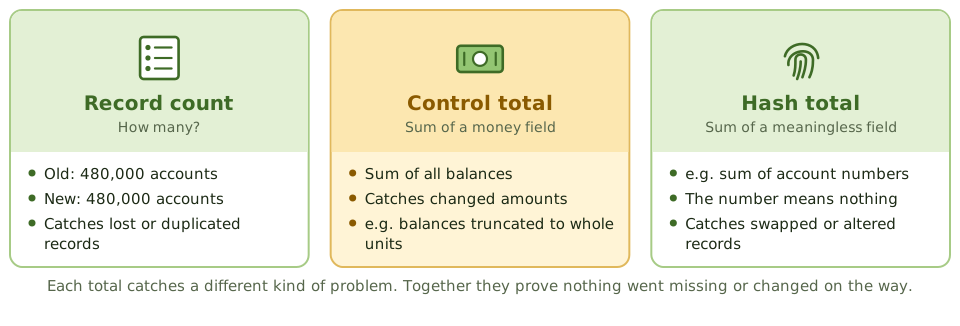
- Record counts match between source and target (allowing for documented exclusions). Catches lost or duplicated records.
- Control totals of money fields match, such as the sum of all balances. Catches changed amounts.
- Hash totals of non-money fields match, such as the sum of all account numbers. The total means nothing in itself, but if it differs, records were altered or swapped.
- A sample of records is compared field by field.
- Rejected and transformed records are reviewed and resolved.
Example. After converting 480,000 customer accounts, the record counts match. But the total of balances in the new system is 12,300 lower than in the old one. Investigation finds a mapping rule that truncated balances to whole units. Without the control total, nobody would have noticed.
Who signs off
IT runs the process, but the business owns the data. The data owner (or user management) reviews the reconciliation and signs off that the conversion is complete and accurate.
After conversion
Keep the source data and the conversion logs. They’re needed for audit, legal retention, investigating any differences that turn up later and, if it comes to it, fallback.
How the exam asks about it
| If the question asks… | The answer is usually… |
|---|---|
| Most important control in data conversion | Reconciliation of record counts and control totals |
| Who signs off on converted data | User management / data owner |
| What to do with dirty data before conversion | Cleanse it in the source |
| What to keep after conversion | Source data and conversion audit trail |
| Purpose of test conversions | Find and fix problems before the final cutover |
In short
- Data conversion moves data from the old system to the new one; its main risk is incomplete or inaccurate data.
- Key controls: data mapping, cleansing before migration, test conversions, reconciliation of record counts and control totals, and exception handling.
- The most important control is reconciling converted data to the source: record counts, hash totals and financial totals.
- Users (data owners) review and sign off that conversion is complete and accurate.
- An audit trail of the conversion and a backup of the source data must be kept.
- Unclean data should be fixed before conversion, not migrated and fixed later.
Exam traps
- The data owner, not IT, signs off on conversion accuracy.
- Test conversions should be run in advance, with full volumes, to find problems before cutover.
- Keep the old data (and a way to access it) after conversion, for audit and fallback.
- Converting dirty data simply moves the problem into the new system.
- Conversion programs are themselves programs; they need testing and change control.
Slides
Click the slide and use the arrow keys. F toggles full screen.
The steps
Reconciliation, the key control