Topics in this domain
- Project Roles and Governance
- PMBOK Phases
- Gantt, PERT, Critical Path
- Function Point Analysis
- Earned Value and Project Risk
- Business Case and Feasibility
- Benefits Realization
- SDLC Phases Overview
- Requirements Definition
- System Design
- Waterfall vs. Iterative vs. Prototyping
- Agile
- DevOps and DevSecOps
- RAD, CASE, Low-Code
- Build, Coding Standards, Code Review
- Testing Levels: Unit, Integration, System, UAT
- Regression, Sociability, Parallel, Pilot Testing
- Defect Management
- Data Migration and Conversion
- Change-Over: Parallel, Phased, Abrupt
- Go-Live Readiness and Acceptance
- Post-Implementation Review
- Input Controls
- Processing Controls
- Output Controls
- Data Integrity and ACID
- EDI and E-Commerce Controls
Input Controls
Stopping bad data at the door
A nightclub bouncer checks every guest at the door. Are they on the list? Old enough? Already inside? It’s much easier than finding troublemakers once they’re on the dance floor.
Application controls follow the data through a system: in, through, and out. This article covers the first stage.
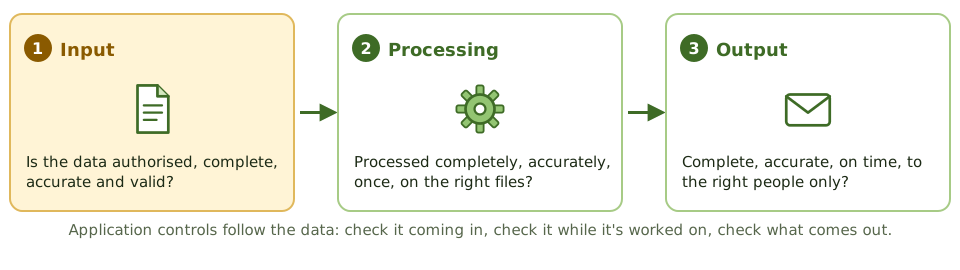
Input controls are the bouncer. They make sure data entering an application is authorised, complete, accurate and valid. They’re often the most effective application controls, because preventing bad data is cheaper than finding it later.
Who’s allowed to enter it?
Input authorisation makes sure only approved transactions get in:
- signatures or approval on source documents
- access controls, so only authorised users can enter each transaction type
- unique user IDs and passwords, so every entry can be traced to a person
- workflow approval by a supervisor for transactions above a threshold
- terminal or location restrictions for sensitive inputs
Batch totals
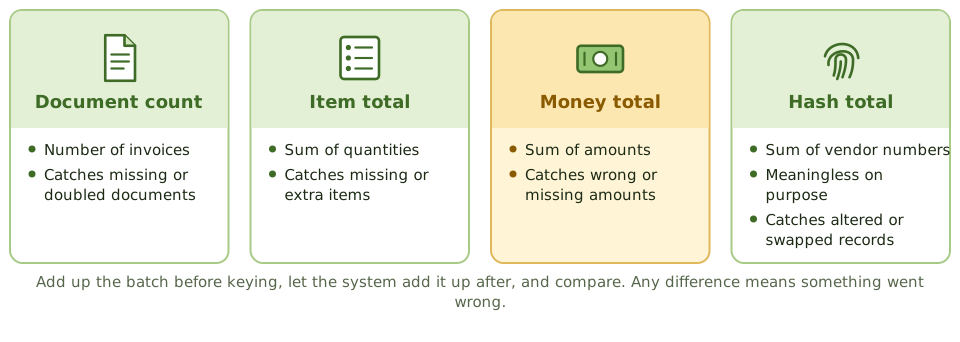
When transactions are grouped into batches, you add up the batch before it’s keyed in, the system adds it up after, and the two are compared. Any difference means something was lost, added or changed.
| Total | Example | Catches |
|---|---|---|
| Total documents | Count of invoices | Missing or duplicate documents |
| Total items | Sum of quantities | Missing or extra items |
| Total monetary amount | Sum of invoice amounts | Wrong or missing amounts |
| Hash total | Sum of vendor account numbers | Lost, added or altered records, even when the amounts still match |
A hash total means nothing in itself (who cares what all the vendor numbers add up to?). That’s the point: it exists only to prove the same records came through unchanged.
Batch registers record batches sent and received; batch balancing compares the manual and system totals.
The validation edits
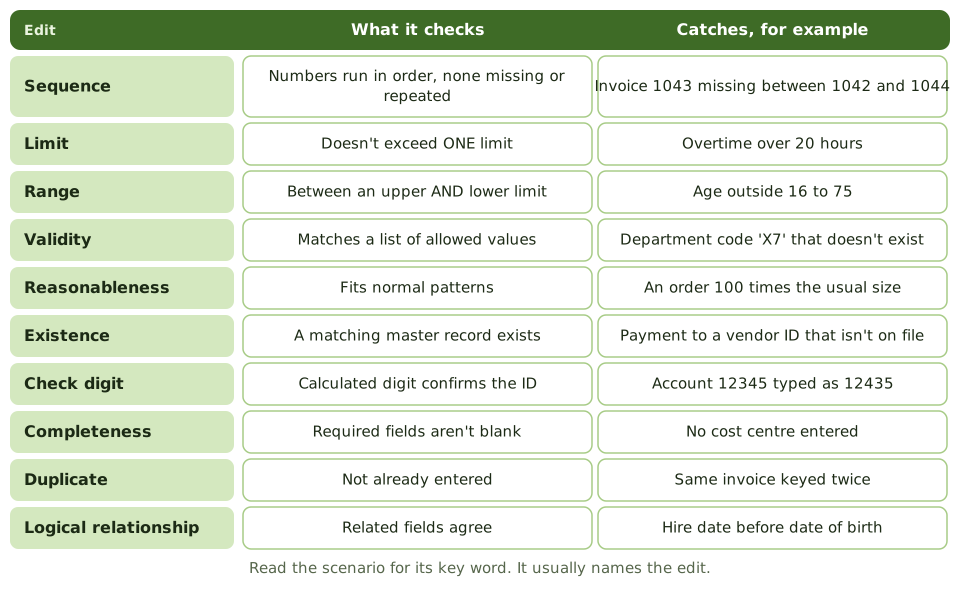
These are the checks the system runs on each field. The exam loves them.
| Edit | What it checks |
|---|---|
| Sequence check | Control numbers run in order; missing or duplicate numbers are flagged |
| Limit check | Data doesn’t exceed one set limit |
| Range check | Data falls between an upper and a lower limit |
| Validity check | Data matches a list of allowed values |
| Reasonableness check | Data is reasonable compared with normal patterns or history |
| Table lookup | Data matches an entry in a table |
| Existence check | A matching record exists, such as the customer in the master file |
| Key verification | Data is keyed twice by different people and compared (costly, so used for critical fields only) |
| Check digit | An extra digit calculated from the others confirms the ID, catching typos and swapped digits |
| Completeness check | Required fields aren’t blank or zero |
| Duplicate check | The transaction hasn’t already been entered |
| Logical relationship check | Related fields agree, such as hire date after date of birth |
Spot the key word in the scenario:
- “between an upper and lower limit” → range check
- “transposed digits” → check digit
- “missing invoice numbers” → sequence check
- “unusually large order” → reasonableness check
- “vendor not on file” → existence check
A check digit catches keying mistakes, not unauthorised transactions. A correctly typed fraudulent account number passes it happily.
When input fails
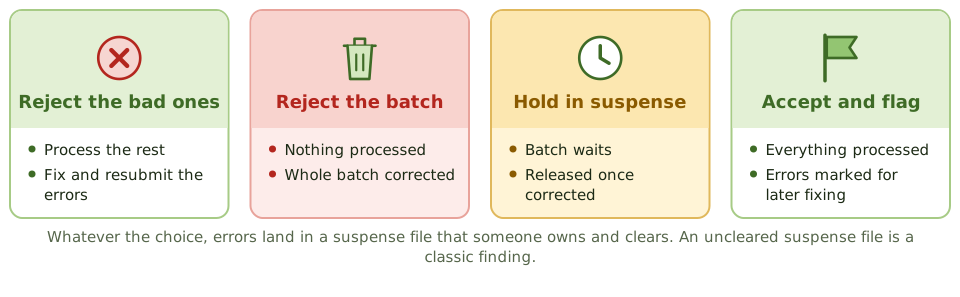
When data fails validation, the system can:
- reject only the bad transactions, processing the rest
- reject the whole batch
- hold the batch in suspense until it’s corrected
- accept the batch and flag the errors for later correction
Whichever is chosen, errors go to an error log or suspense file that someone owns, reviews, corrects and resubmits. A suspense file that nobody clears is a classic audit finding.
Example. A payroll clerk enters 37 hours of overtime for one employee instead of 3.7. A limit check on overtime (maximum 20 hours) rejects it. The hash total of employee numbers on the batch also matches, confirming no employee records were added or dropped.
How the exam asks about it
| If the question asks… | The answer is usually… |
|---|---|
| Control to detect transposed digits in an account number | Check digit |
| Control checking that values fall between two limits | Range check |
| Control detecting missing documents in a numbered series | Sequence check |
| Control that uses a meaningless total of account numbers | Hash total |
| Control that a vendor ID exists before payment | Existence check |
| Best control to make sure only authorised transactions are entered | Input authorisation / access controls |
In short
- Input controls make sure only complete, accurate, valid and authorised data enters the system.
- Authorisation can be by signatures on source documents, online access controls, unique passwords or supervisory approval in workflow.
- Batch controls compare totals before and after input: total monetary amount, total items, total documents and hash totals.
- A hash total is a meaningless total of a non-financial field (such as account numbers) used to detect lost or altered records.
- Validation edits include sequence, limit, range, validity, reasonableness, existence, check digit, completeness, duplicate and logical relationship checks.
- A check digit detects transcription and transposition errors in identifiers such as account numbers.
- Errors are handled by rejecting only the bad transaction, rejecting the whole batch, holding the batch in suspense, or accepting and flagging.
Exam traps
- Range check has upper AND lower limits; limit check has only one.
- Validity check compares against a list of valid values; existence check confirms a record exists in a master file.
- A check digit catches keying and transposition errors, not unauthorised transactions.
- Hash totals have no meaning in themselves; that's the point.
- Key verification (re-keying) is costly and used only for critical fields.
- Reasonableness compares input to what's normal, such as an order 100 times larger than usual.
Slides
Click the slide and use the arrow keys. F toggles full screen.
Stopping bad data at the door
A nightclub bouncer checks every guest at the door: on the list? old enough? already inside? It's much easier than finding troublemakers once they're on the dance floor.
Input controls are the bouncer for an application. They make sure only authorised, complete, accurate and valid data gets in, which is far cheaper than finding bad data later.
Batch totals
The validation edits
When input fails