Topics in this domain
- Project Roles and Governance
- PMBOK Phases
- Gantt, PERT, Critical Path
- Function Point Analysis
- Earned Value and Project Risk
- Business Case and Feasibility
- Benefits Realization
- SDLC Phases Overview
- Requirements Definition
- System Design
- Waterfall vs. Iterative vs. Prototyping
- Agile
- DevOps and DevSecOps
- RAD, CASE, Low-Code
- Build, Coding Standards, Code Review
- Testing Levels: Unit, Integration, System, UAT
- Regression, Sociability, Parallel, Pilot Testing
- Defect Management
- Data Migration and Conversion
- Change-Over: Parallel, Phased, Abrupt
- Go-Live Readiness and Acceptance
- Post-Implementation Review
- Input Controls
- Processing Controls
- Output Controls
- Data Integrity and ACID
- EDI and E-Commerce Controls
DevOps and DevSecOps
From big releases to a conveyor belt
Old-style IT shipped software like a removal van: a huge load every few months, packed by one team and driven by another. DevOps works more like a factory conveyor belt: small items move along constantly, and every single one passes through the same automated checks.
DevOps brings development and operations together as one team, with automation doing the repetitive, error-prone work. The key practices:
- Continuous integration (CI): developers merge code often, and every merge triggers an automated build and tests.
- Continuous delivery: code is always in a releasable state; going live is a push-button decision.
- Continuous deployment: every change that passes the pipeline goes to production automatically.
- Infrastructure as code: servers and networks are defined in version-controlled code.
- Monitoring and feedback: problems are spotted fast and changes rolled back fast.
The pipeline
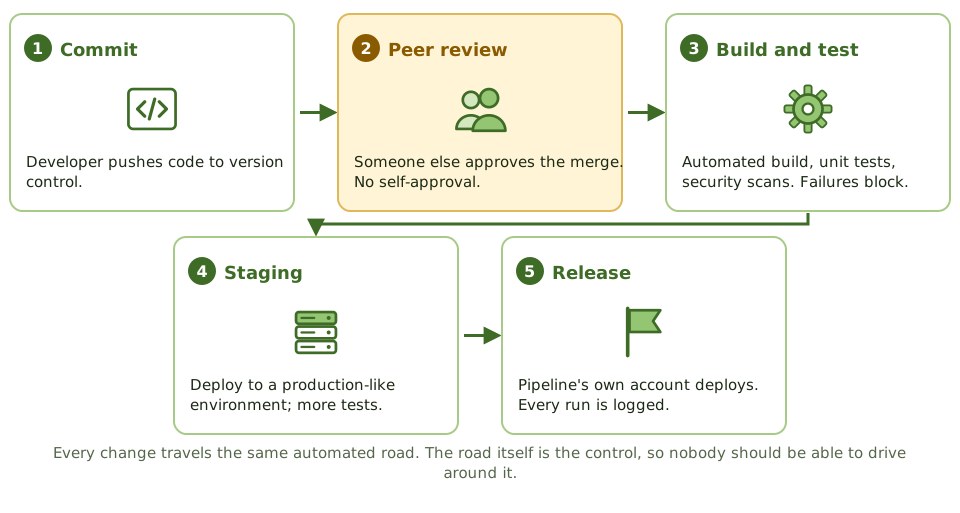
The pipeline is the automated road every change travels. If it’s set up properly, it enforces review, testing and logging every single time, which is more reliable than a human remembering to do it.
Segregation of duties, the DevOps way
Traditionally, developers built and a separate operations team deployed. In DevOps the same team often does both. The goal hasn’t changed: no single person should be able to push an unauthorised change to production. What changes is how it’s enforced.
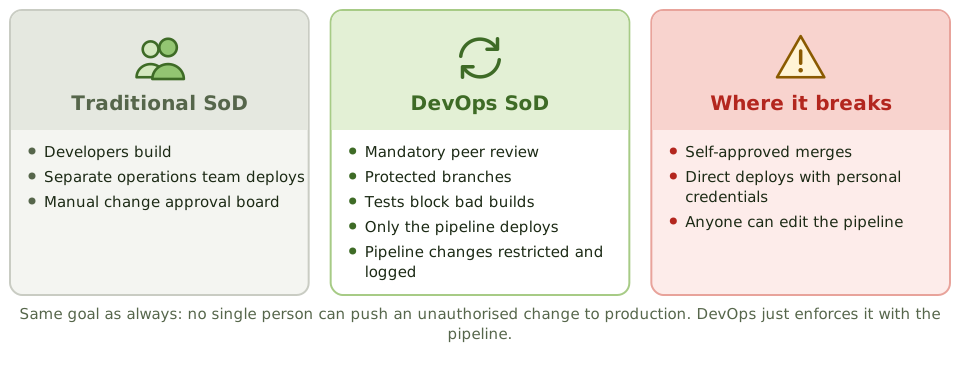
- mandatory peer review before merging, by someone other than the author
- branch protection that developers can’t switch off
- automated tests that block failing builds
- deployment only through the pipeline’s own service account, with no direct developer access to production
- logs of every pipeline run and deployment
If developers can deploy outside the pipeline, or approve their own merges, all of this falls apart.
Example. An auditor matches one quarter’s production deployments to pipeline runs. Most match, but 11 deployments came from a senior engineer’s personal credentials during an outage, and none were reviewed afterwards. The finding: direct deployment access outside the pipeline, with no emergency change review.
The pipeline is a control
Because the pipeline enforces the controls, whoever can change the pipeline can switch them off. Access to pipeline configuration is as sensitive as access to production, and changes to it need their own approval and logging.
Auditors in DevOps environments test the pipeline’s configuration and its evidence (logs, approvals, test results) rather than chasing individual manual sign-offs.
DevSecOps: security on the conveyor belt
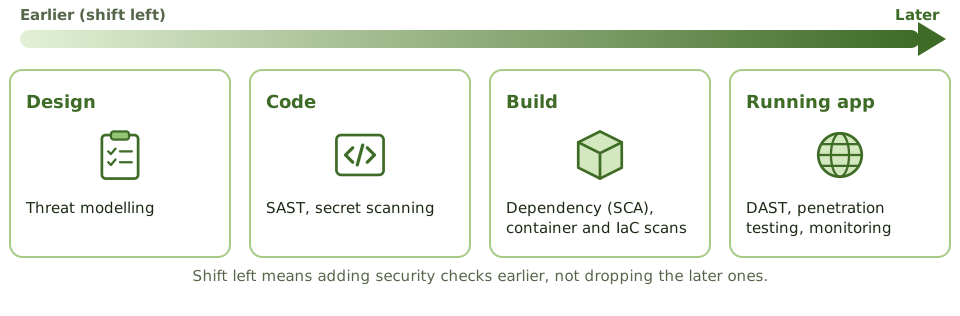
DevSecOps builds security checks into every stage. “Shift left” means moving them earlier in the process, where problems are cheaper to fix. It doesn’t mean dropping the later checks.
| Control | What it catches |
|---|---|
| Threat modelling | Design-level risks, before anything is built |
| Static application security testing (SAST) | Vulnerabilities in the source code |
| Secret scanning and vaults | Passwords and keys left in code |
| Software composition analysis (SCA) | Known vulnerabilities and licence issues in third-party libraries |
| Container and infrastructure-as-code scanning | Misconfigurations before deployment |
| Dynamic application security testing (DAST) | Vulnerabilities in the running application |
Hard-coded secrets in source code are one of the most common DevOps findings.
How the exam asks about it
| If the question asks… | The answer is usually… |
|---|---|
| How SoD is maintained in DevOps | Peer review, branch protection, deployment only via the pipeline |
| Greatest risk in a CI/CD environment | Bypassing the pipeline or self-approving changes |
| Control to detect vulnerable libraries | Software composition analysis / dependency scanning |
| Who should be able to change pipeline configuration | A restricted group, with changes approved and logged |
| Meaning of shift left | Introduce security and testing earlier in development |
In short
- DevOps combines development and operations to deliver changes frequently and reliably, using automation.
- Continuous integration merges and tests code often; continuous delivery keeps code always deployable; continuous deployment releases automatically.
- In DevOps, segregation of duties is often achieved through the pipeline: peer review, automated tests and controlled deployment accounts.
- DevSecOps builds security into every stage: static and dynamic testing, dependency scanning, secrets management, infrastructure-as-code checks.
- The pipeline itself becomes a critical control; changes to it need strict control.
- Auditors test pipeline configuration and evidence rather than individual manual approvals.
Exam traps
- DevOps doesn't remove the need for SoD; it changes how it's enforced.
- If developers can bypass the pipeline and deploy directly, the automated controls are worthless.
- Who can change the pipeline configuration is a key access question.
- Secrets hard-coded in source code are a common DevOps finding.
- Shift left means testing earlier, not skipping later testing.
Slides
Click the slide and use the arrow keys. F toggles full screen.
The pipeline
Segregation of duties, the DevOps way
DevSecOps and shift left