Topics in this domain
- Project Roles and Governance
- PMBOK Phases
- Gantt, PERT, Critical Path
- Function Point Analysis
- Earned Value and Project Risk
- Business Case and Feasibility
- Benefits Realization
- SDLC Phases Overview
- Requirements Definition
- System Design
- Waterfall vs. Iterative vs. Prototyping
- Agile
- DevOps and DevSecOps
- RAD, CASE, Low-Code
- Build, Coding Standards, Code Review
- Testing Levels: Unit, Integration, System, UAT
- Regression, Sociability, Parallel, Pilot Testing
- Defect Management
- Data Migration and Conversion
- Change-Over: Parallel, Phased, Abrupt
- Go-Live Readiness and Acceptance
- Post-Implementation Review
- Input Controls
- Processing Controls
- Output Controls
- Data Integrity and ACID
- EDI and E-Commerce Controls
Processing Controls
Keeping it right on the inside
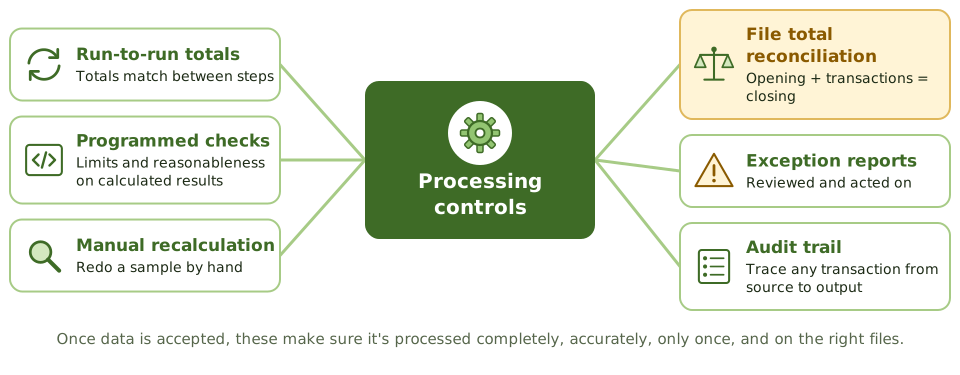
Once input controls have let data in, it still has to be handled properly. Processing controls make sure it’s processed:
- completely: nothing lost, nothing added
- accurately: calculations and updates are right
- once: no duplicates
- on the right files and versions
Run-to-run totals
Think of a school trip that changes buses halfway. The teacher counts the children off the first bus and onto the second. If 30 got off and only 29 got on, someone’s lost, and you know exactly where it happened.
Run-to-run totals do this for a job with several steps. Each step produces control totals, and each one is compared with the step before.
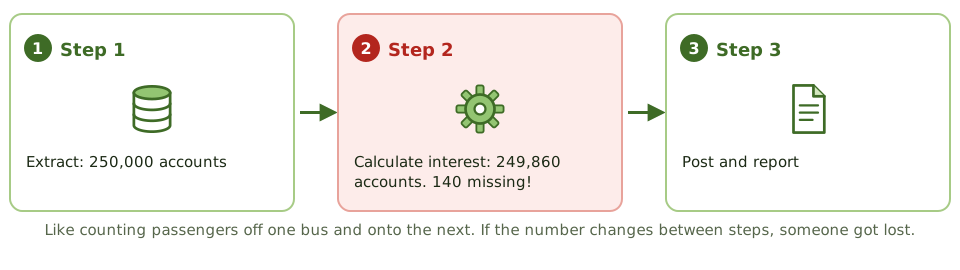
Example. A nightly interest calculation job runs in three steps. Run-to-run totals show 250,000 accounts at step one and 249,860 at step two. Investigation finds 140 accounts with a new product code that the step two program didn’t recognise and silently skipped. Without the totals, those customers would have received no interest.
They catch records lost or added between steps. They don’t catch a wrong calculation within a step; that needs the checks below.
Checking the calculations
| Control | How it works |
|---|---|
| Programmed checks | The software checks its own results, such as limit and reasonableness checks on calculated amounts (a net pay over a threshold gets flagged) |
| Manual recalculation | A sample of transactions is recalculated by hand to confirm the program’s logic |
| Editing | Data is validated again during processing |
| Reconciliation of file totals | Opening balance + transactions = closing balance, for each master file |
| Exception reports | Items failing checks are reported, reviewed and resolved |
An exception report that nobody reviews isn’t a control. It’s just paper.
Master data needs extra care
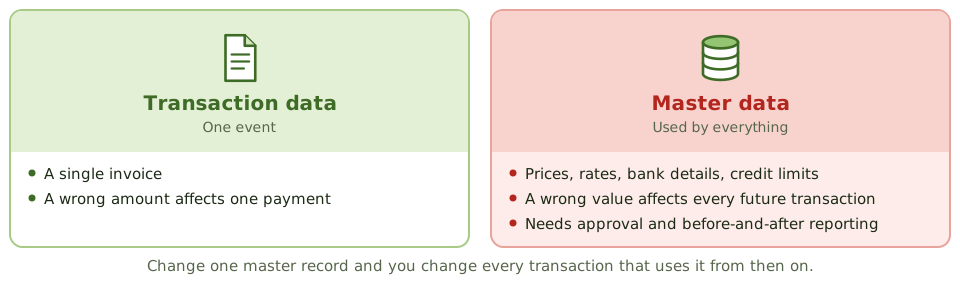
Master data (prices, rates, bank details, credit limits) is used by every transaction that touches it. A wrong invoice affects one payment; a wrong price affects every sale from then on. So changes to master data are higher risk.
| Data file control | Purpose |
|---|---|
| Before-and-after image reporting | Shows each value before and after a change, so changes can be reviewed and traced |
| Authorised file updating | Changes to master data need approval |
| Maintenance error reporting | Errors in file maintenance are reported and fixed |
| Transaction logs | A full record of changes, for the audit trail and for recovery |
| Internal and external labels | The right file is used |
| Version usage | Processing uses the correct, current version |
| Data file security | Only authorised users and programs can update files |
| One-for-one checking | Each source document is matched to a processed item |
| Prerecorded input | Fields pre-filled from master data reduce keying errors |
| Source document retention | Supports reconstruction and audit |
Audit trails
A processing audit trail lets any transaction be traced from source to output and back again. It’s needed to investigate errors, support audits and meet legal requirements. It should record who, what and when, plus before and after values for sensitive changes.
How the exam asks about it
| If the question asks… | The answer is usually… |
|---|---|
| Control detecting records lost between processing steps | Run-to-run totals |
| Control to review changes to master data | Before-and-after image reporting / review of master file change reports |
| Verifying a program’s calculations | Manual recalculation of a sample |
| Opening balance plus transactions equals closing balance | Reconciliation of file totals |
| Exception report exists but isn’t reviewed | Ineffective control |
In short
- Processing controls make sure data is processed completely, accurately and only once, and that files are updated correctly.
- Run-to-run totals compare control totals between processing steps to detect lost or added records.
- Programmed controls detect processing errors, such as limit checks on calculated amounts and reasonableness checks.
- Manual recalculation of a sample of transactions verifies the program's calculations.
- Reconciliation of file totals confirms master files were updated correctly.
- Data file controls include before-and-after image reporting, transaction logs, file labels, version control and authorised file maintenance.
- Exception reports must be reviewed and acted on.
Exam traps
- Run-to-run totals detect lost or added records between steps, not wrong calculations within a step.
- Before-and-after images let changes to master data be reviewed and traced.
- Changes to master data (such as prices or rates) are higher risk than single transactions, because they affect all future processing.
- Exception reports with no reviewer are not a control.
Slides
Click the slide and use the arrow keys. F toggles full screen.
Keeping it right on the inside
Once the bouncer has let data in, it still has to be handled properly: processed completely (nothing lost or added), accurately (calculations right), only once (no duplicates), and on the right files.
Processing controls check all of that while the system does its work.
Run-to-run totals
Master data needs extra care