Topics in this domain
- Project Roles and Governance
- PMBOK Phases
- Gantt, PERT, Critical Path
- Function Point Analysis
- Earned Value and Project Risk
- Business Case and Feasibility
- Benefits Realization
- SDLC Phases Overview
- Requirements Definition
- System Design
- Waterfall vs. Iterative vs. Prototyping
- Agile
- DevOps and DevSecOps
- RAD, CASE, Low-Code
- Build, Coding Standards, Code Review
- Testing Levels: Unit, Integration, System, UAT
- Regression, Sociability, Parallel, Pilot Testing
- Defect Management
- Data Migration and Conversion
- Change-Over: Parallel, Phased, Abrupt
- Go-Live Readiness and Acceptance
- Post-Implementation Review
- Input Controls
- Processing Controls
- Output Controls
- Data Integrity and ACID
- EDI and E-Commerce Controls
Testing Levels: Unit, Integration, System, UAT
Testing in layers
Think of a car factory. Each part is tested on its own (does the brake pad grip?). Then parts are tested together (do the brakes actually stop the wheel?). Then the whole car goes round a test track. Finally, a customer test-drives it and decides whether to buy.
Software testing climbs the same ladder. Each level proves something different, and none can replace another.
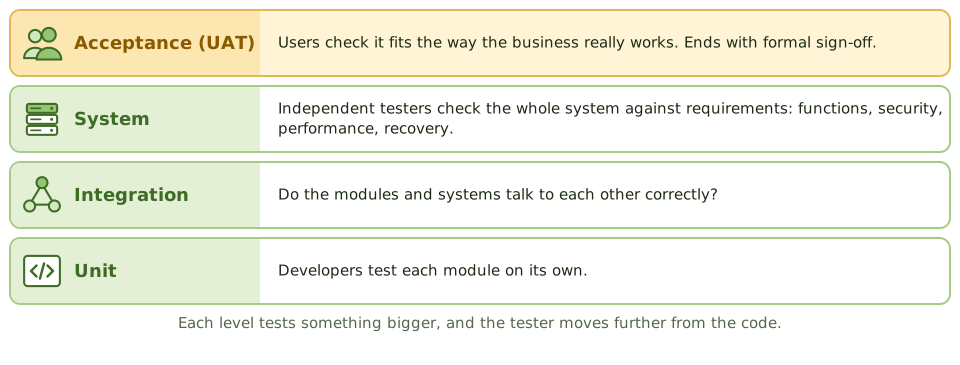
| Level | Tests | Performed by | Approach |
|---|---|---|---|
| Unit | Individual programs or modules | Developers | Mostly white-box |
| Integration | Interfaces between modules or systems | Developers / test team | Top-down or bottom-up |
| System | The complete system against functional and non-functional requirements | Independent test team | Mostly black-box |
| Acceptance | Fitness for business use | Users (UAT) and QA (QAT) | Black-box, against business requirements |
Integration: top-down or bottom-up
When you test modules together, some may not be built yet. You need stand-ins.
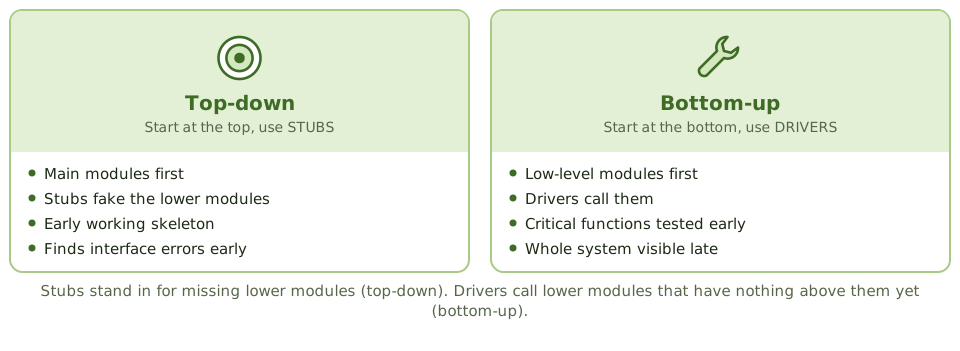
- Top-down starts with the main modules and uses stubs to fake the lower modules. You get an early working skeleton, and interface errors show up early.
- Bottom-up starts with the low-level modules and uses drivers to call them. Critical low-level functions get tested early and no stubs are needed, but you don’t see the whole system until late.
Memory hook: a stub stands in for something below that isn’t built yet; a driver sits above and calls down.
Kinds of system testing
- Functional: does each function meet its requirement?
- Security: access controls, vulnerability scans, penetration tests.
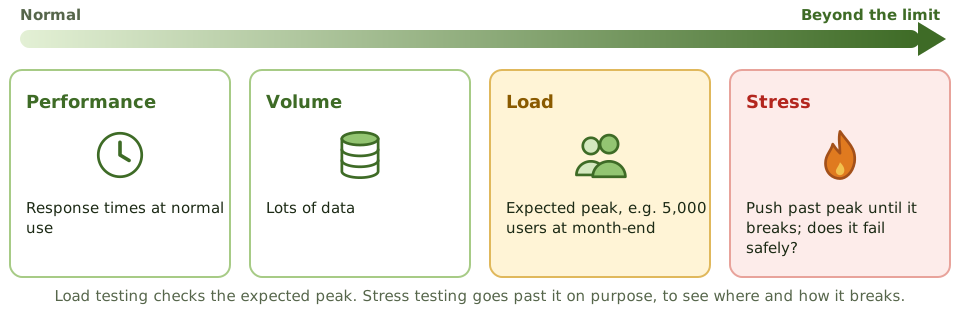
- Performance: response times under normal conditions.
- Volume: large amounts of data.
- Load: the expected peak, e.g. 5,000 users at month-end.
- Stress: deliberately beyond the peak, to find the breaking point and see whether it fails safely.
- Recovery: can it restart and restore after a failure?
- Interface: data exchanges with other systems.
Acceptance testing
User acceptance testing (UAT) is done by users, using real business scenarios, in an environment like production. It ends with formal sign-off by user management, which is a key go-live control.
Quality assurance testing (QAT) covers the technical side: standards, documentation, operational requirements.
Alpha testing uses an early version with internal users. Beta testing gives a near-final version to a limited group of real users.
Example. The project team proposes skipping UAT because system testing passed. The auditor objects: system testing checked the system against the technical specification, but only users can confirm it supports the way the business really works. UAT then finds that month-end reports come out in a format the finance team can’t use.
White-box and black-box
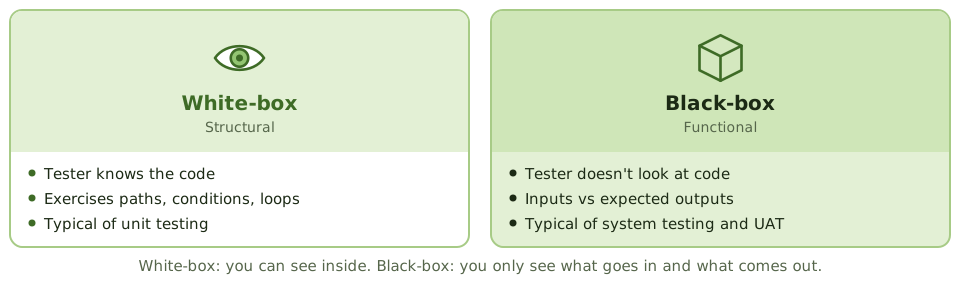
- White-box (structural): the tester can see the code and designs tests to exercise its paths, conditions and loops. Typical of unit testing.
- Black-box (functional): the tester feeds in inputs and checks the outputs against requirements, without looking inside. Typical of system testing and UAT.
Managing testing
- Write test plans early, from requirements and design, not after coding.
- Test cases cover normal, boundary and invalid inputs.
- Use made-up test data, or mask production data to protect privacy.
- Test in a separate test environment.
- Document results; log defects and retest the fixes.
How the exam asks about it
| If the question asks… | The answer is usually… |
|---|---|
| Who performs UAT | Users / business representatives |
| Purpose of UAT | Confirm the system meets business requirements before acceptance |
| Integration approach using stubs | Top-down |
| Test to find the breaking point | Stress testing |
| Concern with using production data in testing | Confidentiality; mask or anonymise it |
| Testing based on internal logic | White-box |
In short
- Unit testing checks individual modules; integration testing checks interfaces between modules; system testing checks the whole system against requirements; UAT confirms it meets business needs.
- Top-down integration uses stubs for lower modules and finds interface errors early; bottom-up uses drivers and tests critical low-level modules first.
- System testing includes functional, security, performance, load, volume, stress, recovery and interface testing.
- User acceptance testing is done by users, against business requirements, in an environment like production, and ends with formal sign-off.
- Quality assurance testing focuses on technical aspects; UAT focuses on functional fit.
- White-box testing examines internal logic; black-box testing examines inputs and outputs without seeing the code.
- Testing should use test data in a test environment, not live production data, unless masked.
Exam traps
- UAT is done by users, not developers. Developer testing doesn't replace it.
- Stress testing goes beyond expected peak to find the breaking point; load testing checks expected volumes.
- Using unmasked production data for testing creates privacy and confidentiality risk.
- Test plans should be prepared early (during requirements and design), not after coding.
- Alpha testing is internal; beta testing is by a limited set of real users.
Slides
Click the slide and use the arrow keys. F toggles full screen.
Testing in layers
Think of a car factory. Each part is tested on its own (does the brake pad grip?), then parts are tested together (do the brakes stop the wheel?), then the whole car goes on a test track, and finally a customer test-drives it.
Software testing climbs the same ladder, and each level proves something different.
Top-down vs bottom-up integration
Kinds of system testing
White-box vs black-box