Topics in this domain
- IT Service Management
- Hardware Components and Architecture
- Operating Systems
- OSI Model
- TCP/IP and Common Protocols
- Network Devices: Switches, Routers, Gateways
- LAN/WAN Topologies
- Database Models and DBMS
- Database Controls and Normalization
- Asset Management
- Configuration Management
- Job Scheduling and Batch Processing
- Incident Management
- Problem Management
- Change Management
- Release and Patch Management
- Service Level Management
- Capacity and Performance Monitoring
- End-User Computing
- BCP Lifecycle
- Business Impact Analysis
- RTO, RPO, MTD, SDO
- Recovery Strategies
- Alternate Sites: Hot, Warm, Cold
- Backup Types: Full, Incremental, Differential
- Backup Storage and Rotation
- DRP Contents
- Testing BCP/DRP
- High Availability, RAID, Insurance
- Auditing BCP
Business Impact Analysis
What would hurt most?
If your house were on fire and you had two minutes, what would you grab? Probably not the toaster. You’d grab the things that are irreplaceable, or that you’d need first thing tomorrow.
A business impact analysis (BIA) asks the same question of an organisation: which processes matter most, how quickly does the damage grow if they stop, and what do they depend on? It’s the foundation of the whole BCP. Recovery strategies, priorities and budgets all come from it.
The BIA is about impact, not threats. Working out what could cause a disruption is the risk assessment.
The steps
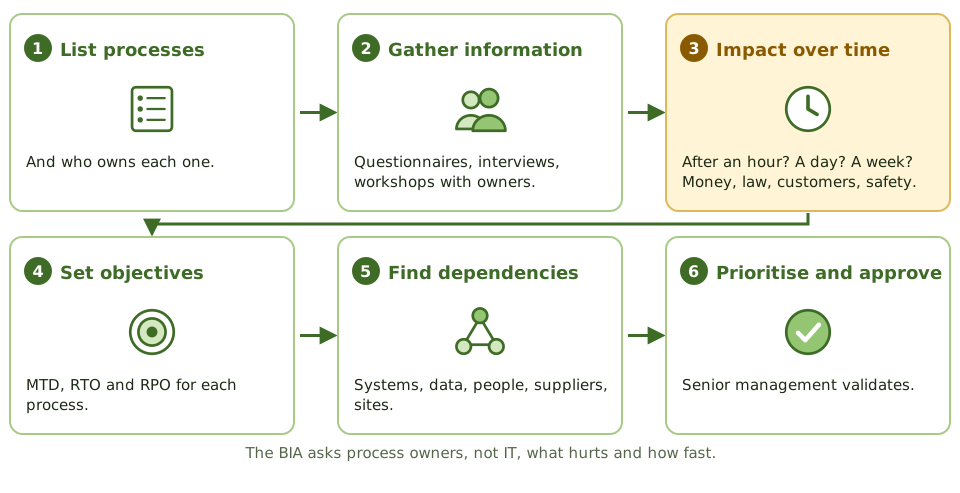
- List the business processes and their owners.
- Gather information from process owners and key users through questionnaires, interviews and workshops.
- Assess impact over time: what happens after an hour, a day, a week? Consider money, regulators, customers, reputation, operations and safety.
- Set recovery objectives for each process: maximum tolerable downtime (MTD), recovery time objective (RTO), recovery point objective (RPO).
- Find dependencies: IT systems, data, people and skills, suppliers, premises, other processes. Miss one, and recovery stalls.
- Prioritise processes for recovery.
- Validate and approve with senior management.
Four levels of criticality
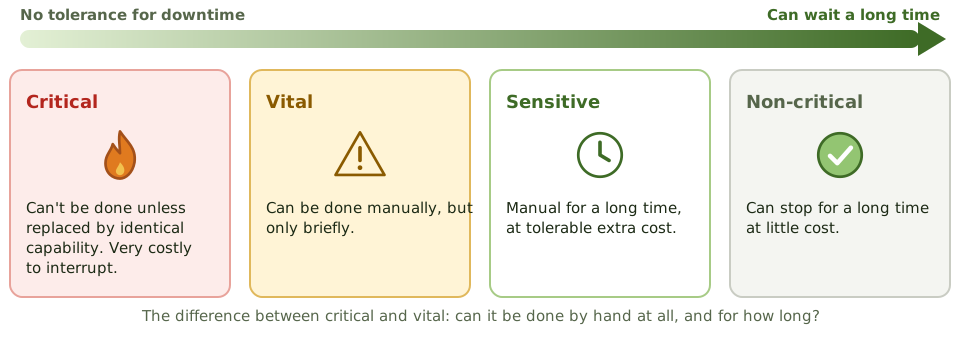
| Category | Meaning |
|---|---|
| Critical | Can’t be done unless replaced by identical capability. Very low tolerance for interruption; very high cost. |
| Vital | Can be done manually, but only for a brief period. |
| Sensitive | Can be done manually for an extended period at tolerable cost, with extra staff or effort. |
| Non-critical | Can be interrupted for a long time at little or no cost. |
The difference between critical and vital is whether it can be done by hand at all. Between vital and sensitive, it’s for how long.
IT systems take their priority from the processes they support. A system behind a critical process is critical, even if IT thinks of it as a minor application.
Finding the right spend
Two costs pull in opposite directions:
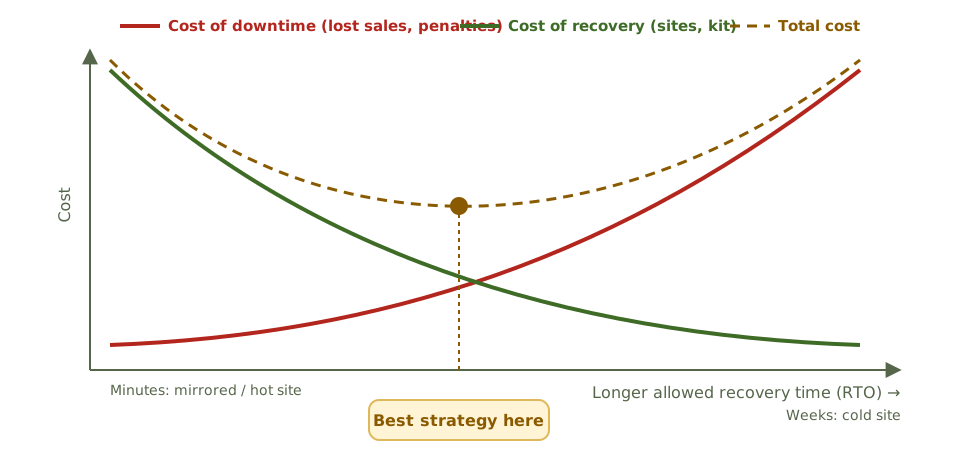
- The cost of downtime rises the longer a process is down.
- The cost of recovery falls as you allow more time (a mirrored site costs far more than a cold site).
The best strategy sits where the total is lowest, as long as it’s still within the MTD. A very short RTO is only worth paying for if downtime is very expensive.
Business decides, IT follows
- Process owners and key users supply the information and define the impacts.
- IT describes system dependencies and current recovery capability.
- Senior management validates and approves the priorities.
- The BCP coordinator facilitates.
Example. IT assumed the email system was its top recovery priority. The BIA showed the customer order system had an MTD of four hours, because large customers’ contracts include penalties for missed deliveries, while email could be down for a day using phones and a backup messaging tool. Recovery priorities and spending were changed.
Review the BIA after significant business changes, and periodically.
How the exam asks about it
| If the question asks… | The answer is usually… |
|---|---|
| Primary purpose of a BIA | Identify critical processes and the impact of disruption, to set recovery priorities |
| Main source of BIA information | Business process owners and key users |
| Output used to choose recovery strategies | RTO, RPO and MTD for each process |
| Process that can be done manually only briefly | Vital |
| How the optimal recovery strategy is found | Balancing the cost of downtime against the cost of recovery |
| When to update the BIA | After significant business changes and periodically |
In short
- The BIA identifies critical business processes, the impact of their disruption over time, and the resources they depend on.
- It produces recovery priorities and objectives: MTD, RTO and RPO for each process and supporting system.
- Impacts include financial loss, regulatory penalties, customer harm, reputational damage and safety.
- Information comes from process owners through questionnaires, interviews and workshops, and is validated with senior management.
- Criticality categories: critical, vital, sensitive and non-critical, based on how long a process can be down and whether manual workarounds exist.
- Comparing the rising cost of downtime with the falling cost of recovery helps find the optimal recovery strategy.
- The BIA should be reviewed when the business changes significantly, and periodically.
Exam traps
- The BIA is about business impact, not threats; identifying threats is the risk assessment.
- Process owners, not IT, are the main source of BIA information.
- A shorter RTO means a more expensive recovery strategy; the BIA balances the two.
- IT systems inherit recovery objectives from the business processes they support.
- Dependencies (suppliers, other systems, key people) must be identified, or recovery will stall.
Slides
Click the slide and use the arrow keys. F toggles full screen.
The steps
Four levels of criticality
Finding the right spend