Topics in this domain
- IT Service Management
- Hardware Components and Architecture
- Operating Systems
- OSI Model
- TCP/IP and Common Protocols
- Network Devices: Switches, Routers, Gateways
- LAN/WAN Topologies
- Database Models and DBMS
- Database Controls and Normalization
- Asset Management
- Configuration Management
- Job Scheduling and Batch Processing
- Incident Management
- Problem Management
- Change Management
- Release and Patch Management
- Service Level Management
- Capacity and Performance Monitoring
- End-User Computing
- BCP Lifecycle
- Business Impact Analysis
- RTO, RPO, MTD, SDO
- Recovery Strategies
- Alternate Sites: Hot, Warm, Cold
- Backup Types: Full, Incremental, Differential
- Backup Storage and Rotation
- DRP Contents
- Testing BCP/DRP
- High Availability, RAID, Insurance
- Auditing BCP
Capacity and Performance Monitoring
Enough, but not too much
A restaurant needs enough tables for Saturday night, but not so many that half sit empty all week. And if a big party is booked for next month, the manager needs to know now, not when they walk through the door.
Capacity management makes sure IT can meet current and future demand at acceptable cost. Too little capacity means slow systems and outages; too much wastes money.
Three levels
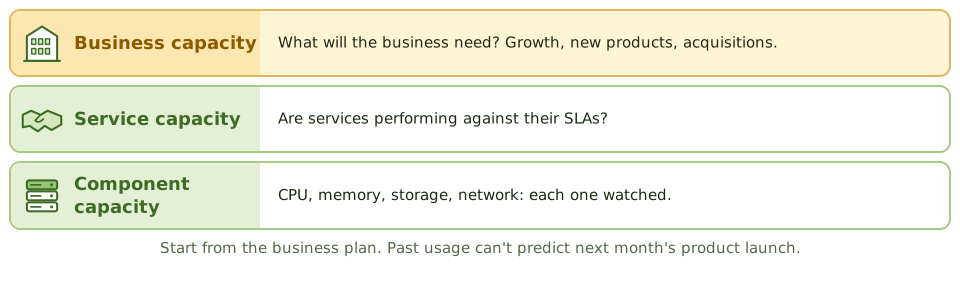
| Level | Focus |
|---|---|
| Business capacity | Turning business plans (growth, new products, acquisitions) into future IT needs |
| Service capacity | Managing the performance of services against their SLAs |
| Component capacity | Monitoring individual resources: CPU, memory, storage, network |
The activities
- Monitoring utilisation and performance continuously, with thresholds and alerts
- Analysis of trends, peak periods and bottlenecks
- Tuning to make better use of what’s already there
- Demand management: shaping when work happens, such as moving batch jobs off-peak
- Forecasting, combining trends with business plans
- a capacity plan that’s documented, reviewed and funded
The key exam point: forecasts should start from business plans, not only past growth. A product launch or an acquisition can change demand overnight, and no trend line will predict it.
Watch the peaks
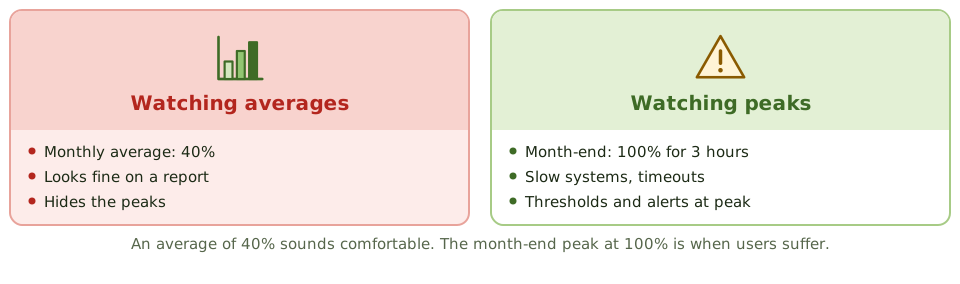
An average of 40% looks comfortable on a monthly report. The three hours at 100% during month-end close are when users suffer. Monitor peak periods, not just averages.
Warning signs
- users report slow systems before IT notices
- emergency hardware purchases
- storage runs out unexpectedly
- no link between business planning and IT capacity planning
- only averages monitored, so peaks are missed
The cloud helps, because capacity can grow on demand (elasticity). But it still needs monitoring and cost control: auto-scaling with no limits can produce some unpleasant bills.
Example. Marketing plans a promotion expected to triple website traffic for a week. Nobody tells IT. The site fails on the first morning. The control gap: business demand forecasts don’t feed into capacity planning.
How the exam asks about it
| If the question asks… | The answer is usually… |
|---|---|
| Primary input to capacity planning | Business plans and forecasts, plus utilisation trends |
| Purpose of performance monitoring | Detect issues early and support capacity planning |
| Users report slow systems before IT notices | Inadequate monitoring and thresholds |
| Risk of excess capacity | Unnecessary cost |
In short
- Capacity management makes sure IT resources meet current and future business demand cost-effectively.
- It covers business capacity (future demand), service capacity (service performance) and component capacity (CPU, memory, storage, network).
- Monitoring utilisation and response times, with thresholds and alerts, gives early warning.
- Capacity plans use trend analysis and business forecasts, such as new products or acquisitions.
- Insufficient capacity causes outages and slow response; excessive capacity wastes money.
- Cloud elasticity helps but still needs monitoring and cost control.
Exam traps
- Capacity planning should start from business plans, not just past utilisation.
- Average utilisation can hide peaks; monitor peak periods.
- Performance problems are often first noticed by users when monitoring is missing.
- Auto-scaling without limits can produce unexpected costs.
Slides
Click the slide and use the arrow keys. F toggles full screen.
Three levels
Watch the peaks