Topics in this domain
- IT Service Management
- Hardware Components and Architecture
- Operating Systems
- OSI Model
- TCP/IP and Common Protocols
- Network Devices: Switches, Routers, Gateways
- LAN/WAN Topologies
- Database Models and DBMS
- Database Controls and Normalization
- Asset Management
- Configuration Management
- Job Scheduling and Batch Processing
- Incident Management
- Problem Management
- Change Management
- Release and Patch Management
- Service Level Management
- Capacity and Performance Monitoring
- End-User Computing
- BCP Lifecycle
- Business Impact Analysis
- RTO, RPO, MTD, SDO
- Recovery Strategies
- Alternate Sites: Hot, Warm, Cold
- Backup Types: Full, Incremental, Differential
- Backup Storage and Rotation
- DRP Contents
- Testing BCP/DRP
- High Availability, RAID, Insurance
- Auditing BCP
Job Scheduling and Batch Processing
The night shift
A bakery runs to a strict timetable overnight: mix the dough, let it rise, bake, cool, pack. Bake before it’s risen, or pack before it’s cooled, and the batch is ruined.
Most transaction processing, interfaces, backups and reports run as scheduled batch jobs, often overnight. If the wrong job runs, a job runs twice, or one fails without anyone noticing, data can end up wrong or missing in every downstream system.
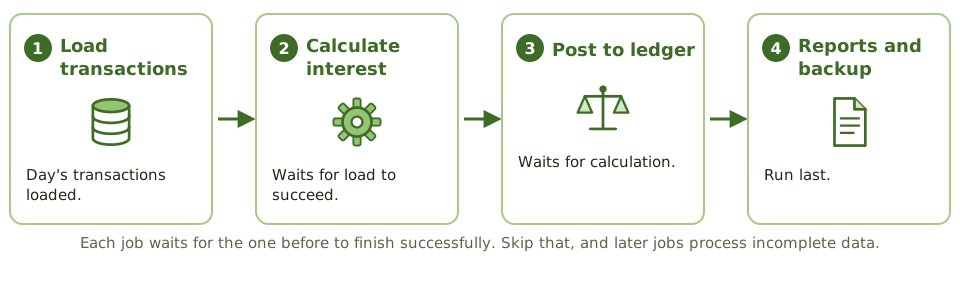
Job scheduling software runs the jobs automatically in the right order and at the right time. It enforces dependencies (a job waits until the one before it finishes successfully), reduces manual operator intervention, and logs everything that runs.
The controls
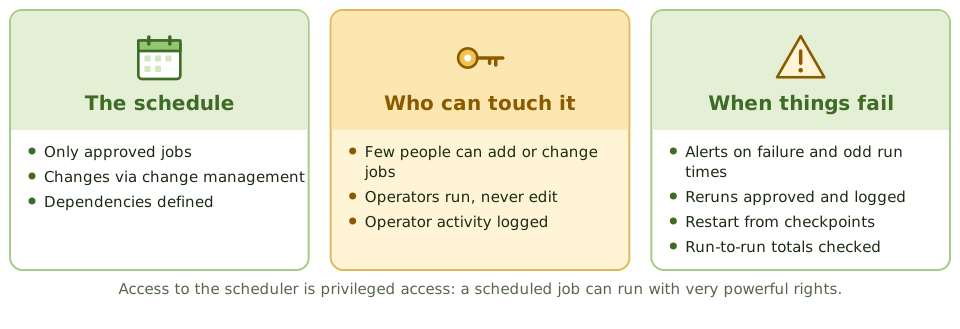
| Control | Detail |
|---|---|
| Authorised schedule | Only approved jobs are in the production schedule |
| Change management | New or changed jobs and schedules are approved and tested |
| Restricted access | Few people can add, change or delete jobs; operators can run but not edit |
| Dependencies | Jobs wait for the ones before them to complete successfully |
| Monitoring and alerts | Failures and unusual run times are flagged |
| Exception handling | Failures investigated; restarts from checkpoints |
| Rerun authorisation | Reruns approved and logged, with checks for duplicate processing |
| Ad hoc jobs | Jobs run outside the schedule need the same approval and logging |
| Logs | Job logs kept and reviewed |
| Output checks | Run-to-run totals and reconciliations confirm nothing went missing |
A scheduled job can run with very powerful rights, so access to the scheduler is effectively privileged access. Review it like admin access.
Operators
Operators run the approved schedule and respond to failures. They shouldn’t be able to change job definitions, program code or input data, and their console activity should be logged.
Reruns
When a job fails halfway through, rerunning it from the start can process the first half twice.
Example. An interest accrual job fails halfway through. An operator reruns it from the start without authorisation. Half the accounts receive interest twice. A rerun procedure requiring approval, a restart from a checkpoint, and a run-to-run total check would have prevented it.
How the exam asks about it
| If the question asks… | The answer is usually… |
|---|---|
| Main benefit of automated job scheduling | Reduces errors from manual intervention; enforces sequence |
| Control over changes to the production schedule | Change management with approval |
| Risk of unauthorised reruns | Duplicate processing |
| Who should be able to modify job definitions | A restricted, authorised group, not operators |
| Evidence that jobs ran as scheduled | Scheduler logs reviewed for exceptions |
In short
- Job scheduling software runs batch jobs automatically in the right order and at the right time, reducing operator error.
- Only authorised, approved jobs should be in the production schedule; changes to schedules go through change management.
- Access to the scheduler is restricted, because a scheduled job can run with powerful privileges.
- Job outcomes are monitored; failures are investigated and reruns are authorised and logged.
- Job logs and exception reports are reviewed to detect unauthorised or failed jobs.
- Dependencies between jobs must be defined so later jobs don't process incomplete data.
Exam traps
- Operators shouldn't be able to change job definitions or programs, only run approved schedules.
- A rerun without authorisation can duplicate transactions.
- Ad hoc jobs submitted outside the schedule need the same approval and logging.
- Scheduler access is effectively privileged access; review it like admin access.
Slides
Click the slide and use the arrow keys. F toggles full screen.
The night shift
A bakery runs to a strict timetable overnight: mix the dough, let it rise, bake, cool, then pack. Bake before it's risen, or pack before it's cooled, and the whole batch is ruined.
Most transaction processing, interfaces, backups and reports run the same way, as scheduled batch jobs. If the wrong job runs, runs twice, or fails silently, every downstream system can end up wrong.
The controls