Topics in this domain
- IT Service Management
- Hardware Components and Architecture
- Operating Systems
- OSI Model
- TCP/IP and Common Protocols
- Network Devices: Switches, Routers, Gateways
- LAN/WAN Topologies
- Database Models and DBMS
- Database Controls and Normalization
- Asset Management
- Configuration Management
- Job Scheduling and Batch Processing
- Incident Management
- Problem Management
- Change Management
- Release and Patch Management
- Service Level Management
- Capacity and Performance Monitoring
- End-User Computing
- BCP Lifecycle
- Business Impact Analysis
- RTO, RPO, MTD, SDO
- Recovery Strategies
- Alternate Sites: Hot, Warm, Cold
- Backup Types: Full, Incremental, Differential
- Backup Storage and Rotation
- DRP Contents
- Testing BCP/DRP
- High Availability, RAID, Insurance
- Auditing BCP
DRP Contents
A recipe for the worst day
A good recipe works for anyone who follows it, not just the chef who wrote it. And it’s no use if it’s locked in a kitchen that’s on fire.
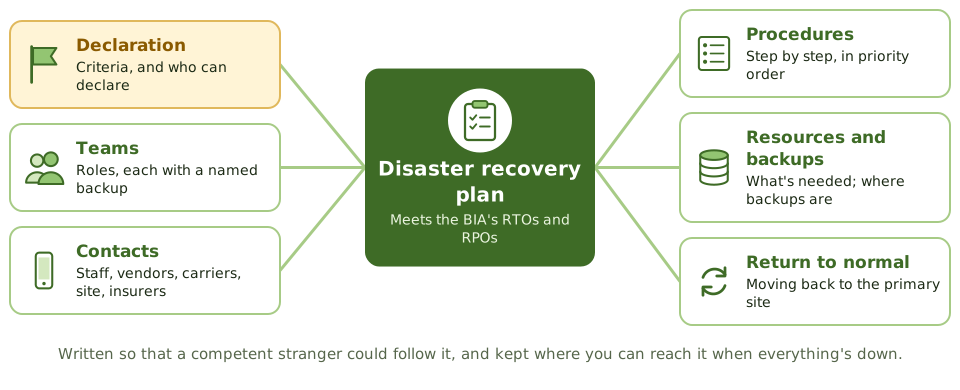
The disaster recovery plan (DRP) is the step-by-step recipe for recovering IT services after a disruption, so they meet the RTOs and RPOs set by the BIA. It’s part of the business continuity plan and must follow its priorities.
What’s in it
| Section | What it includes |
|---|---|
| Scope and objectives | Systems covered, recovery priorities, RTO and RPO |
| Assumptions | What the plan assumes will be available |
| Declaration and escalation | When to invoke the plan, who can declare a disaster, how people are notified |
| Teams and responsibilities | Recovery teams, leaders and members, each with a primary and backup person |
| Contacts | Staff, management, vendors, telecom carriers, recovery site, insurers, authorities, key customers |
| Recovery procedures | Step-by-step instructions for restoring infrastructure, systems and data, in priority order |
| Resources | Hardware, software, licences, network, workspace, supplies |
| Backups and vital records | Where backups are, how to get them, offsite inventory |
| Alternate site | Address, access, configuration, contract contacts |
| Communication | Internal and external, including the media |
| Return to normal | Restoring the primary site and moving back to it, not just failing over |
| Maintenance | Owner, review schedule, distribution list |
The teams
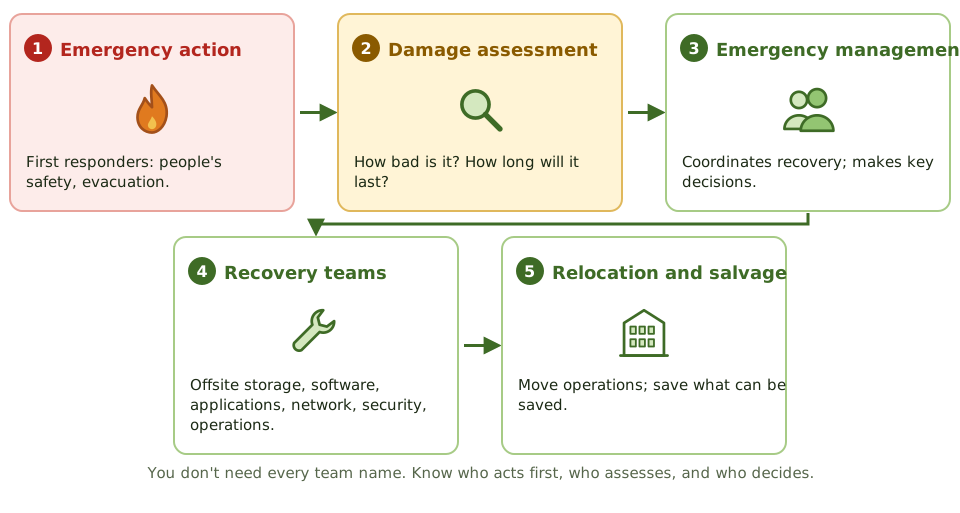
The Review Manual lists many teams. You don’t need them all by heart, but recognise the main ones:
- Emergency action team: first responders, focused on safety and evacuation. People’s safety always comes first.
- Damage assessment team: works out how bad the damage is and how long the outage will last.
- Emergency management team: coordinates the whole recovery and makes the key decisions.
- Offsite storage team: retrieves backups, media and records.
- Software and applications teams: restore operating systems and applications, and check data integrity.
- Network and communications teams: restore data and voice networks.
- Security team: keeps systems and data secure during the recovery.
- Emergency operations team: runs operations at the recovery site.
- Relocation and salvage teams: move operations, and save what can be saved from the damaged site.
- Larger plans add coordination, administrative, legal, transport and supplies teams.
Keeping it usable
- Procedures are detailed enough for a competent person other than the usual administrator to follow.
- Every role has a named backup. A plan with names but no deputies fails the moment someone is on holiday.
- Copies are kept offsite, in a form you can reach when email and file shares are down.
- The plan is updated after changes to systems, people and suppliers, and after every test.
- Staff are trained in their roles.
Example. During a test, the recovery team can’t find the DRP: it’s stored on a file share in the data centre that’s being “lost”. The printed copy in the recovery binder is two years old and lists a backup supplier the company stopped using. Both findings are about plan availability and maintenance.
How the exam asks about it
| If the question asks… | The answer is usually… |
|---|---|
| First priority in a disaster | Safety of people |
| Team that estimates the extent of damage and outage | Damage assessment team |
| Who can declare a disaster | Defined in the plan; an authorised senior person |
| Where copies of the DRP should be kept | Offsite and accessible to team members |
| Most important update trigger | Changes to systems, staff or suppliers, and test results |
In short
- The DRP documents how IT systems, data and infrastructure will be recovered to meet the business's recovery objectives.
- It covers declaration and escalation, teams and responsibilities, contact lists, recovery procedures in priority order, resources and the return to normal operations.
- Recovery is organised into teams such as the emergency action, damage assessment, emergency management, offsite storage, software, applications, network, security and relocation teams.
- Each role has a named primary and backup person.
- Copies of the plan must be stored offsite and be accessible when primary systems are down.
- The plan must be updated after changes in systems, staff or suppliers, and after tests.
Exam traps
- The first priority in any disaster is the safety of people.
- A plan that lists only names, without roles and deputies, fails when someone is unavailable.
- Recovery procedures must be detailed enough for someone other than the usual administrator to follow.
- The plan should cover returning to the primary site, not just failing over.
- Who can declare a disaster must be defined in advance.
Slides
Click the slide and use the arrow keys. F toggles full screen.
A recipe for the worst day
A good recipe works for anyone who follows it, not just the chef who wrote it. And it's no use locked in a kitchen that's on fire.
The disaster recovery plan is the step-by-step recipe for getting IT back within the BIA's RTOs and RPOs. It's part of the business continuity plan and follows its priorities.
The teams